Provide access to "IntegralHeight" property in the "DataGridViewComboBoxColumn" and "DataGridViewComboBox"
- Dominant language
- C#
- Stars
- 4.9k
- Forks
- 1.1k
- Avg merge
- 1d 13m
- Merged PRs (30d)
- 85
Description
**Is your feature request related to a problem? Please describe.**
The `DataGridViewComboBoxColumn` and `DataGridViewComboBox` have a `MaxDropDownItems` to set the maximum number of items visible in the dropdown list. This property works only if the `IntegralHeight` property is disabled for the `ComboBox`. Unfortunately, unlike `ComboBox` or `ToolStripComboBox`, the user does not have access to this property, which makes the `MaxDropDownItems` properties useless
**Describe the solution you'd like and alternatives you've considered**
I suggest adding an API for `DataGridViewComboBoxColumn` and `DataGridViewComboBox` based on the logic of `MaxDropDownItems` property that will allow the user to customize the `IntegralHeight` property:
**DataGridViewComboBoxCell.cs**
```
[DefaultValue(DefaultIntegralHeight)]
public virtual bool IntegralHeight
{
get
{
object integralHeight = Properties.GetObject(s_propComboBoxCellIntegralHeight, out bool found);
if (found)
{
return (bool)integralHeight;
}
return DefaultIntegralHeight;
}
set
{
Properties.SetObject(s_propComboBoxCellIntegralHeight, value);
if (OwnsEditingComboBox(RowIndex))
{
EditingComboBox.IntegralHeight = value;
}
}
}
```
**DataGridViewComboBoxColumn.cs**
```
[DefaultValue(DataGridViewComboBoxCell.DefaultIntegralHeight)]
[SRCategory(nameof(SR.CatBehavior))]
public bool IntegralHeight
{
get
{
if (ComboBoxCellTemplate is null)
{
throw new InvalidOperationException(SR.DataGridViewColumn_CellTemplateRequired);
}
return ComboBoxCellTemplate.IntegralHeight;
}
set
{
if (IntegralHeight != value)
{
ComboBoxCellTemplate.IntegralHeight = value;
if (DataGridView is not null)
{
DataGridViewRowCollection dataGridViewRows = DataGridView.Rows;
int rowCount = dataGridViewRows.Count;
for (int rowIndex = 0; rowIndex < rowCount; rowIndex++)
{
DataGridViewRow dataGridViewRow = dataGridViewRows.SharedRow(rowIndex);
if (dataGridViewRow.Cells[Index] is DataGridViewComboBoxCell dataGridViewCell)
{
dataGridViewCell.IntegralHeight = value;
}
}
}
}
}
}
```
**Example:**
```
private void InitializeComponent()
{
this.dataGridView1 = new System.Windows.Forms.DataGridView();
this.column1 = new System.Windows.Forms.DataGridViewComboBoxColumn();
((System.ComponentModel.ISupportInitialize)(this.dataGridView1)).BeginInit();
this.SuspendLayout();
this.dataGridView1.Columns.AddRange(new System.Windows.Forms.DataGridViewColumn[] {
this.column1});
this.dataGridView1.Location = new System.Drawing.Point(0, 0);
this.dataGridView1.Name = "dataGridView1";
this.dataGridView1.Size = new System.Drawing.Size(492, 150);
this.dataGridView1.EditingControlShowing += DataGridView1_EditingControlShowing;
this.column1.HeaderText = "Column1";
this.column1.Name = "column1";
this.column1.Items.AddRange(new object[] { 1, 2, 3, 4, 5, 6 });
this.ClientSize = new System.Drawing.Size(492, 272);
this.Controls.Add(this.dataGridView1);
this.Name = "DataGridView";
this.Text = "DataGridView";
((System.ComponentModel.ISupportInitialize)(this.dataGridView1)).EndInit();
this.ResumeLayout(false);
this.PerformLayout();
}
private void DataGridView1_EditingControlShowing(object sender, System.Windows.Forms.DataGridViewEditingControlShowingEventArgs e)
{
this.column1.IntegralHeight = false;
this.column1.MaxDropDownItems = 3;
}
private System.Windows.Forms.DataGridView dataGridView1;
private System.Windows.Forms.DataGridViewComboBoxColumn column1;
```
**Will this feature affect UI controls?**
- No
**Will VS Designer need to support the feature?**
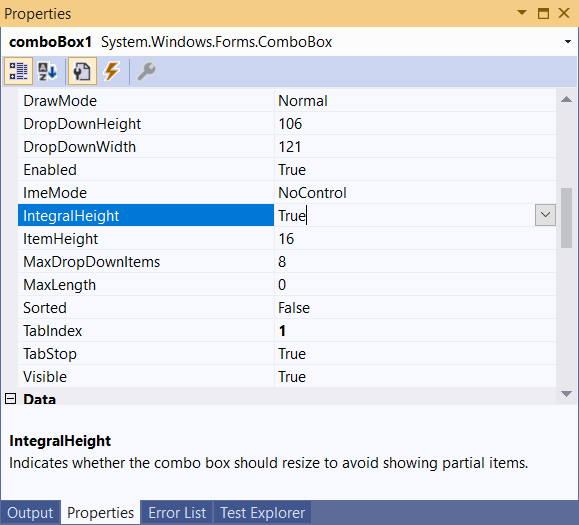
- Yes, ComboBox have the "IntegralHeight" property in PropertyGrid
**What impact will it have on accessibility?**
- No
**Will this feature need to be localized or be localizable?**
- It looks like 'DataGridViewComboBoxColumn.MaxDropDownItems' is localizable so I'm assuming yes.
Contributor guide
Assessment
This issue has not been assessed yet.