Application.SetHighDpiMode(HighDpiMode.SystemAware) or DpiAware and TableLayoutPanel
- Dominant language
- C#
- Stars
- 4.9k
- Forks
- 1.1k
- Avg merge
- 20h 23m
- Merged PRs (30d)
- 103
Description
* .NET Core Version:
.NET Core SDK (gemäß "global.json"):
Version: 3.1.301
Commit: 7feb845744
Laufzeitumgebung:
OS Name: Windows
OS Version: 10.0.19041
OS Platform: Windows
RID: win10-x64
Base Path: C:\Program Files\dotnet\sdk\3.1.301\
Host (useful for support):
Version: 3.1.5
Commit: 65cd789777
* Have you experienced this same bug with .NET Framework?:
Yes, but a bit different
**Problem description:**
The Position, Margin or Size of a NumericUpDown control inside a TableLayoutPanel is not correct when HighDpiMode.SystemAware or DpiAware is set and the Scaling is set to more than 100% (e.g. 150%).
This picture shows 100% scaling (everything looks good):
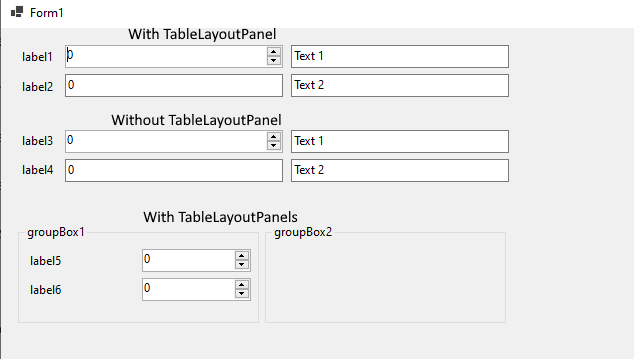
[TestDpiAware.zip](https://github.com/dotnet/winforms/files/4842346/TestDpiAware.zip)
This picture shows 150% scaling:

**Expected behavior:**
The size and margin of the controls inside a TableLayoutPanel should be the same as the controls without a TableLayoutPanel.
**Minimal repro:**
Run the TestDpiAware.exe from the zipped project and change the scaling in Windows. Move the mouse to the controls and you can see Location, Size and Margin from some controls.
[TestDpiAware.zip](https://github.com/dotnet/winforms/files/4842373/TestDpiAware.zip)
Contributor guide
Assessment
This issue has not been assessed yet.