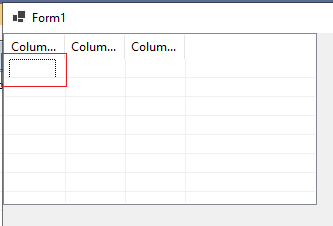
The selected cell's below dot line is missing when setting the ListView’s GridLines to true
- Dominant language
- C#
- Stars
- 4.9k
- Forks
- 1.1k
- Avg merge
- 1d 13m
- Merged PRs (30d)
- 85
Description
* .NET Core Version: 5.0.100-preview.5.20256.4
* Have you experienced this same bug with .NET Framework?: Yes
**Problem description:**
The below selected dot line of the selected cell is missing.
**Expected behavior:**
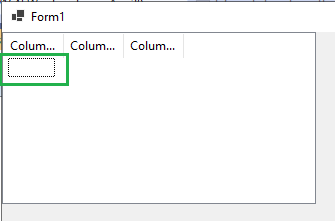
The dot line should not be missing.
GridLines = False
**Minimal repro:**
1. Create a winforms core project or run the attached project.
[ListView_GridLines.zip](https://github.com/dotnet/winforms/files/4598241/ListView_GridLines.zip)
2. Drag and drop a ListView to Form designer.
3. Click the ‘Edit Items…’ & ‘Edit Columns…’ to add some Items & Columns.
4. Set the View property to Details, and set the GridLines to True.
5. Build and run.
Contributor guide
Assessment
This issue has not been assessed yet.