VS Code: Using "Ctrl+F12" throws an exception: "The editor could not be opened because the file was not found."
- Dominant language
- TypeScript
- Stars
- 3.1k
- Forks
- 737
- Avg merge
- 18h 40m
- Merged PRs (30d)
- 31
Description
## Environment data
VS Code version: [1.75.0](https://code.visualstudio.com/Download)
C# Extension version: [1.25.4](https://github.com/OmniSharp/omnisharp-vscode/releases)
VS 2022: 17.4.4
**Platform**
- [x] Windows
- [x] Linux
- [x] Mac
## Steps to reproduce
1. Open a normal Terminal Emulator, create MVC project and open it using VS code
```
mkdir MVC3x
cd MVC3x
dotnet new mvc --use-program-main
code .
```
2. Go to [https://github.com/OmniSharp/omnisharp-vscode/releases](https://github.com/OmniSharp/omnisharp-vscode/releases) > Download the csharp-1.25.4-win32-x64.vsix.
3. In VS Code and go to the Extensions Tab, select "Install from VSIX" > install the file you downloaded.
4. Open Program.cs, then enter the code: `public interface ICheese {}` above public class Program, and Save the changes in Program.cs.
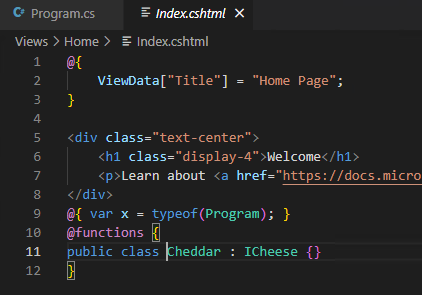
5. Edit Index.cshtml to include the following at the bottom:
```
@{ var x = typeof(Program); }
@functions {
public class Cheddar : ICheese {}
}
```
6. Save and close Index.razor.
7. Wait for CodeLens references numbers to load in Program.cs.
8. Bring the cursor to the ICheese part of `public interface ICheese` and enter `Ctrl+F12`. You will encounter the error: "The editor could not be opened because the file was not found."
**Actual behavior:**
Open Program.cs, bring the cursor to the ICheese part of `public interface ICheese` and enter `Ctrl+F12`, you will encounter the error: "The editor could not be opened because the file was not found."

**Expected behavior:**
Enter `Ctrl+F12` in program.cs to navigate to the implementation in Index.cshtml.
**Additional context:**
Note:
1. This issue repro on C# extension 1.25.4 and 1.25.3, does not repro on C# extension 1.25.1.
2. When you open Index.cshtml, then enter `Ctrl+F12` in Program.cs it works fine.
Contributor guide
Assessment
This issue has not been assessed yet.