Editor's Bracket styling C# seems to be only following JavaScript style bracket-styling
- Dominant language
- TypeScript
- Stars
- 3.1k
- Forks
- 737
- Avg merge
- 17h 56m
- Merged PRs (30d)
- 21
Description
Repost on a closed issue in https://github.com/Microsoft/vscode/issues/29314
Spotted by @binnysenpai
Apparently, the Editor only follow JavaScript-style bracket-styling for the autobracket formatting for C#/C++ files.
[video link ](https://gyazo.com/d1db57bb5cb6427e5dd02090df87cb57)
Usually in Visual Studio, this would be autoomaticaly formatted by automatically newline the opening bracket and put the statement after the line.
And also it seems not to format automatically this type of statements
[video link ](https://i.gyazo.com/3eac29c66f4366cdf0989f6933277f8a.mp4)
Which should look like this
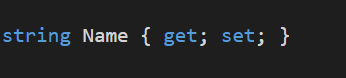
## Environment data
`dotnet --info` output:
```prolog
.NET Command Line Tools (1.0.0-preview2-003121)
Product Information:
Version: 1.0.0-preview2-003121
Commit SHA-1 hash: 1e9d529bc5
Runtime Environment:
OS Name: Windows
OS Version: 10.0.14393
OS Platform: Windows
RID: win10-x64
```
VS Code version: 1.13.1
C# Extension version: 1.10.0
Contributor guide
Assessment
This issue has not been assessed yet.