dotnet / dotnet/project-system
Issue with Debugging VB applications after installing Version 17.3.0 Preview 4.0
- Dominant language
- C#
- Stars
- 1k
- Forks
- 415
- PR merge metrics
- No merged PRs in 30d
Description
## Visual Studio Version
Version 17.3.0 Preview 4.0
## Summary
The new designer at some point changes both check boxes to checked
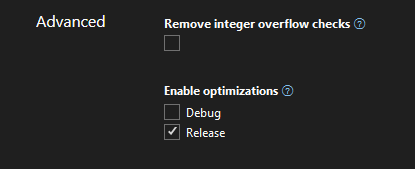
and changes the XML file to add Optimize true to both sections.
```XML
41999,42016,42017,42018,42019,42020,42021,42022,42032,42036
x64
True
41999,42016,42017,42018,42019,42020,42021,42022,42032,42036
True
```
after that symbol are not loaded. The real issue besides the value being set is the message you get don't help solve the problem. It points to 2 other areas that could also cause symbols not to load. I would also think that I should be able to debug an optimized application.
## Steps to Reproduce
Just load a VB WinForms app and then open Properties
## Expected Behavior
The value should not be set to true under debug section, the no symbols loaded error message should point to this change AND I should be able to debug an optimized application.
## Actual Behavior
Symbols are not loaded AND message as to why is wrong
## User Impact
Minor once you understand this issue a showstopper until you do and remove the optimize true line from debug section
Contributor guide
Assessment
This issue has not been assessed yet.