dotnet / dotnet/project-system
Unable to condition target frameworks on solution configuration
- Dominant language
- C#
- Stars
- 1k
- Forks
- 415
- PR merge metrics
- No merged PRs in 30d
Description
## Visual Studio Version
17.2.0 (and earlier)
## Summary
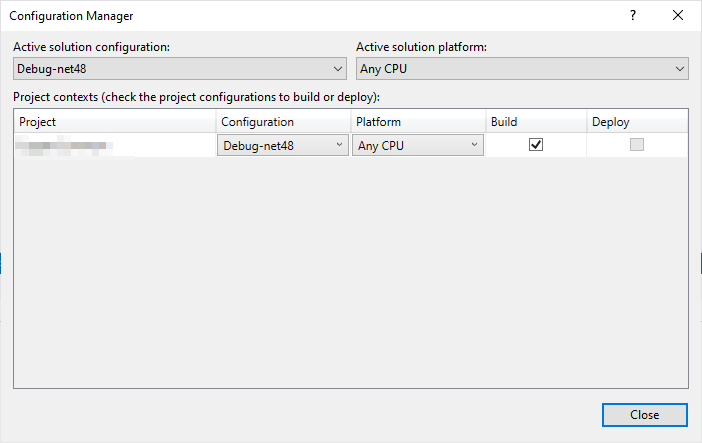
When switching to a different solution configuration that has different project configurations then what's currently loaded for the project, Visual Studio does not properly re-evaluate the value of the `$(Configuration)` MSBuild property for the impacted project(s). In my case, I want to limit the amount of target frameworks being built for a given project configuration (to improve performance and build times during development) by introducing additional solution and project configurations (see image below).
The problem is that switching the configurations does not result in re-evaluating the `$(TargetFrameworks)` property we've configured in `Directory.Build.props` (see snippet below). If I unload and reload the project everything works as expected, but obviously this is not practical.
**Directory.Build.props**
The idea here is that we can dynamically add Configurations based on the value of `$(SupportedTargetFrameworks)` and that the `$TargetFrameworks` value is set by reading the current `$(Configuration)` value and setting the corresponding target framework. We use a custom tools to generate a solution that adds all solution/project configuration combinations.
```xml
net48;netcoreapp3.1;net6.0
Debug;Debug-$(SupportedTargetFrameworks.Replace(';', ';Debug-'))
$(Configurations);Release;Release-$(SupportedTargetFrameworks.Replace(';', ';Release-'))
$(Configuration.Split('-')[1])
$(TargetFrameworkFromConfiguration)
net48;$(TargetFrameworks)
$(SupportedTargetFrameworks)
```
## Steps to Reproduce
1. Create a solution with a single project
2. Add the snippet above to a `Directory.Build.props` file in the solution root
3. Add one or more solution configurations (e.g. `Debug-net48`) to the solution
4. Open the solution in Visual Studio
5. Switch from the `Debug` to `Debug-net48` configuration
## Expected Behavior
Visual Studio re-evaluates all impacted project properties, therefore recognizing that the value of $(TargetFrameworks) has changed and the set of target frameworks under Dependencies in the Solution Explorer should change and the project should be built against those frameworks when a build is executed
## Actual Behavior
Visual Studio does not seem to re-evaluate the project properties, the list of target frameworks is not updated and the build fails with an error message if the new target framework was not present in the previous set of target frameworks (see below)
`NETSDK1005 Assets file 'C:\Projects\[SOLUTIONNAME]\src\[PROJECTNAME]\obj\project.assets.json' doesn't have a target for 'netcoreapp3.1'. Ensure that restore has run and that you have included 'netcoreapp3.1' in the TargetFrameworks for your project.`
## User Impact
We need a solution to limit the amount of target frameworks being built/tested during development to speed things up a bit. We run a 84-project solution, each targeting at least 2 target frameworks. We do want to be flexible towards the developers with which target framework they need to target in which configuration (Debug/Release) for debugging/framework-specific development purposes. Therefore, solution configurations seemed like the way to go.
Can this be addressed or is there another way to achieve this?
Thanks,
Contributor guide
Assessment
This issue has not been assessed yet.