dotnet / dotnet/project-system
New Property Pages: Add evaluation log
- Dominant language
- C#
- Stars
- 1k
- Forks
- 415
- PR merge metrics
- No merged PRs in 30d
Description
Related: https://github.com/dotnet/project-system/issues/6931
Related: https://github.com/dotnet/project-system/issues/7050
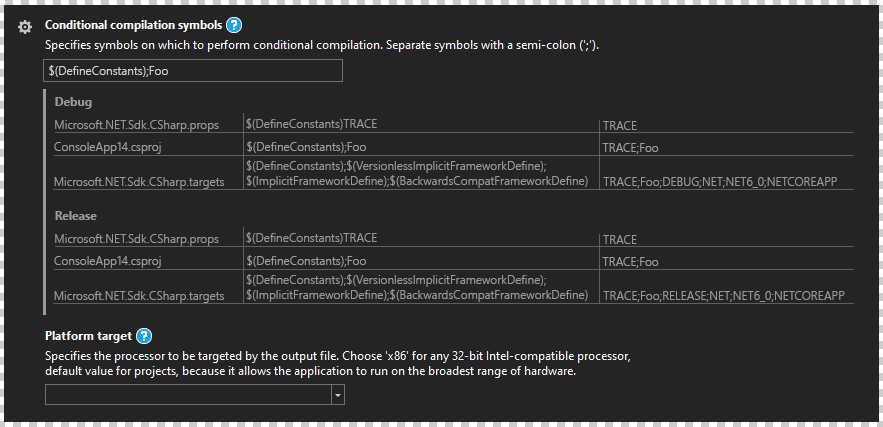
One of the design issues for the new property pages is what information to display to the user for recursive properties. I wanted to make a mock-up of an idea to expand the current evaluated value display to allow it to show the entire evaluation log. It would show these three aspects:
- Source of property value
- Value in source
- Evaluated value at time of processing
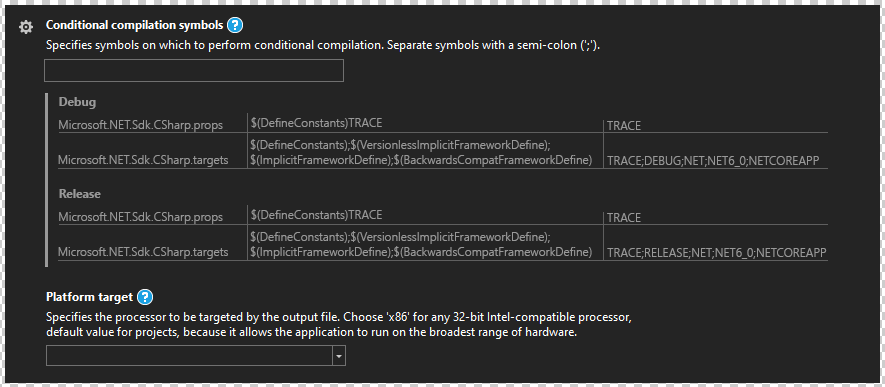
Each row on the table shows these 3 values. The top-down order of the table is showing the processing order of the property. This would definitely show the progression of a property. I tried to keep it clear and concise, but I realize adding table headers may help. By default, properties would still show the normal final evaluated value display. Let me step through the idea with the mock-up images I've made. I will be using `DefineConstants` in this example.
---
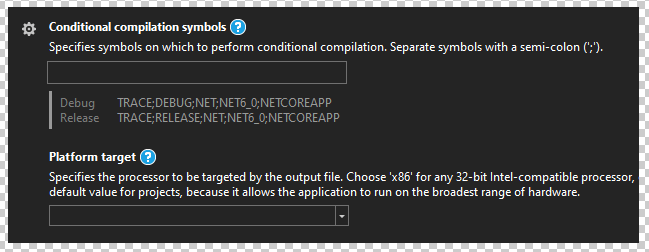
You start with the normal looking property display. The value in the field would *always display the project's value*. Here, the project has no value defined for `DefineConstants`.
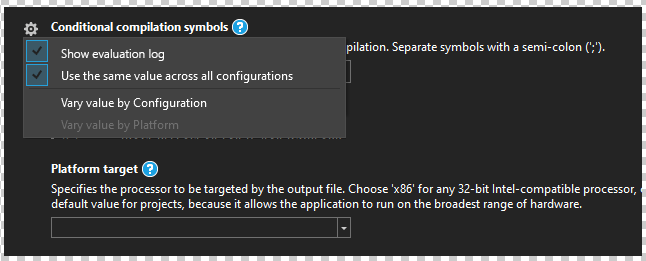
To enable the evaluation log, we would adapt the ⚙ menu to be more general purpose (like how it is in VSCode). It would not simply relate to configuration dimensions only. I've added a `Show evaluation log` option as a checkbox.
After enabling the evaluation log, the current final evaluated value display is hidden, and the evaluation log appears. It is a simple table per configuration showing the source, value, and evaluated value.
---
To show an example of what happens when you put in a value, here I put in the value `$(DefineConstants);Foo`. You can see `;Foo` in the final evaluation display.
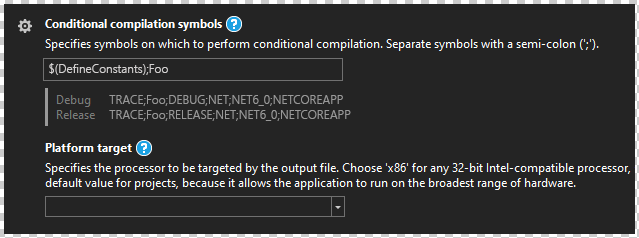
After enabling the evaluation log, you can see there is a new row for `ConsoleApp14.csproj`, which is the project filename of the current project. This is inserted in-between the 2 other rows since this is the evaluation order. With this, there is no confusion around how editing the property affects the final evaluated value.
---
I believe this concept would be great for any property and be a substantial enhancement over the current property pages. Since the data is turned on/off as needed, when showing the evaluation log, it would acquire the data needed for it at that time. Maybe some kind of cache would be required since rebuilding to acquire that data is time consuming. I'm not aware of the challenges required to make the evaluation log work, but I do know that it is a useful feature for those trying to understand how and why a property is set to a certain value. This is especially useful for complex systems and feels like the feature would be a good key differentiator between doing .NET developing in Visual Studio versus doing it in an editor like VSCode. I'd consider this to be a 'premium' feature for project management.
Contributor guide
Assessment
This issue has not been assessed yet.