dotnet / dotnet/project-system
New Property Pages: Double click (fast click) dimensional checkbox causes desync, UI splits into varied state
- Dominant language
- C#
- Stars
- 1k
- Forks
- 415
- PR merge metrics
- No merged PRs in 30d
Description
#### Summary
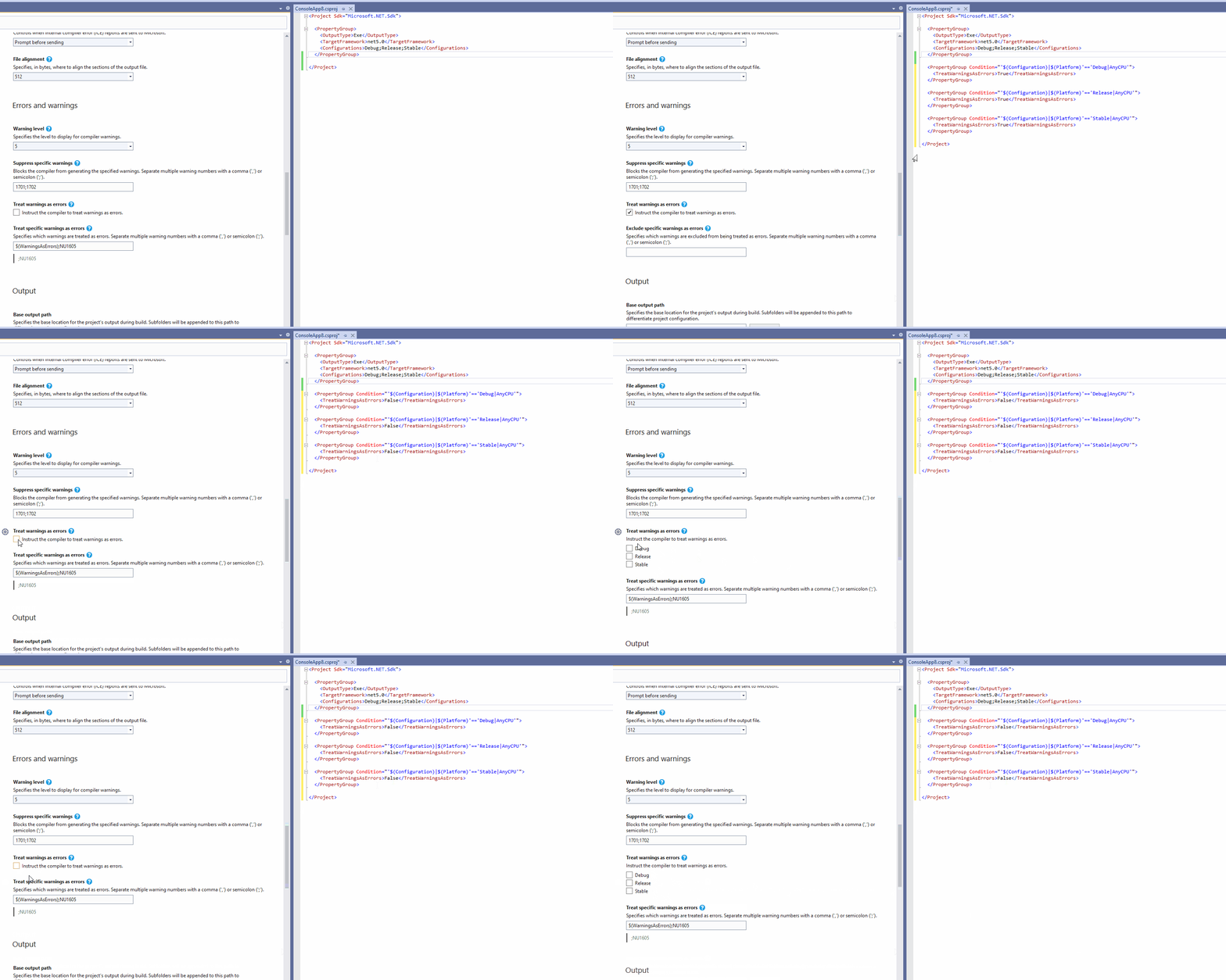
If you have a checkbox that can vary by dimensions (configuration, platform, etc.), it can be set/unset so fast (while non-varied), the value can be misunderstood by the UI. This causes the UI to think that at least 1 of the dimensions is a different value than the others; causing the UI to split into the varied display of the control. This is performed while the control is unvaried, and the result is the control become unintentionally varied.
#### Steps to Reproduce
1. Find a control (such as `Allow unsafe code`) that is a checkbox and allows dimensional varying. Make sure the control is in the non-varied (single checkbox) state.
2. Check and uncheck the control slowly. Observe that it works as intended.
3. Now, quickly (such as double click) click the checkbox. Observe that it now has changed to being the varied display of the control, showing multiple dimensions.
#### Expected Behavior
Slow un/checking of the control operates the same way as fast un/checking of the control.
#### Actual Behavior
When un/checked quickly, the control goes from a non-varied state into a varied state.
#### Clip of Issue
Contributor guide
Assessment
This issue has not been assessed yet.