dotnet / dotnet/project-system
Not able to select some cross platform applications in the Select Startup Project dropdown
- Dominant language
- C#
- Stars
- 1k
- Forks
- 415
- PR merge metrics
- No merged PRs in 30d
Description
**Visual Studio Version**:
VisualStudio 2019 v16.9.0
**Summary**:
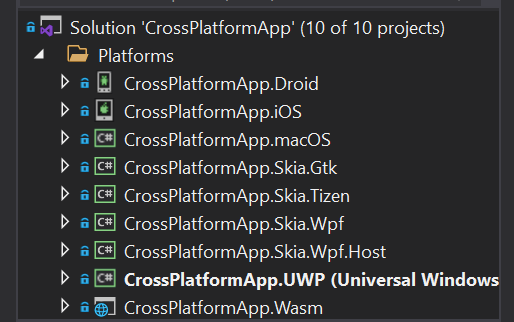
This issue appeared in version 16.9.0. When working with a cross platform solution, the **Set Startup Project** dropdown does not list all viable platform application projects. For example, [in this demonstration solution](https://github.com/baskren/CrossPlatformPlatformProjectsNotAvailable.git), there are the following platform application projects, all of which are executable:
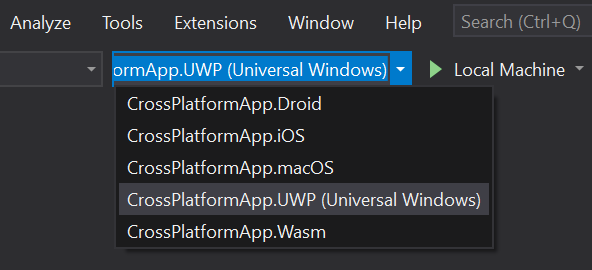
However, in the **Startup Project** drop down, only five out of eight projects are given as options:
**Steps to Reproduce**:
Use [this](https://github.com/baskren/CrossPlatformPlatformProjectsNotAvailable.git) platform project, or:
1. Open VisualStudio 2019 v 16.9.0
2. Install the **Uno Platform Solution Templates** VisualStudio extension
3. Restart VisualStudio 2019 v 16.9.0 to complete the extension install
4. Create a new **Cross-Platform App (Uno Platform)** Solution
5. Open the **Select Startup Project** dropdown
6. Observe the missing platform application projects
**Expected Behavior**:
All the platform application projects are listed in the **Select Startup Project** dropdown.
**Actual Behavior**:
Only some of the platform application projects are listed in the **Select Startup Project** dropdown.
**User Impact**:
Moderate, because it may take a bit of time for the user to discover that there is a work around.
**Work Around**:
In Solution Explorer, right click on a platform application project that you want to run. Select the **Set as Startup Project** popup menu item. Now, the project you want to run appears as the currently selected item in the **Select Startup Project** drop down and will be ran if you click the [Run] button.
Contributor guide
Assessment
This issue has not been assessed yet.