[iOS] Shell.TabBarIsVisible and Shell.NavBarIsVisible wrong behaviour if 5 Tabs and more
- Dominant language
- C#
- Stars
- 23.3k
- Forks
- 2k
- Avg merge
- 1d 15h
- Merged PRs (30d)
- 290
Description
### Description
### Context
I have a project where I want to use a MAUI Shell application with a TabBar. Since the customization of the default Shell.TabBar is extremely limited I created a custom TabBar control and hide the Shell.TabBar on all pages. I still did add the pages to the in the AppShell.xaml though and noticed a strange behaviour that most likely is a bug.
### Bug Description
When there are more than 5 elements in a Shell.TabBar, the additional tabs are added to a "more" button/tab (as supposed to and described in the docs).
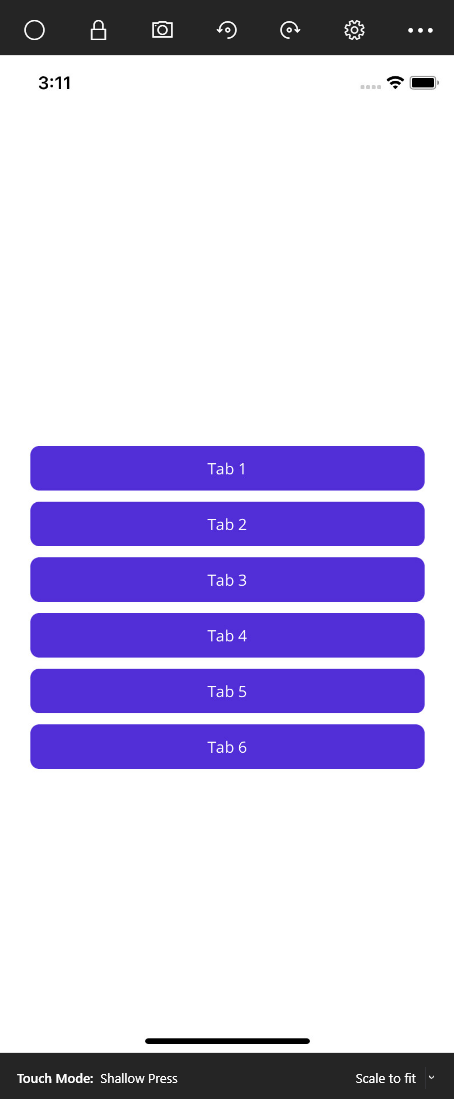
With the Shell.TabBarIsVisible and the Shell.NavBarIsVisible set to false, both elements are hidden from the user in the normal case, BUT if you navigate to a route that would be placed under the "more" button, the TabBar becomes visible and the "more" menu is opened up, instead of just opening the page and keep the TabBar hidden. In addition, once you click on the intended page again inside the "more" menu that pops up to get to that page, the NavBar (< more) is visible again.
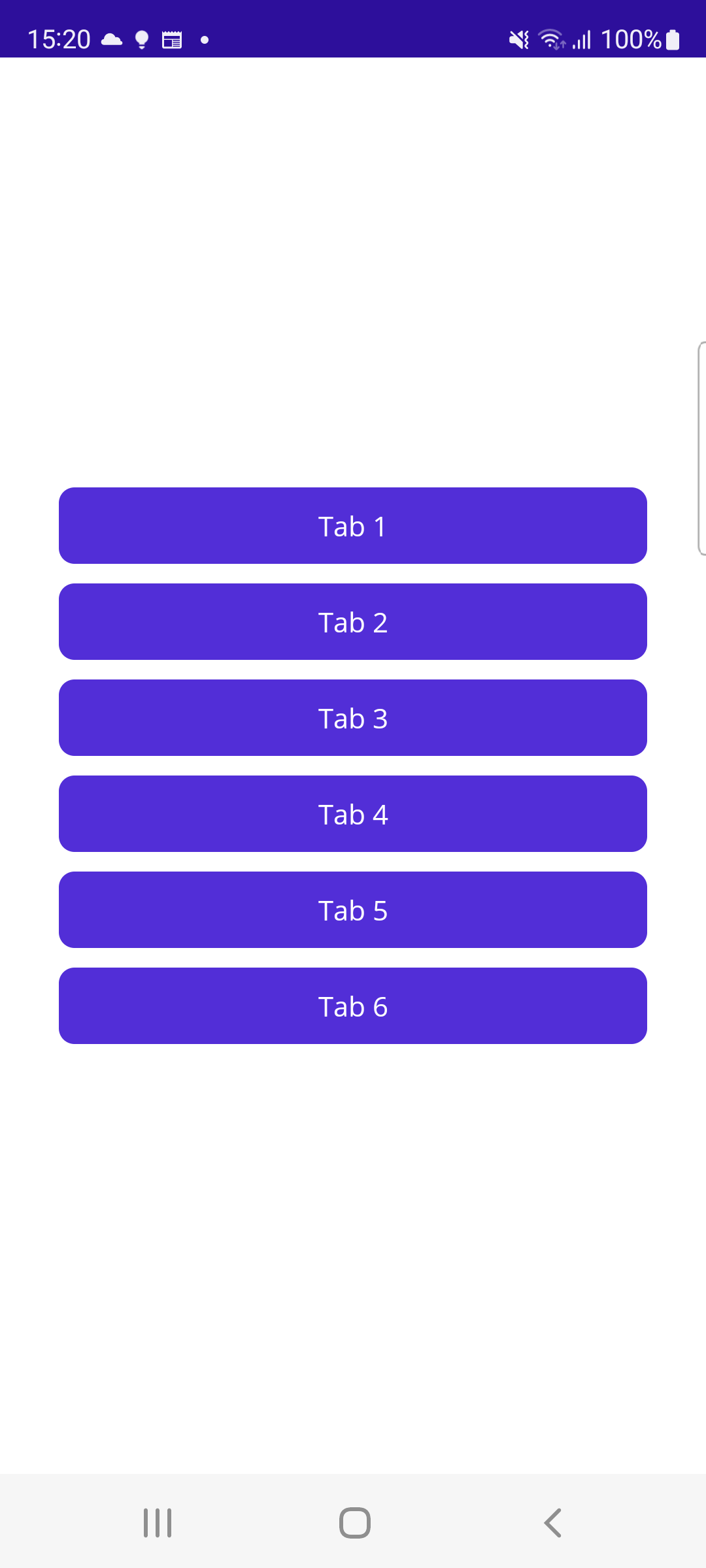
This only happens on iOS, on Android everything works as I would expect (the page opens up, TabBar and More menu stay hidden, NavBar is hidden as well).
### Screenshots SampleProject
There are 6 Tabs in the sample project, all having the MainPage.xml as their page to simplify the code, with six Buttons to navigate to the different pages when the TabBar is hidden.
Note: The iOS screenshots are done using the iOS simulator, but it's the same when using a real iOS (tested with iPhone 12).
With TabBar and NavBar visible (for reference):
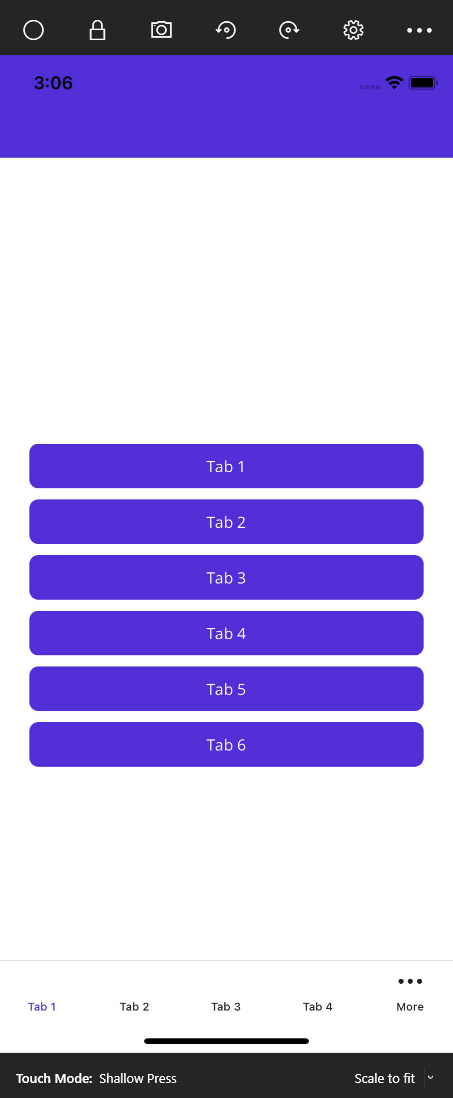
With TabBar and NavBar hidden while clicking on any tab from 1-4:
When clicking on tab 5 or 6 (still with TabBar and NavBar hidden):
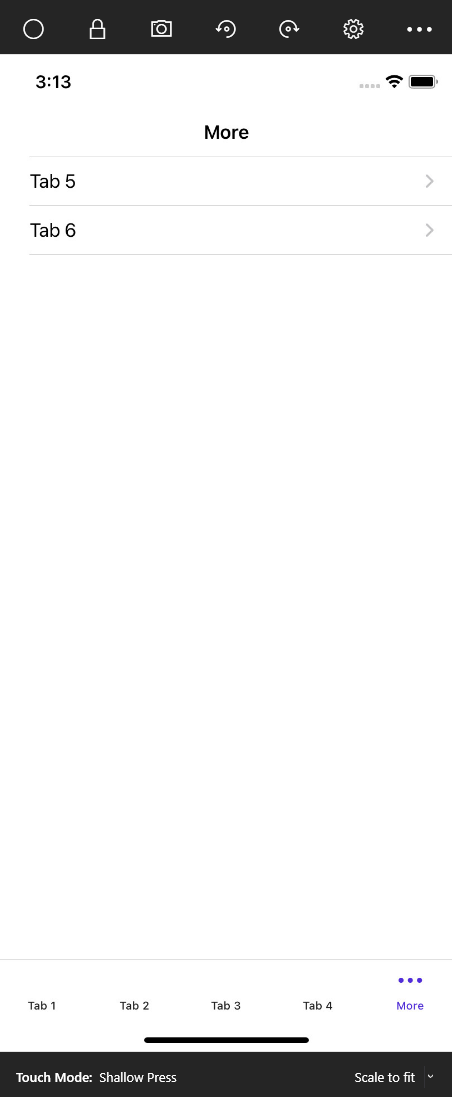
After clicking on tab 5 in the "more" menu that opened up (see previous screenshot), while in tab 5:

When you click the "back" navigation you get to the "more" menu again and can press another tab from there. As soon as you're back on tab 1-4 the TabBar and NavBar are hidden again. It's just within those "more" tabs.
For Android, all Tabs from 1-6 behave and look the same. No "more" menu popping up, NavBar and TabBar stay hidden as expected.
Tab 5 on Android (same for all tabs):
### Steps to Reproduce
1. Create a new MAUI App project (using the VS2022 template)
2. Add a with more than 5 tabs to the AppShell.xaml (you can add different pages for each or use the MainPage for all, but make sure to have different Routes for all of them)
3. Add Buttons to navigate to the different tabs (especially the tabs at position 5+ that are moved to the "more" tab menu)
4. Add the Shell.TabBarIsVisible="false" and Shell.NavBarIsVisible="false" to the MainPage.xaml (or elsewhere)
5. Run the app on Android and on iOS and note the different behaviour when navigating to Tab 5 or higher
### AppShell.xaml
```
```
### MainPage.xaml
```
```
### MainPage.xaml.cs
```namespace MauiTabBarIsVisibleAndMore;
public partial class MainPage : ContentPage
{
public MainPage()
{
InitializeComponent();
}
private async void OnTab1Clicked(object sender, EventArgs e)
{
await Shell.Current.GoToAsync("//Tab1");
}
private async void OnTab2Clicked(object sender, EventArgs e)
{
await Shell.Current.GoToAsync("//Tab2");
}
private async void OnTab3Clicked(object sender, EventArgs e)
{
await Shell.Current.GoToAsync("//Tab3");
}
private async void OnTab4Clicked(object sender, EventArgs e)
{
await Shell.Current.GoToAsync("//Tab4");
}
private async void OnTab5Clicked(object sender, EventArgs e)
{
await Shell.Current.GoToAsync("//Tab5");
}
private async void OnTab6Clicked(object sender, EventArgs e)
{
await Shell.Current.GoToAsync("//Tab6");
}
}
```
### Version with bug
6.0 (current)
### Last version that worked well
Unknown/Other
### Affected platforms
iOS
### Affected platform versions
iOS 15.5
### Did you find any workaround?
Keep the items in the TabBar less than 5, so no "more" tab menu is required.
Add pages that don't need to be in the TabBar (in my case all, since I have the TabBar hidden all the time anyways) as simple ShellItems outside of the TabBar (you might need to keep at least 1 page in the TabBar for it to still work, not sure.)
For my project, I've added them in the **AppShell.xaml.cs** like this:
```
// Shell Item not in the TabBar
Items.Add(new ShellItem
{
Route = "home",
Items = { new ShellContent { ContentTemplate = new DataTemplate(typeof(HomePage)) } }
});
// TabBar Items (keep less than 5 of these)
TabBar.Items.Add(new Tab
{
Route = "summary",
Items = { new ShellContent { ContentTemplate = new DataTemplate(typeof(SummaryPage)) } }
});
```
And in the **AppShell.xaml** I have a TabBar named TabBar:
```
```
### Relevant log output
_No response_
Contributor guide
Research direction
Start with the AppShell.xaml and MainPage.xaml/MainPage.xaml.cs reproduction, then run the six-tab sample on iOS and Android, focusing on navigation to Tab5 and Tab6. Compare the behavior with and without Shell.TabBarIsVisible and Shell.NavBarIsVisible. Done means routes under the iOS “more” tab open while both bars and the menu remain hidden, matching Android.
Written by the indexing model from the issue text.
Assessment
- Tech stack
- csharp, ios
- Domain
- mobile
- Issue type
- Bug
- Difficulty
- 4/5
- Estimated time
- 3-5 days
- Activity status
- Stale
- Clarity
- Mostly clear
- Newbie friendliness
- 35/100