Tab key behaves differently if Entry or Editor is last interactable control on a page on Windows
- Dominant language
- C#
- Stars
- 23.3k
- Forks
- 2k
- Avg merge
- 1d 15h
- Merged PRs (30d)
- 290
Description
### Description
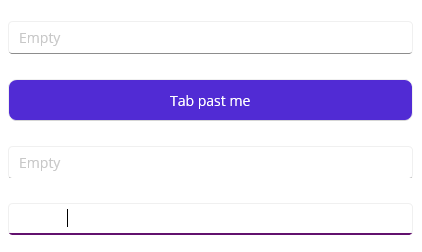
Typically pressing the tab key switches focus to the next available control on the page. However, if an Entry or Editor is the last interactable (type, click, etc.) control on the page, pressing the tab key will insert a tab character into the Entry or Editor field. I would expect it to either wrap around to the first interactable control on the page or just lose focus.
### Steps to Reproduce
1. Create a File > New .NET MAUI App
2. Add a few Entry or Editor elements (or others as long as an Entry or Editor is the final one) to the page. For example:
```xaml
```
3. Start Debugging on Windows
4. Press the tab key to make your way through the controls, including attempting to tab past the final Entry
Example screenshot. The Placeholder text is not shown as a tab character has been inserted (also evident based on the caret position)
### Version with bug
6.0 (current)
### Last version that worked well
Unknown/Other
### Affected platforms
Windows, I was *not* able test on other platforms
### Affected platform versions
Windows SDK 10.0.19041.0
### Did you find any workaround?
No.
### Relevant log output
_No response_
Contributor guide
Research direction
Create a new .NET MAUI app on Windows and reproduce the behavior with the XAML controls shown in the issue. Trace how focus and Tab key handling behave when an Entry or Editor is the final interactable control. Done means pressing Tab at the final control no longer inserts a tab character and instead loses focus or wraps to the first control.
Written by the indexing model from the issue text.
Assessment
- Tech stack
- csharp
- Domain
- desktop, frontend
- Issue type
- Bug
- Difficulty
- 4/5
- Estimated time
- 3-5 days
- Activity status
- Stale
- Clarity
- Mostly clear
- Newbie friendliness
- 45/100