Navbar title color differs on Android and Windows
- Dominant language
- C#
- Stars
- 23.3k
- Forks
- 2k
- Avg merge
- 1d 14h
- Merged PRs (30d)
- 296
Description
### Description
It appeared that the page title in the NavBar was missing on Android but it actually wasn't, it just defaults to white text on a white background whereas Windows defaults to black text on a white background.
### Steps to Reproduce
1. Unzip the project from
[MultiPage-titlecolor.zip](https://github.com/dotnet/maui/files/8605727/MultiPage-titlecolor.zip)
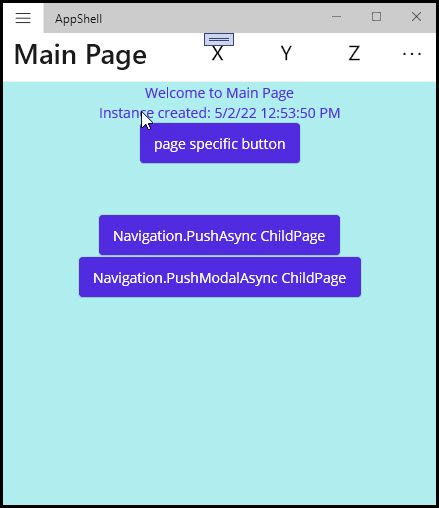
2. Compile and run it on Windows, you should see this:
3. Compile and run it on Android, you should see this:
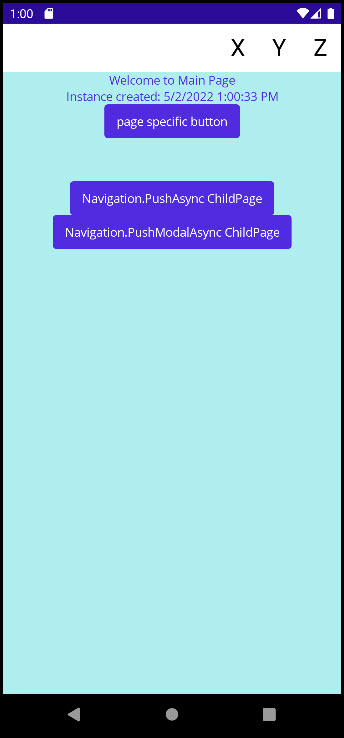
Note the apparent lack of a hamburger icon or page title on Android - they are there, just drawn in white on a white background. Explicitly setting `Shell.TitleColor="Black"` will make the title show up, but the hamburger icon is still white on a white background. Alternatively you can set `Shell.BackgroundColor` to reveal them on Android but it seemingly has no effect on Windows.
### Version with bug
Release Candidate 2 (current)
### Last version that worked well
Unknown/Other
### Affected platforms
Android
### Affected platform versions
Android 11
### Did you find any workaround?
No
### Relevant log output
_No response_
Contributor guide
Research direction
Start by running the attached MultiPage-titlecolor.zip sample on Android and Windows, then inspect the Shell navigation bar rendering involved in the platform difference. Done means the page title and hamburger icon are visible with consistent default contrast on both platforms without requiring explicit Shell.TitleColor or Shell.BackgroundColor settings.
Written by the indexing model from the issue text.
Assessment
- Tech stack
- android
- Domain
- mobile-dev
- Issue type
- Bug
- Difficulty
- 4/5
- Estimated time
- 3-5 days
- Activity status
- Stale
- Clarity
- Mostly clear
- Newbie friendliness
- 35/100