SDK Target Platforms .targets/.props files not loading on MAUI Project
- Dominant language
- C#
- Stars
- 23.3k
- Forks
- 2k
- Avg merge
- 1d 15h
- Merged PRs (30d)
- 290
Description
### Description
The following .props/.targets files don't always load on a MAUI project.
- Microsoft.Android.Sdk.SupportedPlatforms.targets
- Microsoft.iOS.Sdk.SupportedTargetPlatforms.props
- Microsoft.MacCatalyst.Sdk.SupportedTargetPlatforms.props
This happens even when the `TargetFrameworks` property contains all the target platforms (net6.0-ios, net6.0-android, and net6.0-maccatalyst). In fact, it only loads the file associated with the platform that is the first one in the list of values for the `TargetFrameworks` property. The windows file seems to always be loaded regardless of whether or not net6.0-windows is a target platform.
### Request
Can we always load those files regardless of whether or not the related platform is a target listed in the `TargetFrameworks` property?
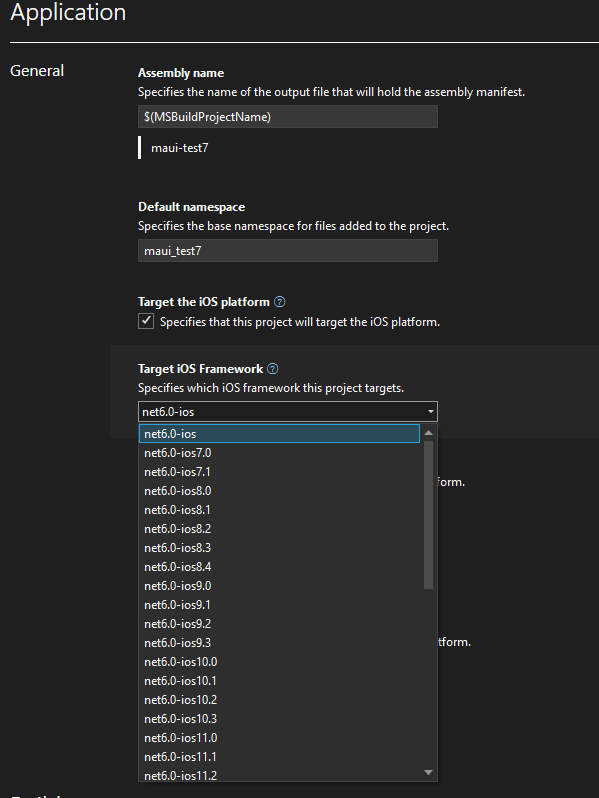
This is necessary because we use those files to read the versions supported to display them to the user for them to select in a combo box (see picture below). So, we always need to display those values even when the framework is not selected, therefore those files should always be loaded.
### Steps to Reproduce
1. Create a MAUI project
2. Make sure net6.0-android, net6.0-ios and net6.0-maccatalyst is listed in the `TagetFrameworks` property.
3. Click the "Show all files" icon in the Solution Explorer
4. Search for "supported"
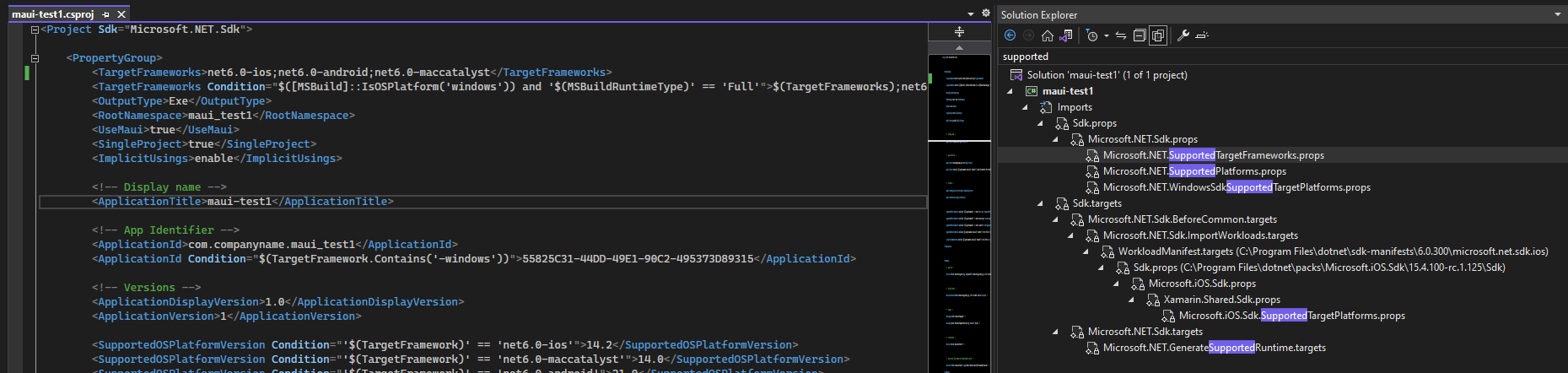
5. Note that only the `Microsoft.NET.WindowsSdkSupportedTargetPlatforms.props ` and the file related to the first platform listed in the `TargetFrameworks` is loaded.
6. Switch the order of the target platforms in the `TargetFrameworks` property.
7. Unload and reload the project
8. Repeat steps 3-5
See picture below for an example:
### Version with bug
Preview 14 (current)
### Last version that worked well
Preview 14 (current)
### Affected platforms
iOS, Android, macOS
### Affected platform versions
n/a
### Did you find any workaround?
_No response_
### Relevant log output
_No response_
> VS bug [#1744763](https://devdiv.visualstudio.com/DevDiv/_workitems/edit/1744763)
Contributor guide
Assessment
This issue has not been assessed yet.