CollectionView where items are sized to fit the screen
- Dominant language
- C#
- Stars
- 23.3k
- Forks
- 2k
- Avg merge
- 1d 15h
- Merged PRs (30d)
- 290
Description
### Description
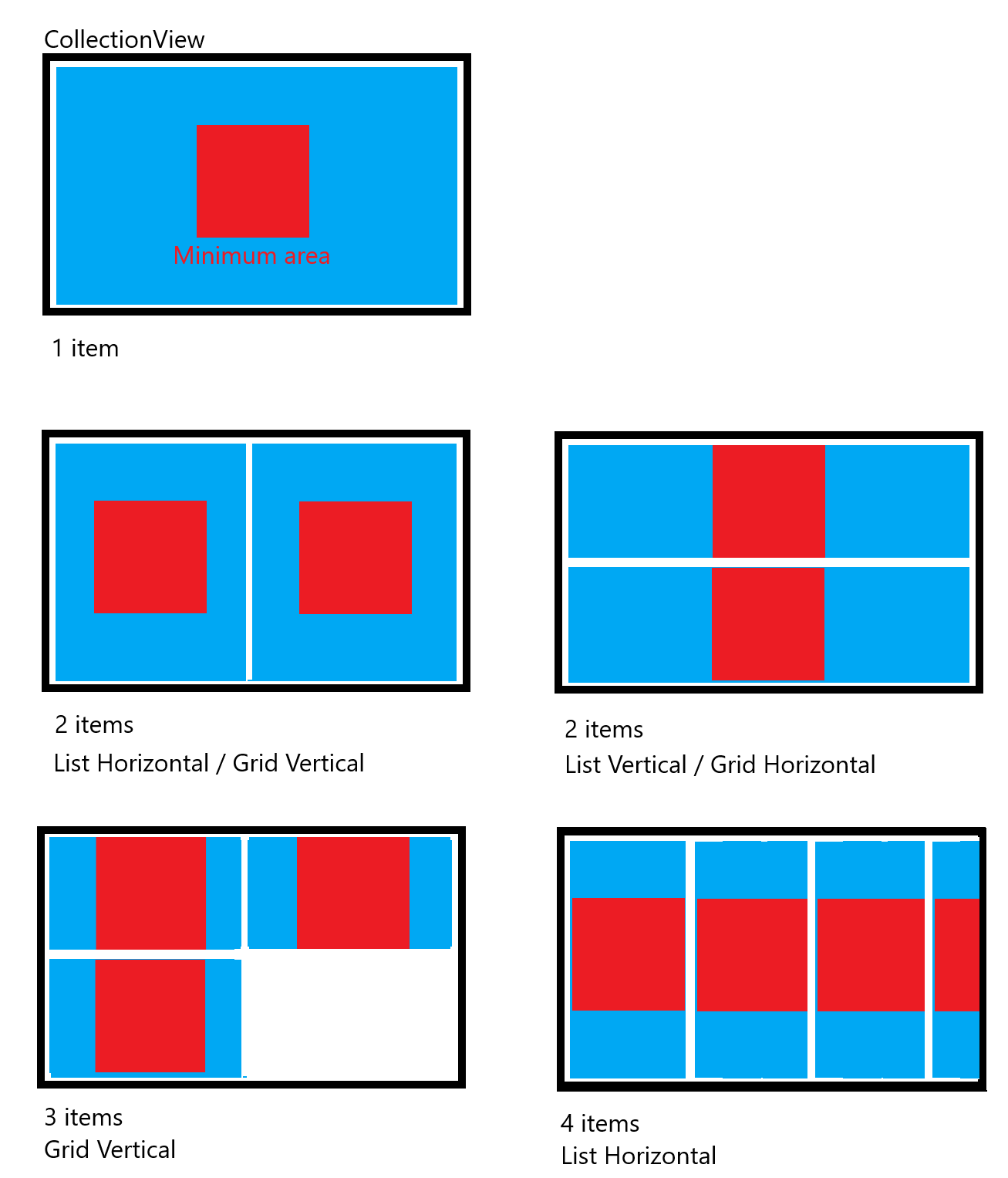
I'd like an option for items to be sized to expand to fill the area when the items would be too small.
[Migrated from Xamarin.Forms] https://github.com/xamarin/Xamarin.Forms/issues/7451
### Public API Changes
Add property `bool FillArea`. When true, the control will split the view among the items evenly and fill the entire area. If the size of the items controlled by ItemSizingStrategy would be less than HeightRequest/WidthRequest of the item, the control would revert to normal layout behavior for that dimension.
### Intended Use-Case
Example:
Imagine an application that contains one or more graphs, and a user can decide how many they want to show. The repeated pattern and variable number is best represented by a CollectionView-type control with an ItemsSource and DataTemplate. However, the user may only have one or two graphs, which are best displayed by filling the screen. With more graphs, they can shrink until a minimum size is reached, after which scrolling behavior can be used.
As of now, there is no easy way to achieve this that I am aware of.
Here's a mockup of what I mean:
Contributor guide
Research direction
Start by locating the CollectionView implementation and its item-sizing and layout entry points; inspect how ItemSizingStrategy and HeightRequest/WidthRequest currently affect measurement. Done means a FillArea option evenly fills available space when items would otherwise be smaller, while preserving normal sizing and scrolling once requested minimum dimensions apply.
Written by the indexing model from the issue text.
Assessment
- Tech stack
- csharp
- Domain
- frontend, mobile-dev
- Issue type
- Feature
- Difficulty
- 4/5
- Estimated time
- 3-5 days
- Activity status
- Stale
- Clarity
- Mostly clear
- Newbie friendliness
- 35/100