HorizontalStackLayout does not limit maximum width of child label to it's width
- Dominant language
- C#
- Stars
- 23.3k
- Forks
- 2k
- Avg merge
- 1d 15h
- Merged PRs (30d)
- 290
Description
### Description
As shown in the attached sample, the label text does not wrap and the label extends beyond the blue bounds of the parent HorizontalStackLayout. If I change HorizontalStackLayout to any other layout control (e.g. VerticalStackLayout) then the label wraps as expected. The expected behavior is for the label to have the same width as the blue parent HorizontalStackLayout.
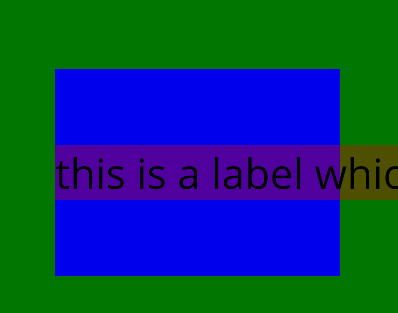
[layoutbug2.zip](https://github.com/dotnet/maui/files/9543370/layoutbug2.zip)
### Steps to Reproduce
1. Deploy included sample app to Android emulator (Pixel_5)
2. Label extends to the right of the parent HorizontalStackLayout but should not.
### Link to public reproduction project repository
none
### Version with bug
6.0.486 (current)
### Last version that worked well
Unknown/Other
### Affected platforms
Android, I was *not* able test on other platforms
### Affected platform versions
Android 12
### Did you find any workaround?
Setting Maximum width of label will cause it to wrap, but this should not be necessary.
### Relevant log output
_No response_
Contributor guide
Research direction
Start by deploying the attached layoutbug2.zip sample to an Android 12 emulator and reproduce the label extending beyond the HorizontalStackLayout. Compare the behavior with VerticalStackLayout and the documented Maximum width workaround; done means the label wraps within the blue parent without requiring an explicit maximum width.
Written by the indexing model from the issue text.
Assessment
- Tech stack
- android, csharp
- Domain
- frontend, mobile-dev
- Issue type
- Bug
- Difficulty
- 4/5
- Estimated time
- 3-5 days
- Activity status
- Active
- Clarity
- Mostly clear
- Newbie friendliness
- 52/100