dotnet / dotnet/machinelearning-modelbuilder
Git Sync may make .mbconfig file lose status, while training continues in background
- Dominant language
- Dockerfile
- Stars
- 285
- Forks
- 66
- PR merge metrics
- No merged PRs in 30d
Description
**System Information (please complete the following information):**
- Model Builder Version (available in Manage Extensions dialog): 16.6.1.2131904
- Visual Studio Version: 16.10.2
**Describe the bug**
- On which step of the process did you run into an issue: Training
- Clear description of the problem:
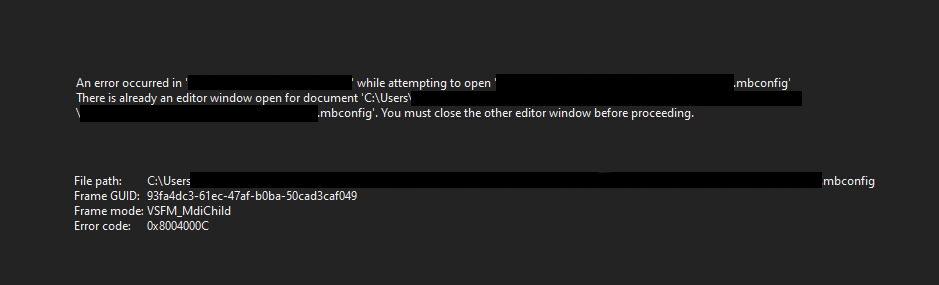
While training and working on Visual Studio, the .mbconfig file may stop showing training status. Training still continues in the background but there is no way to see the status or cancel it.
The error is about the .mbconfig file already being already open, but there is only one tab visible. Perhaps, VS tries to re-open the file just before closing the old tab. Anyway, even if it was made sure the "old tab" was fully closed before opening the new one, possibly the training status would be lost as well.
**To Reproduce**
1. Start training
2. Do changes on solution on another machine and push to git
3. Do git sync on training machine
4. Observer .mbconfig file no longer showing training progress
5. Re-open .mbconfig file and observe it no longer shows training status, and allows re-starting the training
6. Open CPU monitor and observe original training still running
**Expected behavior**
- .mbconfig file should keep showing training status even if git updates are pulled
- when reopening mbconfig file, it should show the current training status (for example, if we close the .mbconfig file by accident)
- if we can not access training status, training should be cancelled (to not keep consuming CPU as user may restart the training)
**Additional info**
Suspect it to be related to .sln file changing (adding new file etc.) which forces Visual Studio to re-open the solution, but this is not confirmed.
Contributor guide
No contributing guide indexed for this repository
Assessment
This issue has not been assessed yet.