dotnet / dotnet/machinelearning-modelbuilder
When Azure ML training fails for datasets with many images
- Dominant language
- Dockerfile
- Stars
- 285
- Forks
- 66
- PR merge metrics
- No merged PRs in 30d
Description
**System Information**
- Model Builder Version:
16.3.2056001
- Visual Studio Version:
Microsoft Visual Studio Enterprise 2019 Preview
Version 16.9.0 Preview 1.0
- Scenario:
Object detection (Azure)
**Describe the bug**
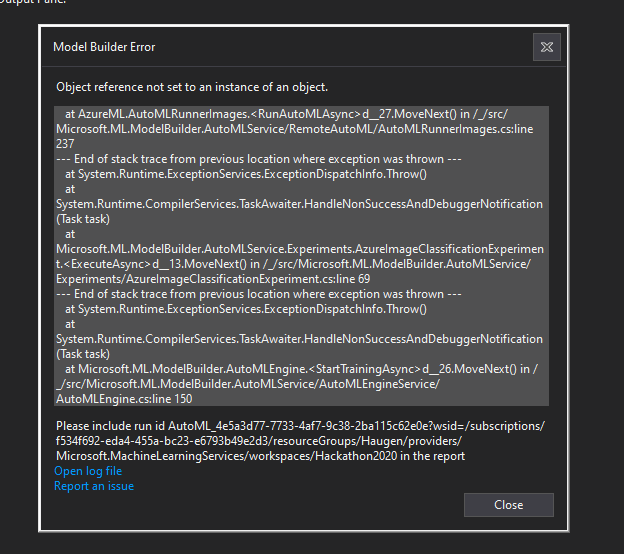
In the event that the training in the cloud fails, the model builder appears to interpret this as a "complete" and tries to download a file that does not exist and so the builder throws a null reference exception.
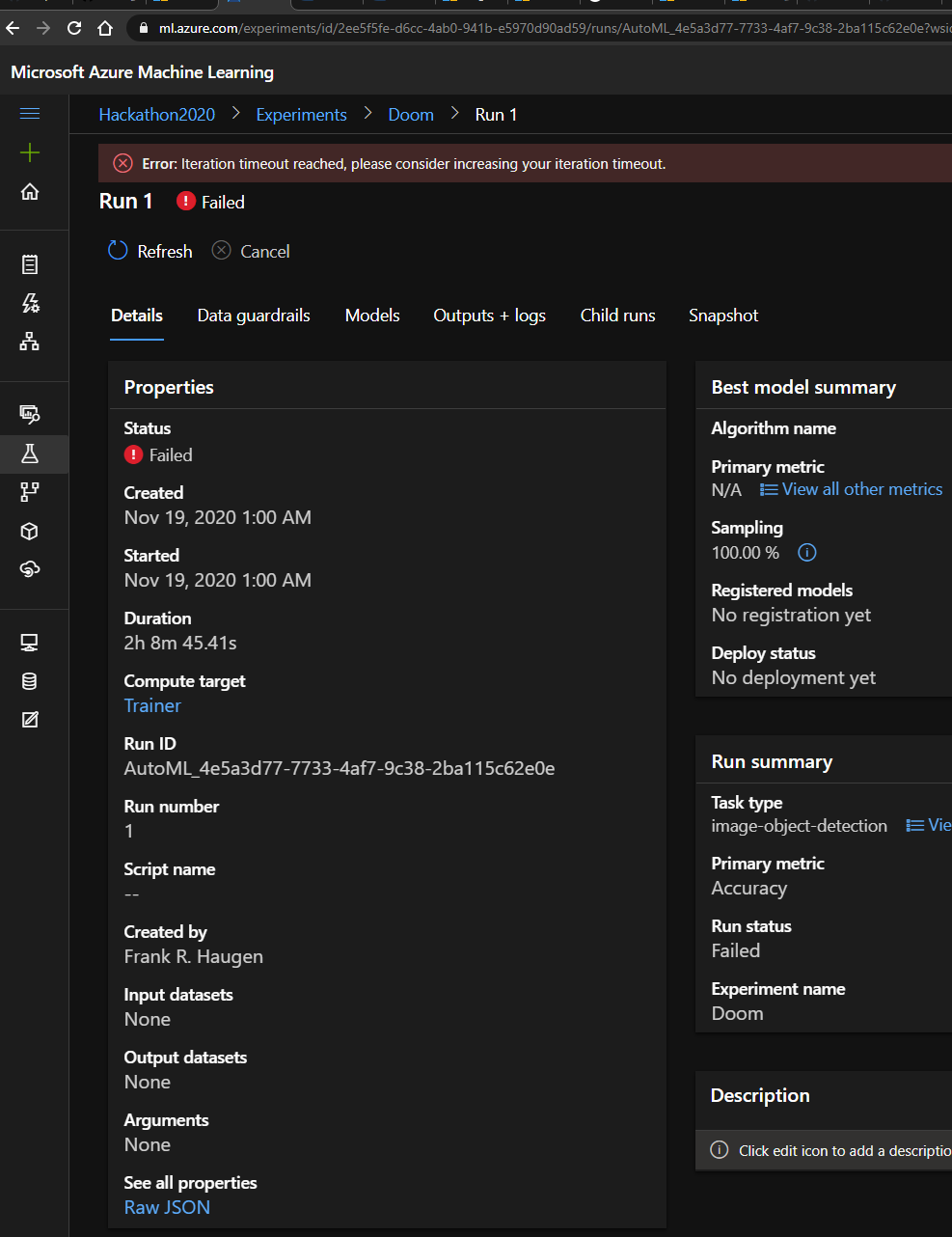
This occurs when there is a failure to train a model in Azure
**To Reproduce**
Steps to reproduce the behavior:
1. Have a set of Vott-tagged images
Images: [https://github.com/freedoom/freedoom/tree/master/sprites](https://github.com/freedoom/freedoom/tree/master/sprites)
Vott-model: [Model.json.txt](https://github.com/dotnet/machinelearning-modelbuilder/files/5565005/Model.json.txt)
(paths needs to be replaced unless you use this format: `C:\tensorflow\sprites\*.png`)
2. Start ML Model Builder and select Object Detection
3. Select all workspace-stuff and the files etc.
4. Start training
5. Wait ~2 Hours for the process to throw
**Expected behavior**
One or more of these is the behaviour I would expect:
1. The process shouldn't hard-fail on this, but a message that the process failed and what error message
2. It shouldn't fail, (In the web-UI it's re-runnable)
3. The process should fail, but the message should inform the user to go to the web UI and rerun the failed run, at which point the model builder process should continue and not fail, so that the resultant model can be used to generate a project
4. The error message in this specific case should link to the documentation where it's described how to remedy this, (Googling and Binging didn't give me any result for how I could increase the "iteration timeout"
**Screenshots**
Error message
Error in the Azure training
**Additional context**
Run Id:
```
AutoML_4e5a3d77-7733-4af7-9c38-2ba115c62e0e?wsid=/subscriptions/f534f692-eda4-455a-bc23-e6793b49e2d3/resourceGroups/Haugen/providers/Microsoft.MachineLearningServices/workspaces/Hackathon2020
```
Stacktrace:
```
at AzureML.AutoMLRunnerImages.d__27.MoveNext() in /_/src/Microsoft.ML.ModelBuilder.AutoMLService/RemoteAutoML/AutoMLRunnerImages.cs:line 237
--- End of stack trace from previous location where exception was thrown ---
at System.Runtime.ExceptionServices.ExceptionDispatchInfo.Throw()
at System.Runtime.CompilerServices.TaskAwaiter.HandleNonSuccessAndDebuggerNotification(Task task)
at Microsoft.ML.ModelBuilder.AutoMLService.Experiments.AzureImageClassificationExperiment.d__13.MoveNext() in /_/src/Microsoft.ML.ModelBuilder.AutoMLService/Experiments/AzureImageClassificationExperiment.cs:line 69
--- End of stack trace from previous location where exception was thrown ---
at System.Runtime.ExceptionServices.ExceptionDispatchInfo.Throw()
at System.Runtime.CompilerServices.TaskAwaiter.HandleNonSuccessAndDebuggerNotification(Task task)
at Microsoft.ML.ModelBuilder.AutoMLEngine.d__26.MoveNext() in /_/src/Microsoft.ML.ModelBuilder.AutoMLService/AutoMLEngineService/AutoMLEngine.cs:line 150
```
Log (the entire thing, probably not useful):
[d1e9ec13-86cb-4885-b721-3312a4959a9b.txt](https://github.com/dotnet/machinelearning-modelbuilder/files/5564964/d1e9ec13-86cb-4885-b721-3312a4959a9b.txt)
Contributor guide
No contributing guide indexed for this repository
Assessment
This issue has not been assessed yet.