Intellisense tooltip shows incorrect overload when using optional arguments
- Dominant language
- F#
- Stars
- 4.3k
- Forks
- 876
- Avg merge
- 4d 22h
- Merged PRs (30d)
- 144
Description
When an overloaded method has optional arguments, the Intellisense tooltip can select the incorrect overload as a first guess. (The user can always select the correct one using ↑/↓, but it can be hard to find the correct one if there's many overloads; the Polly library is an example of a popular library with a ton of overloads for many of its methods.)
Code to repro:
```f#
type Foo() =
member __.Bar(a: int, ?c: bool) = ()
member __.Bar(a: int, b: string, ?c: bool) = ()
member this.Test () =
this.Bar(0, b = "", c = false)
```
The gif below shows the bug. Each time the tooltip disappears and reappears is because I clicked Esc and Ctrl+Shift+Space. Note that when the cursor is at the `c` position, the incorrect overload is shown when invoking the tooltip (though it keeps the previous overload when just moving the caret), and when moving the caret back to `b`, the correct overload is selected. (Note that I originally came across this bug in a less forgiving example with several overloads and several optional arguments; in that case, Intellisense never guessed the correct overload at any position.)
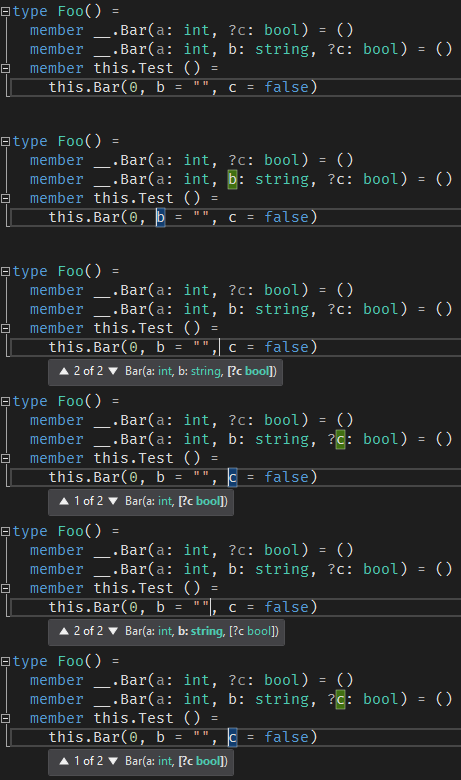
Using VS 15.8.8 and VF# nightlies.
Contributor guide
Assessment
This issue has not been assessed yet.