XML documentation in Visual Studio 2017
- Dominant language
- F#
- Stars
- 4.3k
- Forks
- 876
- Avg merge
- 4d 11h
- Merged PRs (30d)
- 131
Description
I would like to add a multi-line XML documentation that will appear in the Intelli-Sense bubble when my mouse hover over it. Please see the following post:
https://stackoverflow.com/questions/44565660/f-xml-multiline-documentation-visual-studio-2017
#### Repro steps
1. Use Visual Studio 2017.
2. Type the following code, and hover your mouse over it.

#### Expected behavior
In Visual Studio 2015, the following code works.

#### Actual behavior
In Visual Studio 2017, the following code does not work.

#### Known workarounds
According to stack overflow answers, the following code works for getting double-spacing. Is single spacing no longer supported?
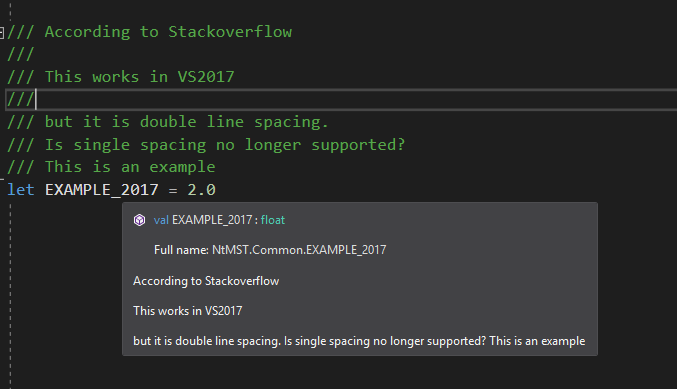
Thank you very much for your help.
Contributor guide
Assessment
This issue has not been assessed yet.