Infer.NET F# client code causes Intellisense to show "internal error: the index is outside of the legal range"
- Dominant language
- F#
- Stars
- 4.3k
- Forks
- 876
- Avg merge
- 4d 11h
- Merged PRs (30d)
- 131
Description
Using the Infer.NET library (Microsoft.ML.Probabilistic) in F# projects leads to errors in Intellisense when trying to use it on the `Variable` type. E.g. when trying to complete from `Variable.` to `Variable.Bernoulli(0.5)`.
**Repro steps**
1. Open one of those F# development environments and create a project (I tested the following environments with .NET 5 and netcoreapp31 as the workspace SDK versions)
- Visual Studio 2019
- Rider 2020.3.4
- VSCode Insiders with .NET Interactive
2. Reference the `Microsoft.ML.Probabilistic` package
3. Open the `Microsoft.ML.Probabilistic.Models` namespace
4. Try to use Intellisense for the `Variable` type (e.g. to get to the `Variable.Bernoulli()` method
This behavior is reproducible on the current main branch of the [Infer.NET repo](https://github.com/dotnet/infer). A good point to look would be the `TwoCoins.fs` file in the `TestFSharp` project.
**Expected behavior**
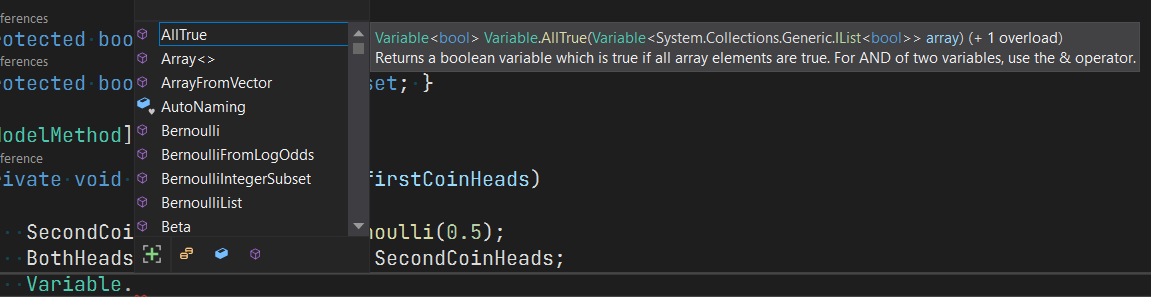
To see a tooltip like this one when trying to complete from the `Variable` type (example taken from current C# Intellisense experience).
**Actual behavior**
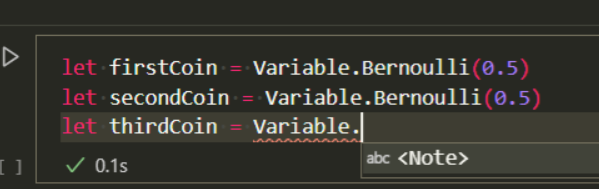
Receiving an error like this one when completing from the `Variable` type.
VS:

Rider:

.NET Interactive:
**Known workarounds**
The error doesn't cause additional errors. It could be ignored as the code still runs/compiles.
**Related information**
* Operating system: Windows 10 20H2 19042.870
* .NET Runtime kind (.NET Core, .NET Framework, Mono): NET472, NET5, netcoreapp31
* Editing Tools (e.g. Visual Studio Version, Visual Studio): Visual Studio, Visual Studio Code Insiders (.NET Interactive), Rider
Contributor guide
Assessment
This issue has not been assessed yet.