Cosmos: Selecting complex properties (object or collections mapped as "OwnsOne" and "OwnsMany") makes the query return the entire document
- Dominant language
- C#
- Stars
- 14.8k
- Forks
- 3.4k
- PR merge metrics
- PR metrics pending
Description
I'm using [Microsoft.EntityFrameworkCore.Cosmos 6.0.1](https://www.nuget.org/packages/Microsoft.EntityFrameworkCore.Cosmos/6.0.1) to perform queries against a Cosmos DB, but the problem I'm facing is that whenever I include in the `Select` any property that is either an **object** or a **collection/array** (mapped as "OwnsOne" and "OwnsMany"), instead of querying only the selected properties, it actually selects the entire document for EF to be able to select the complex/collection property.
# Code sample
## Entities
```csharp
public record Litigation
{
public string Id { get; set; }
public string IdentifierNumber { get; set; }
public GenericEntity City { get; set; }
public List Subjects { get; set; }
}
public record GenericEntity
{
public int Id { get; set; }
public string Name { get; set; }
}
```
## Entity type configuration
> Note: There might be probably a way to avoid using `ToJsonProperty` for each Cosmos camelCase property (maybe using serialized options), but I'm not worried about that for now.
```csharp
public class LitigationTypeConfiguration : IEntityTypeConfiguration
{
public void Configure(EntityTypeBuilder builder)
{
builder.ToContainer(CosmosConstants.LitigationContainerName)
.HasPartitionKey(l => l.TenantId)
.HasNoDiscriminator();
builder.Property(t => t.Id).ToJsonProperty("id").IsRequired();
builder.Property(t => t.IdentifierNumber).ToJsonProperty("identifierNumber");
builder.OwnsOne(t => t.City,
o =>
{
o.ToJsonProperty("city");
o.Property(p => p.Id).ToJsonProperty("id");
o.Property(p => p.Name).ToJsonProperty("name");
});
builder.OwnsMany(t => t.Subjects,
o =>
{
o.ToJsonProperty("subjects");
o.Property(p => p.Id).ToJsonProperty("id");
o.Property(p => p.Name).ToJsonProperty("name");
});
}
}
```
## Queries sample and Results
### Query sample 1) Selecting only simple properties
#### Query sample:
```csharp
var test = _context.Litigations
.Where(l => l.Id == id)
.WithPartitionKey("MyPartitionKey")
.AsNoTracking()
.Select(l => new
{
l.Id,
l.IdentifierNumber,
}).ToList();
```
#### Result:
Note that only the `c["id"]` and `c["identifierNumber"]` were selected, as expected.

### Query sample 2) Selecting a complex object property (city)
#### Query sample:
```csharp
var test = _context.Litigations
.Where(l => l.Id == id)
.WithPartitionKey("MyPartitionKey")
.AsNoTracking()
.Select(l => new
{
l.Id,
l.IdentifierNumber,
l.City // <-------------
}).ToList();
```
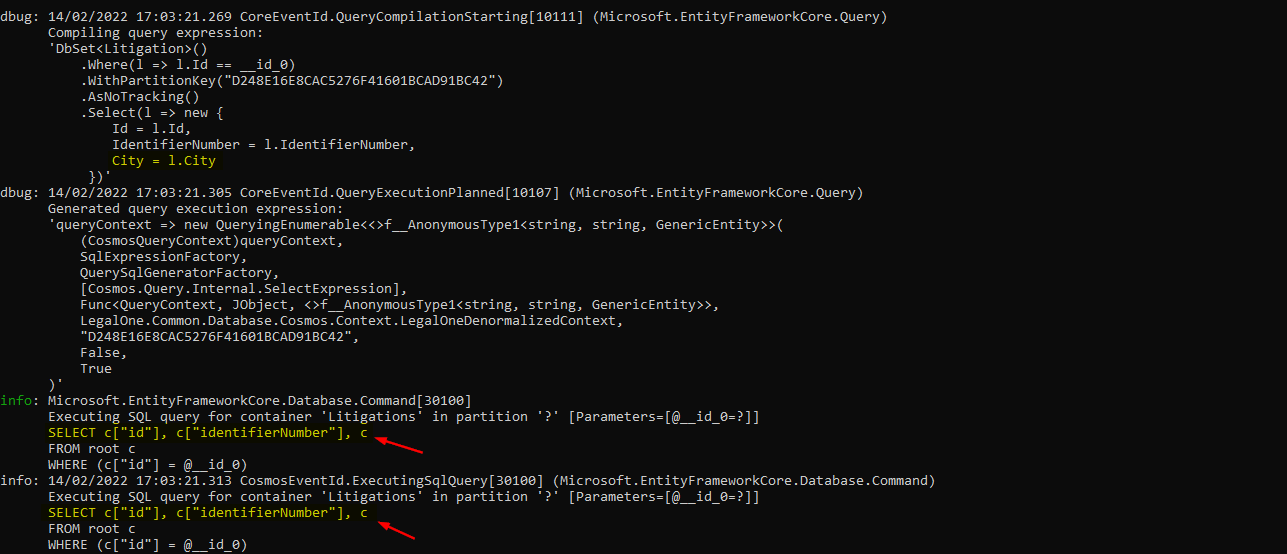
#### Result:
In this case, **the entire document is being selected** (represented in the result as `c`), which shouldn't happen. If I copy and past this query on Azure Portal Cosmos Data Explorer, I can see it is indeed returning the entire document:
### Query sample 3) Selecting a collection/array property (subjects)
#### Query sample:
```csharp
var test = _context.Litigations
.Where(l => l.Id == id)
.WithPartitionKey("MyPartitionKey")
.AsNoTracking()
.Select(l => new
{
l.Id,
l.IdentifierNumber,
l.Subjects // <-------------
}).ToList();
```
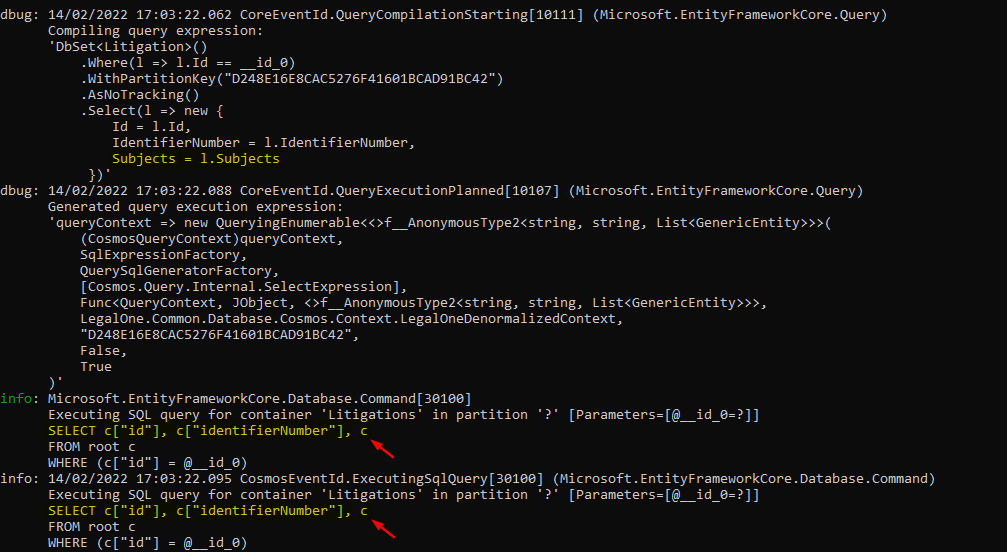
#### Result:
The same behavior happening when selecting a complex object is also happening with a collection property:
### Provider and version information
EF Core version: 6.0.1
Database provider: Microsoft.EntityFrameworkCore.Cosmos 6.0.1
Target framework: .NET 6.0
Operating system: Windows
IDE: Visual Studio Professional 2022
Contributor guide
Assessment
This issue has not been assessed yet.