dotnet / dotnet/dotnet-api-docs
Form.Size should explain deviations because of OS theme
- Dominant language
- C#
- Stars
- 949
- Forks
- 1.7k
- Avg merge
- 3d 27m
- Merged PRs (30d)
- 49
Description
Docs for `Form.Size` have the following statement (emphasis mine).
"This property allows you to set both the height and width (**in pixels**) of the form"
https://github.com/dotnet/dotnet-api-docs/blob/01926044059a08ca27e73042b7e9eaee551bceaf/xml/System.Windows.Forms/Form.xml#L7102
This isn't always true: depending on OS theme, the size of the form in pixels you actually see is smaller.
This is an important information when the form should cover specific area.
This is how a form with Size = (200, 200) looks like when the app is running (in background is the Visual Studio designer window with the same form open).
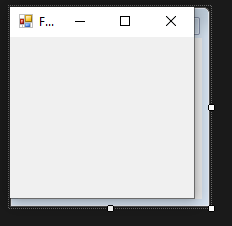
Measured size is about (186, 192).
I think the documentation should mention this, and also explain how to calculate the visible size from the property.
Contributor guide
Assessment
This issue has not been assessed yet.