dotnet / dotnet/dotnet-api-docs
Separator style in a menu described incorrectly
- Dominant language
- C#
- Stars
- 949
- Forks
- 1.7k
- Avg merge
- 3d 27m
- Merged PRs (30d)
- 49
Description
https://github.com/dotnet/dotnet-api-docs/blob/main/xml/System.Windows.Controls/Separator.xml
> Separator controls inside Menu elements appear differently from Separator controls outside a Menu. When you create a Menu with a Separator, the control automatically applies the Style identified by the MenuItem.SeparatorStyleKey property. Styles are placed in resource dictionaries and are searched for by their keys. To change the Style of a Separator inside a Menu, you must use the MenuItem.SeparatorStyleKey property to create your new Style.
Note that it is possible to provide a style directly. Notice that although present the MenuItem.SeparatorStyleKey style is not applied.
```
<Setter Property="OverridesDefaultStyle" Value="true" />
<Setter Property="Template">
<Setter.Value>
<ControlTemplate TargetType="{x:Type Separator}">
<Border Width="30" Height="4" Margin="4" Background="Green"/>
</ControlTemplate>
</Setter.Value>
</Setter>
<Setter Property="Background"
Value="Red"/>
```
Also when the style is not set directly, the style from MenuItem.SeparatorStyleKey is not applied when using the xaml in the linked https://docs.microsoft.com/en-us/dotnet/api/system.windows.controls.menuitem.separatorstylekey?view=net-5.0.
This should be corrected to use BasedOn as I have done above.
You can see why the documentation is incorrect
https://referencesource.microsoft.com/#PresentationFramework/src/Framework/System/Windows/Controls/MenuItem.cs,1336
or
https://github.com/dotnet/wpf/blob/f879e0bed3867a83a31cc3e00509ee4bb8f9fb6a/src/Microsoft.DotNet.Wpf/src/PresentationFramework/System/Windows/Controls/MenuItem.cs#L1327
```
Separator separator = item as Separator;
if (separator != null)
{
bool hasModifiers;
BaseValueSourceInternal vs = separator.GetValueSource(StyleProperty, null, out hasModifiers);
if (vs <= BaseValueSourceInternal.ImplicitReference)
separator.SetResourceReference(StyleProperty, SeparatorStyleKey);
separator.DefaultStyleKey = SeparatorStyleKey;
}
```
Although above is BaseValueSourceInternal
https://docs.microsoft.com/en-us/dotnet/api/system.windows.basevaluesource?view=net-5.0
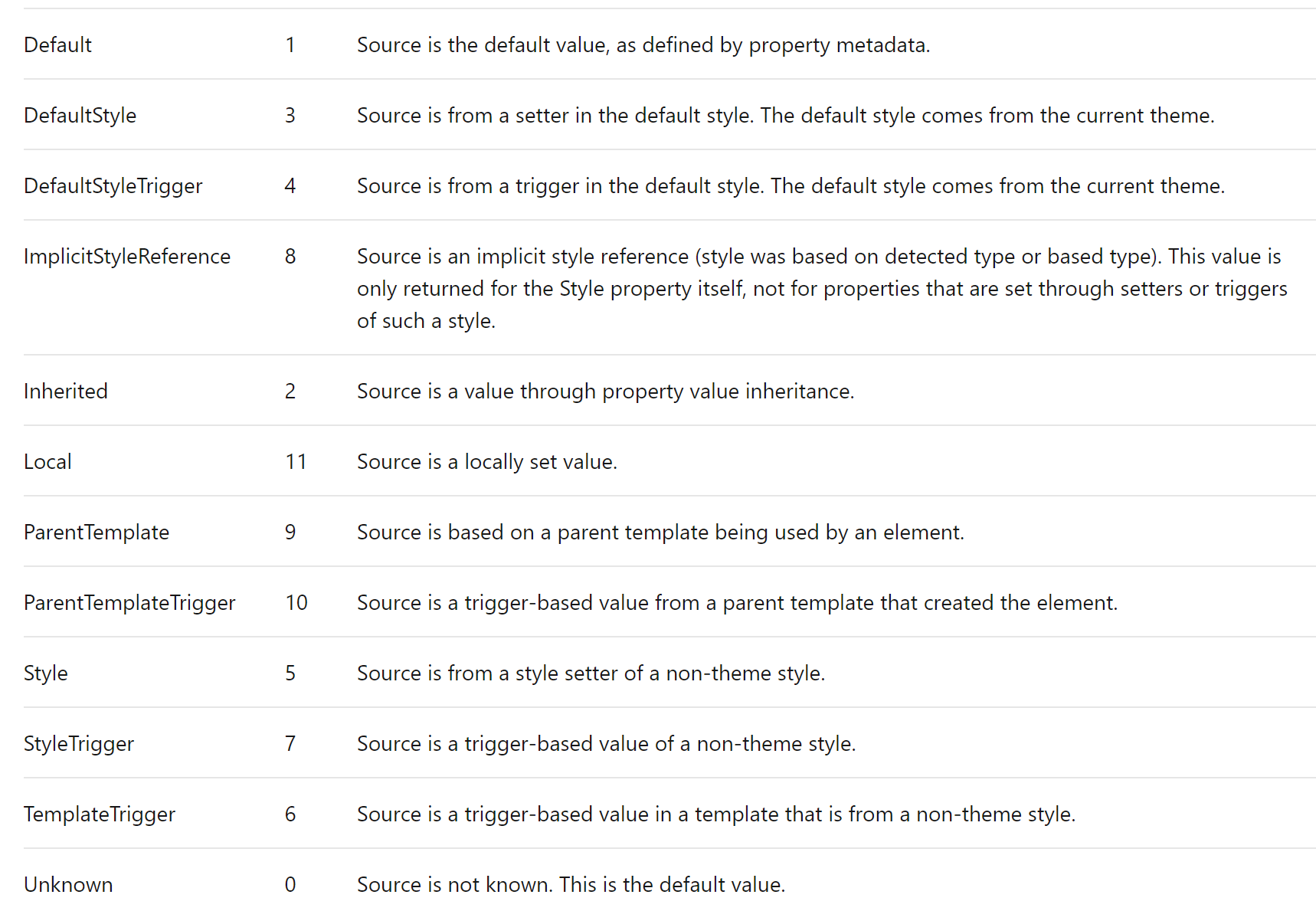
For a Separator with no style set the BaseValueSource is Default
For a Separator with style set the BaseValueSource is Local ( 11 > 8 )
I suggest that the docs to be changed to
Separator controls inside Menu elements have different behaviour with respect to styles from Separator controls outside a Menu. When you create a Menu with a Separator, the default style is changed to the Style identified by the MenuItem.SeparatorStyleKey property. Styles are placed in resource dictionaries and are searched for by their keys. To change the Style of a Separator inside a Menu, either provide a Style directly to each Separator or to style all Separator you must use the MenuItem.SeparatorStyleKey property to create your new Style.
Contributor guide
Assessment
This issue has not been assessed yet.