How to Trust certificates when publishing for other users?
- Dominant language
- No language data
- Stars
- 282
- Forks
- 265
- Avg merge
- 2d 2h
- Merged PRs (30d)
- 19
Description
The guide is excellent, but doesn't cover some details concerning how to "Trust" a created certificate.
When I follow your guide and choose "Create..." to ceate a new temporary self-signed certificate for testing. Then after filling out the details:

I get the option to "Trust" the newly generated certificate:
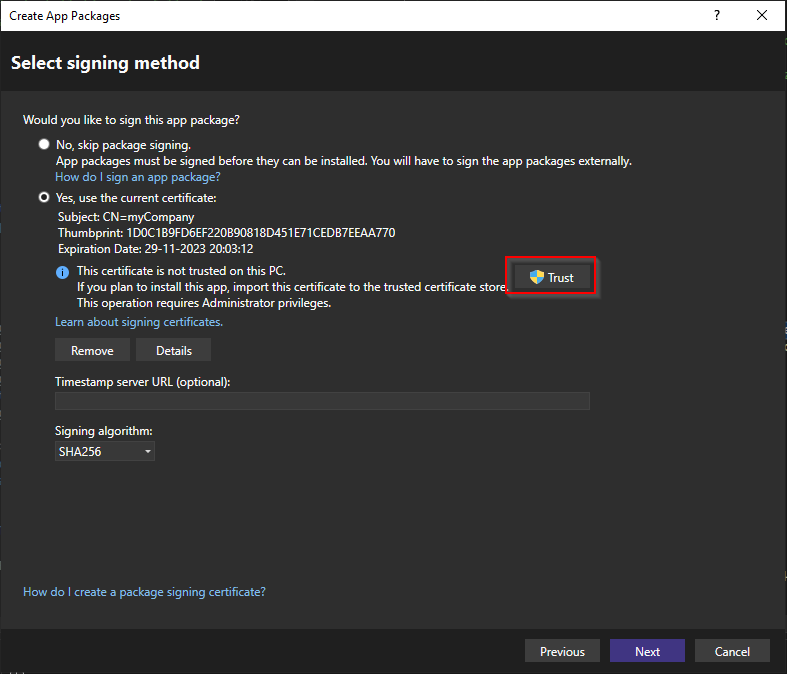
Now; if I press "Trust" and finish the Wizzard, the App is published and I can choose to install from the generated MSIX file.
But if I ask my colleague to try an install the app on his PC, then the install is not allowed because the certificate are not trusted on his PC.
If we install the certificate in the "Trusted Root Certification Authorities", then we are still not able to install the app.
I get the same result if I choose not to trust the certificate and try to install the app on my own PC.
I need to test the app on other PC's. So, how do I manually "Trust" the certificate on other PC's?
BTW. The

button doesn't work properly on my PC. When I press it the code will be generated and put into the "..\bin\Debug\net6.0-windows10.0.19041.0\win10-x64\AppPackages" folder, but the content are not being copied to the "Installer location"
---
#### Document Details
⚠ *Do not edit this section. It is required for learn.microsoft.com ➟ GitHub issue linking.*
* ID: a9a8421b-ca5d-96e3-35ab-60118e356017
* Version Independent ID: a9a8421b-ca5d-96e3-35ab-60118e356017
* Content: [Publish a .NET MAUI app to a folder for Windows - .NET MAUI](https://learn.microsoft.com/en-us/dotnet/maui/windows/deployment/publish-visual-studio-folder?view=net-maui-7.0)
* Content Source: [docs/windows/deployment/publish-visual-studio-folder.md](https://github.com/dotnet/docs-maui/blob/main/docs/windows/deployment/publish-visual-studio-folder.md)
* Product: **dotnet-mobile**
* Technology: **dotnet-maui**
* GitHub Login: @davidbritch
* Microsoft Alias: **dabritch**
Contributor guide
Assessment
This issue has not been assessed yet.