[Bug] Filter rules ignored after update to .NET 7
- Dominant language
- C#
- Stars
- 4.4k
- Forks
- 890
- Avg merge
- 2h 11m
- Merged PRs (30d)
- 10
Description
**Describe the bug**
Custom `filterConfig.yml` is not working after our projects were updated to .NET 7.
**To Reproduce**
Steps to reproduce the behavior:
1. Use DocFx on a C# project which targets .NET 7
2. Have a custom filter enabled
```yaml
"metadata": [
{
...
"filter": "filterConfig.yml"
....
}
],
```
**Expected behavior**
Custom filter works.
**Context:**
- OS: Windows 10
- Docfx version: 2.59.4
- .NET version: .NET 7.0
- `docfx.json` config
```json
{
"metadata": [
{
"src": [
{
"files": [
"**.csproj"
],
"src": "../MyProjectFolder"
}
],
"dest": "api",
"disableGitFeatures": false,
"disableDefaultFilter": false,
"filter": "filterConfig.yml"
}
],
"build": {
"content": [
{
"files": [
"api/**.yml",
"api/index.md",
"api/**.md"
]
},
{
"files": [
"articles/**.md",
"articles/**/toc.yml",
"toc.yml",
"*.md"
]
}
],
"resource": [
{
"files": [
"images/**",
"api/extra/*.jpeg",
"api/extra/*.png",
"api/extra/*.gif",
"api/extra/*.jpg"
]
}
],
"overwrite": [
{
"files": [
"apidoc/**.md"
],
"exclude": [
"obj/**",
"_site/**"
]
}
],
"dest": "_site",
"globalMetadataFiles": [],
"fileMetadataFiles": [],
"template": [
"default",
"templates/darkfx"
],
"postProcessors": [ "ExtractSearchIndex" ],
"globalMetadata": {
"_enableSearch": "true"
},
"markdownEngineName": "markdig",
"noLangKeyword": false,
"keepFileLink": false,
"cleanupCacheHistory": false,
"disableGitFeatures": false
}
}
```
- .NET info
```csharp
.NET SDK:
Version: 7.0.101
Commit: bb24aafa11
Runtime Environment:
OS Name: Windows
OS Version: 10.0.19044
OS Platform: Windows
RID: win10-x64
Base Path: C:\Program Files\dotnet\sdk\7.0.101\
Host:
Version: 7.0.1
Architecture: x64
Commit: 97203d38ba
.NET SDKs installed:
2.1.818 [C:\Program Files\dotnet\sdk]
3.1.426 [C:\Program Files\dotnet\sdk]
6.0.301 [C:\Program Files\dotnet\sdk]
6.0.307 [C:\Program Files\dotnet\sdk]
7.0.101 [C:\Program Files\dotnet\sdk]
.NET runtimes installed:
Microsoft.AspNetCore.All 2.1.30 [C:\Program Files\dotnet\shared\Microsoft.AspNetCore.All]
Microsoft.AspNetCore.App 2.1.30 [C:\Program Files\dotnet\shared\Microsoft.AspNetCore.App]
Microsoft.AspNetCore.App 3.1.26 [C:\Program Files\dotnet\shared\Microsoft.AspNetCore.App]
Microsoft.AspNetCore.App 3.1.32 [C:\Program Files\dotnet\shared\Microsoft.AspNetCore.App]
Microsoft.AspNetCore.App 5.0.17 [C:\Program Files\dotnet\shared\Microsoft.AspNetCore.App]
Microsoft.AspNetCore.App 6.0.6 [C:\Program Files\dotnet\shared\Microsoft.AspNetCore.App]
Microsoft.AspNetCore.App 6.0.12 [C:\Program Files\dotnet\shared\Microsoft.AspNetCore.App]
Microsoft.AspNetCore.App 7.0.1 [C:\Program Files\dotnet\shared\Microsoft.AspNetCore.App]
Microsoft.NETCore.App 2.0.9 [C:\Program Files\dotnet\shared\Microsoft.NETCore.App]
Microsoft.NETCore.App 2.1.30 [C:\Program Files\dotnet\shared\Microsoft.NETCore.App]
Microsoft.NETCore.App 3.1.26 [C:\Program Files\dotnet\shared\Microsoft.NETCore.App]
Microsoft.NETCore.App 3.1.32 [C:\Program Files\dotnet\shared\Microsoft.NETCore.App]
Microsoft.NETCore.App 5.0.17 [C:\Program Files\dotnet\shared\Microsoft.NETCore.App]
Microsoft.NETCore.App 6.0.6 [C:\Program Files\dotnet\shared\Microsoft.NETCore.App]
Microsoft.NETCore.App 6.0.12 [C:\Program Files\dotnet\shared\Microsoft.NETCore.App]
Microsoft.NETCore.App 7.0.1 [C:\Program Files\dotnet\shared\Microsoft.NETCore.App]
Microsoft.WindowsDesktop.App 3.1.26 [C:\Program Files\dotnet\shared\Microsoft.WindowsDesktop.App]
Microsoft.WindowsDesktop.App 3.1.32 [C:\Program Files\dotnet\shared\Microsoft.WindowsDesktop.App]
Microsoft.WindowsDesktop.App 5.0.17 [C:\Program Files\dotnet\shared\Microsoft.WindowsDesktop.App]
Microsoft.WindowsDesktop.App 6.0.6 [C:\Program Files\dotnet\shared\Microsoft.WindowsDesktop.App]
Microsoft.WindowsDesktop.App 6.0.12 [C:\Program Files\dotnet\shared\Microsoft.WindowsDesktop.App]
Microsoft.WindowsDesktop.App 7.0.1 [C:\Program Files\dotnet\shared\Microsoft.WindowsDesktop.App]
Other architectures found:
x86 [C:\Program Files (x86)\dotnet]
registered at [HKLM\SOFTWARE\dotnet\Setup\InstalledVersions\x86\InstallLocation]
```
**Additional context**
We have a custom `filterConfig.yml`
```yaml
apiRules:
- exclude:
uidRegex: ^System\.Object
type: Type
attributeRules:
- include:
uidRegex: ^System\.Xml\.Serialization
type: Namespace
```
to exclude any `System.Object` inheritance
and to include attributes like `XmlElement` or `XmlAttribute`.
**Now, after we updated our projects to .NET 7, the filter is not working anymore. DocFx generates all `System.Object` stuff and XML attributes are ignored. Just like if the custom filter is not there.** When projects were targeting .NET 6 everything was working.
I've tried to debug DocFx to at least get a hint of what is going on.
I've set a breakpoint in `SymbolVisitorAdapter.cs` - `GetAttributeInfo(ImmutableArray attributes)`
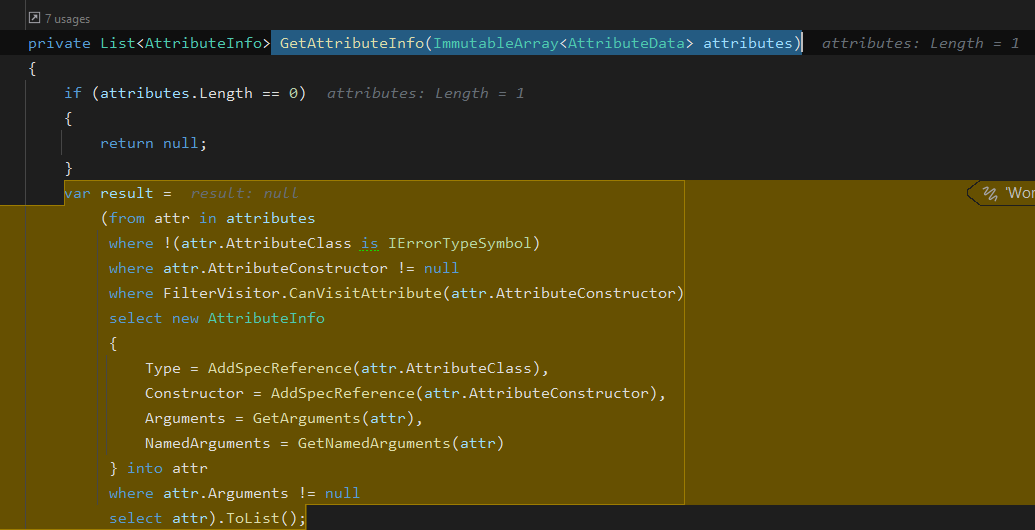
and here the `AttributeClass` is of type `ErrorType` with the message:

thus it does not even evaluate filters.
Now, I tried to adjust `docfx.json` to use `.dll` instead of `.csproj` but it doesn't help. (Although the error changes a bit)
```yaml
{
"metadata": [
{
"src": [
{
"files": [
"MyProject.dll"
],
"src": "../MyProject/bin/Debug/net7.0"
}
],
...
```

**Is there a way to work around this, or do we have to wait until DocFx supports .NET 7?**
Contributor guide
Assessment
This issue has not been assessed yet.