Searched word remains marked when search field is cleared
- Dominant language
- C#
- Stars
- 4.4k
- Forks
- 890
- Avg merge
- 2h 11m
- Merged PRs (30d)
- 10
Description
**Operating System**: Windows
**DocFX Version Used**: 2.59.4
**Template used**: default
**Steps to Reproduce**:
1. Search a word in DocFX.

2. Click into an article from search results.
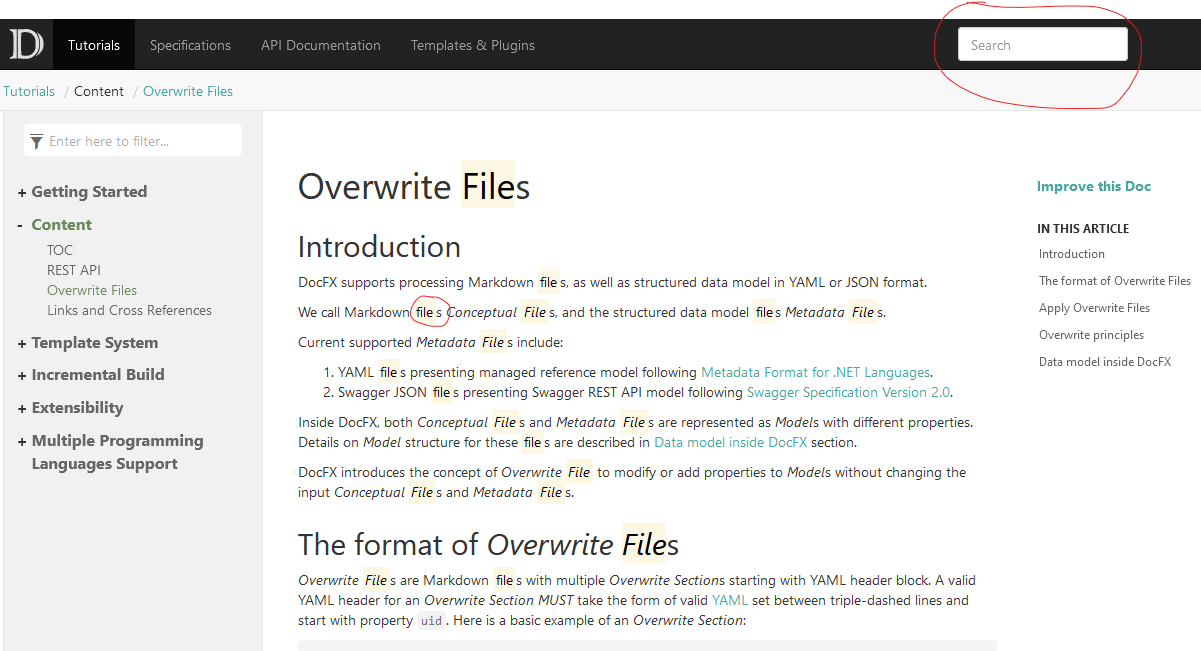
**Expected Behavior**:
Searched word should have default background when search field is cleared. No additional space should be added before or after the searched word.
**Actual Behavior**:
Searched work remains marked when clicking into an article and search field is cleared and a space is added around the searched word. I.e, when I search for "file" as in the example, the word "files" in the article becomes "file s"
Contributor guide
Assessment
This issue has not been assessed yet.