Global [VB Defaults] settings won't be applied to newly created VB.Net [.Net Core 3] console applications
- Dominant language
- PowerShell
- Stars
- 22k
- Forks
- 4.9k
- Avg merge
- 5d 5h
- Merged PRs (30d)
- 29
Description
It looks like [VB Defaults] project settings from Visual Studio 2019 (ver 16.3.6) isn't applied to newly created .Net Core 3 VB.Net console applications.
Expected results: whenever [VB Defaults] is changed, these new settings will be applied to every newly created VB console project using .Net Core 3.
Actual results: After changing VB Defaults settings and trying to create a new VB Console application, it won't inherit the new global settings from [VB Defaults].
Steps to reproduce:
1. Update VS 2019 to the latest version: 16.3.6 ( .NET Core 3.0 SDK is installed automatically -
version below)
2. Create a Console App (.Net Core) (Visual Basic) from Visual Studio:
3. Go to Tools > Options > Projects and Solutions > VB Defaults:
- Set the following values:
Option Strict On
Option Explicit On
Option Infer Off
- Ok to close. Save All changes
4. Create a new Console App (.Net Core) (Visual Basic) and open it. Then, create an Integer variable and assign the string value "2" to it
5. Check VB Default settings again

Notice in the screenshot above that the Option Strict On option was not applied to the project - implicit conversion from String to Integer is Enabled - showing that Option Strict is still Off.
However, when trying to create a new Project/Solution using .Net Framework 4.7.2, everything works normally:
7. Create a new Console App (.Net Framework 4.7.2) (Visual Basic)
8. Check VB Defaults settings
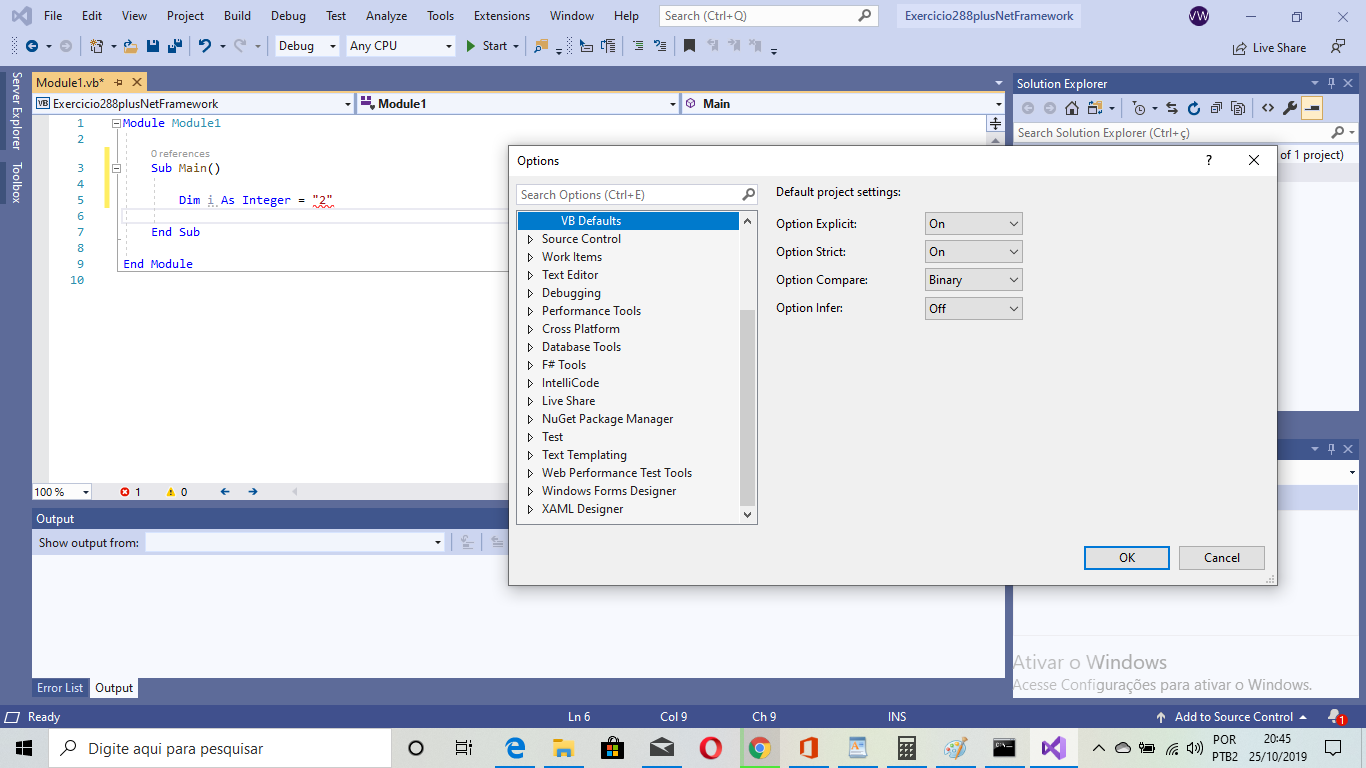
Notice the VS returns an error message after I assign the string "2" to an Integer variable, showing that the Option Strict On from "VB Defaults" project settings were really applied to the .Net Framework 4.7.2 VB console solution.
> $ dotnet --info
> SDK do .NET Core (reflecting any global.json)::
> Version: 3.0.100
> Commit: 04339c3a26
>
> Ambiente de runtime:
> OS Name: Windows
> OS Version: 10.0.18362
> OS Platform: Windows
> RID: win10-x64
> Base Path: C:\Program Files\dotnet\sdk\3.0.100\
>
> Host (useful for support):
> Version: 3.0.0
> Commit: 7d57652f33
>
> .NET Core SDKs installed:
> 3.0.100 [C:\Program Files\dotnet\sdk]
>
> .NET Core runtimes installed:
> Microsoft.AspNetCore.All 2.1.13 [C:\Program Files\dotnet\shared\Microsoft.AspNetCore.All]
> Microsoft.AspNetCore.App 2.1.13 [C:\Program Files\dotnet\shared\Microsoft.AspNetCore.App]
> Microsoft.AspNetCore.App 3.0.0 [C:\Program Files\dotnet\shared\Microsoft.AspNetCore.App]
> Microsoft.NETCore.App 2.1.13 [C:\Program Files\dotnet\shared\Microsoft.NETCore.App]
> Microsoft.NETCore.App 3.0.0 [C:\Program Files\dotnet\shared\Microsoft.NETCore.App]
> Microsoft.WindowsDesktop.App 3.0.0 [C:\Program Files\dotnet\shared\Microsoft.WindowsDesktop.App]
Contributor guide
Assessment
This issue has not been assessed yet.