Not all attributes are detected when using ModelMetadataType
- Dominant language
- C#
- Stars
- 38.4k
- Forks
- 10.9k
- Avg merge
- 2d 6h
- Merged PRs (30d)
- 290
Description
### Describe the bug
Some attributes decorating properties are not applied when using ModelMetadataType to apply attributes. A couple examples are `RequiredAttribute` and `JsonIgnore` and `MaxLength`.
When applied directly to a contract class, they work, but when applied to properties of a metadata class, some do (`DefaultValue`) and some don't.
### Business need
The reason this is needed is when using a WCF connected service with an auto-generated contract class, attributes and changes do not persist when refreshing/updating the WCF service as the entire contract is regenerated.
In order to retain basic contract changes (hide/show/require) properties, we create a metadata class so that the WCF classes can be updated/regenerated without adding all of the needed attributes back.
### To Reproduce
Create a basic ASP.Net Core 5 project with Swagger UI and create a class with the below code that contains the controller/contract/metadata.
```
using System.Net.Mime;
using Microsoft.AspNetCore.Mvc;
using System.ComponentModel.DataAnnotations;
using System.ComponentModel;
using System.Text.Json.Serialization;
namespace SwaggerAttribBugPOC
{
[Route("api/[controller]")]
[ApiController]
public class SampleController : ControllerBase
{
[HttpGet, Route("SampleEndpoint"), Produces(MediaTypeNames.Application.Json)]
public SampleGeneratedContract SampleEndpoint([FromQuery] SampleGeneratedContract contract)
{
return contract;
}
}
[ModelMetadataType(typeof(SampleGeneratedContractMetadata))]
public partial class SampleGeneratedContract
{
private string property1;
private string property2;
private string property3;
/// Commented out attributes work, but when moved to SampleGeneratedContractMetadata
/// [Required] and [JsonIgnore] do not, but [DefaultValue] does?
// [Required]
public string Property1 { get { return this.property1; } set { this.property1 = value; } }
// [Required]
// [DefaultValue("ABC")]
public string Property2 { get { return this.property2; } set { this.property2 = value; } }
// [JsonIgnore]
public string Property3 { get { return this.property3; } set { this.property3 = value; } }
}
public class SampleGeneratedContractMetadata
{
[Required] // Does NOT work
public string Property1;
[Required] // Does NOT work
[DefaultValue("ABC")] // DOES WORK
public string Property2;
[JsonIgnore] // Does NOT work
public string Property3;
}
}
```
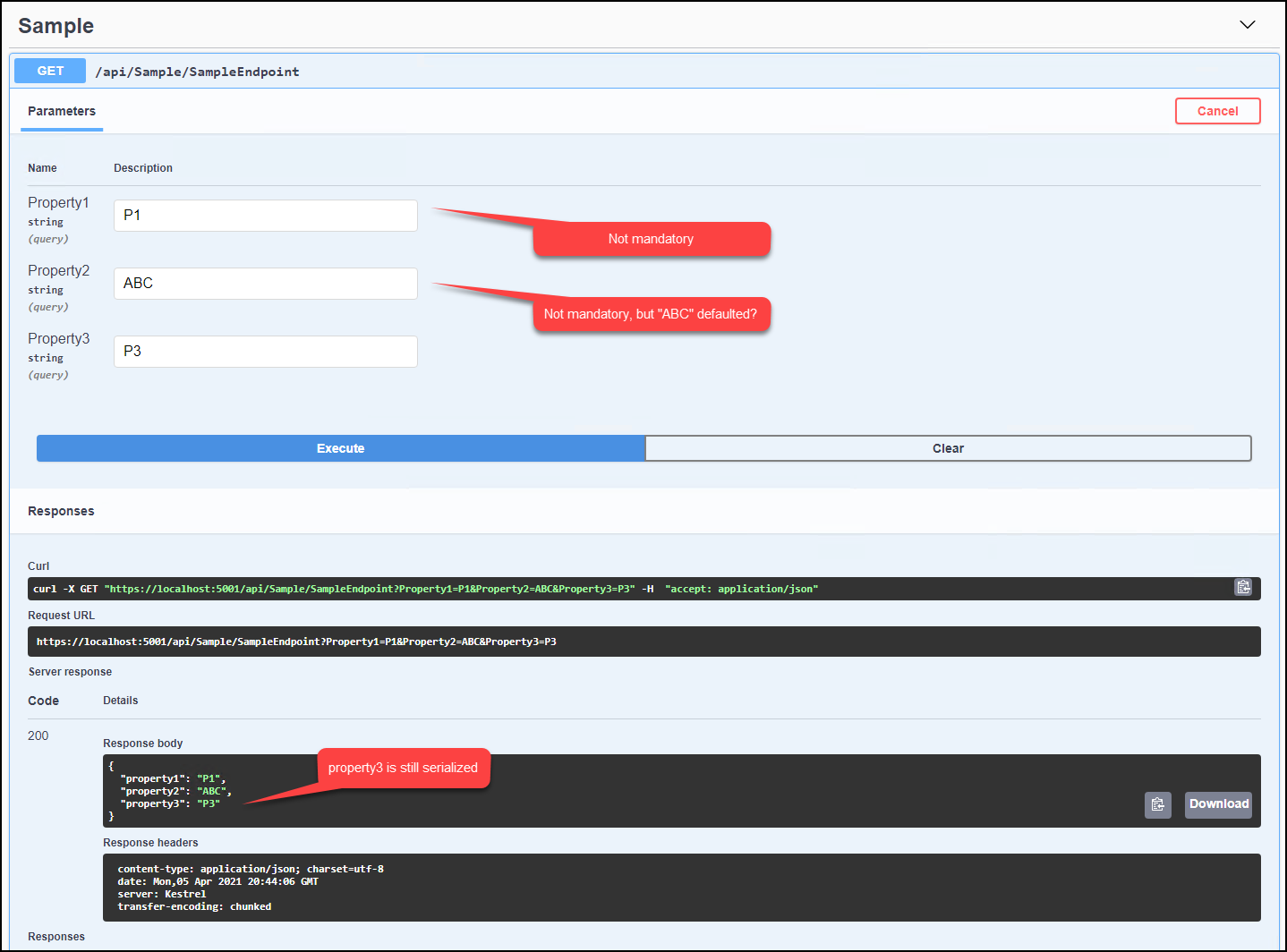
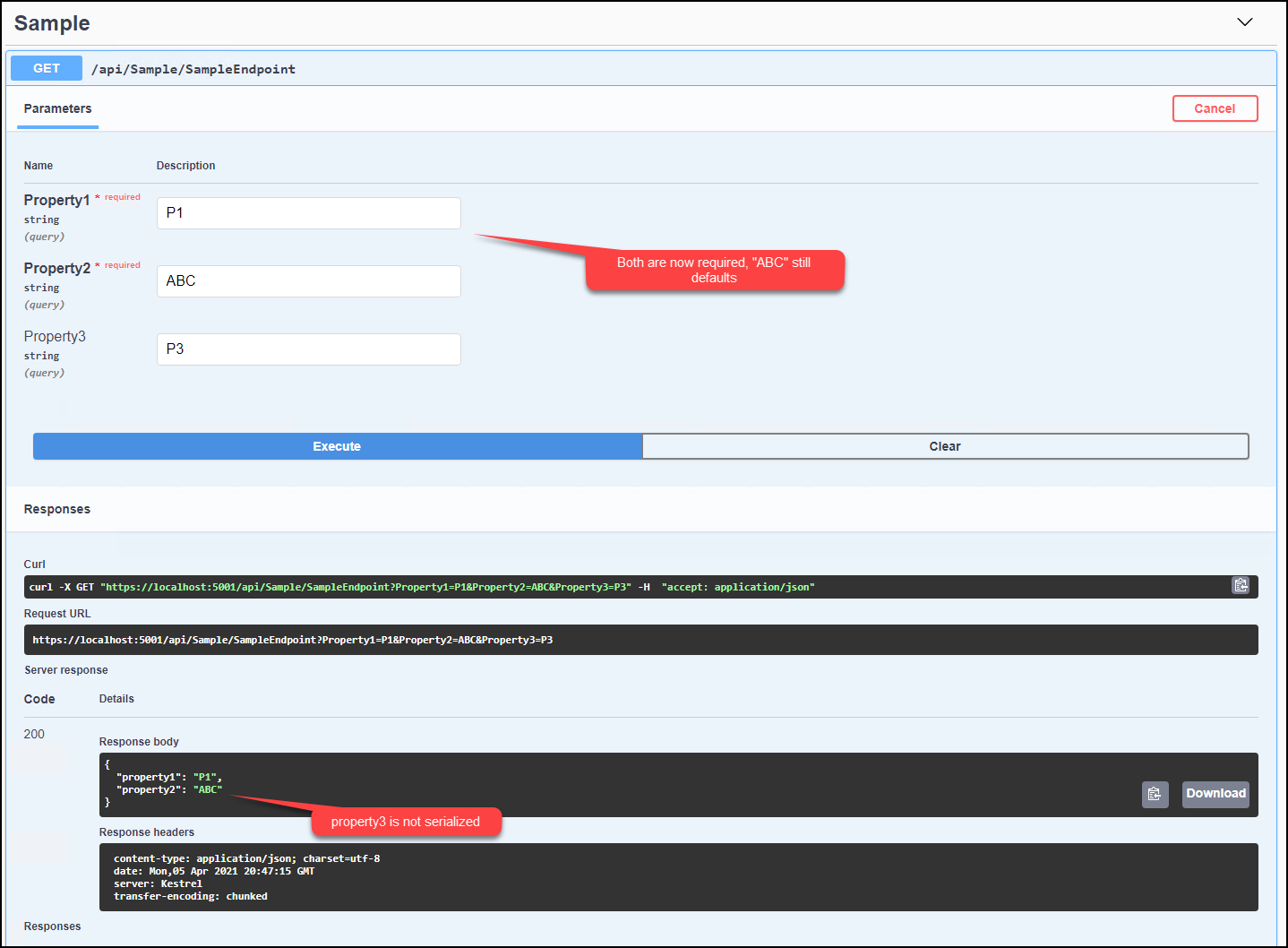
Uncomment the contract attributes and comment out the metadata content (as below) and now Property1/Property2 are mandatory and Property3 is not serialized.
```
[ModelMetadataType(typeof(SampleGeneratedContractMetadata))]
public partial class SampleGeneratedContract
{
private string property1;
private string property2;
private string property3;
/// Commented out attributes work, but when moved to SampleGeneratedContractMetadata
/// [Required] and [JsonIgnore] do not, but [DefaultValue] does?
[Required]
public string Property1 { get { return this.property1; } set { this.property1 = value; } }
[Required]
[DefaultValue("ABC")]
public string Property2 { get { return this.property2; } set { this.property2 = value; } }
[JsonIgnore]
public string Property3 { get { return this.property3; } set { this.property3 = value; } }
}
public class SampleGeneratedContractMetadata
{
/*
[Required] // Does NOT work
public string Property1;
[Required] // Does NOT work
[DefaultValue("ABC")] // DOES WORK
public string Property2;
[JsonIgnore] // Does NOT work
public string Property3;
*/
}
```
### Further technical details
- ASP.NET Core - `Core 5`
- Include the output of `dotnet --info`
```
.NET SDK (reflecting any global.json):
Version: 5.0.103
Commit: 72dec52dbd
Runtime Environment:
OS Name: Windows
OS Version: 6.3.9600
OS Platform: Windows
RID: win81-x64
Base Path: C:\Program Files\dotnet\sdk\5.0.103\
Host (useful for support):
Version: 5.0.3
Commit: c636bbdc8a
.NET SDKs installed:
5.0.103 [C:\Program Files\dotnet\sdk]
.NET runtimes installed:
Microsoft.AspNetCore.All 2.1.25 [C:\Program Files\dotnet\shared\Microsoft.AspN
etCore.All]
Microsoft.AspNetCore.App 2.1.25 [C:\Program Files\dotnet\shared\Microsoft.AspN
etCore.App]
Microsoft.AspNetCore.App 3.1.12 [C:\Program Files\dotnet\shared\Microsoft.AspN
etCore.App]
Microsoft.AspNetCore.App 5.0.3 [C:\Program Files\dotnet\shared\Microsoft.AspNe
tCore.App]
Microsoft.NETCore.App 2.1.25 [C:\Program Files\dotnet\shared\Microsoft.NETCore
.App]
Microsoft.NETCore.App 3.1.12 [C:\Program Files\dotnet\shared\Microsoft.NETCore
.App]
Microsoft.NETCore.App 5.0.3 [C:\Program Files\dotnet\shared\Microsoft.NETCore.
App]
Microsoft.WindowsDesktop.App 3.1.12 [C:\Program Files\dotnet\shared\Microsoft.
WindowsDesktop.App]
Microsoft.WindowsDesktop.App 5.0.3 [C:\Program Files\dotnet\shared\Microsoft.W
indowsDesktop.App]
```
- The IDE (VS / VS Code/ VS4Mac) you're running on, and its version - Microsoft Visual Studio Professional 2019
Version 16.8.5
Contributor guide
Assessment
This issue has not been assessed yet.