AspNetCoreModule_x64 install failure: InstallValidate. Return value 3.
- Dominant language
- C#
- Stars
- 38.4k
- Forks
- 10.9k
- Avg merge
- 2d 6h
- Merged PRs (30d)
- 290
Description
### Describe the bug
Installation of dotnet-hosting-2.2.0-win.exe's AspNetCoreModule_x64 install fails with error message: InstallValidate. Return value 3.
### To Reproduce
I'm not 100% sure, I haven't been able to narrow down the condition. The installer woks on most of our servers, but on two servers it doesn't.
Servers:
Windows 2012 R2 Standard Version 6.3 (Build 9600)
IIS Version 8.5.9600.16384
ARR 3.0.1750
(Screenshots & systeminfo below)
1. Using Installer dotnet-hosting-2.2.0-win.exe

2. Run the installer from the GUI or by command line and this is the resulting error:
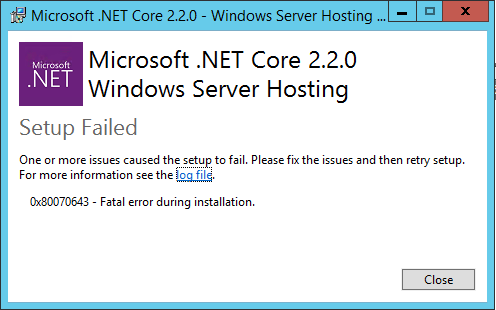
When running from the command line, the installation fails during the first installation dotnet-hosting-2.2.0-win.exe-install_000_AspNetCoreModule_x64.log:
[dotnet-hosting-2.2.0-win.exe-install_000_AspNetCoreModule_x64.log](https://github.com/aspnet/AspNetCore/files/3250582/dotnet-hosting-2.2.0-win.exe-install_000_AspNetCoreModule_x64.log)
And, dotnet-hosting-2.2.0-win.exe-install.log:
[dotnet-hosting-2.2.0-win.exe-install.log](https://github.com/aspnet/AspNetCore/files/3250584/dotnet-hosting-2.2.0-win.exe-install.log)
This is a screenshot of appwiz.cpl (I figure the logs might have more information):
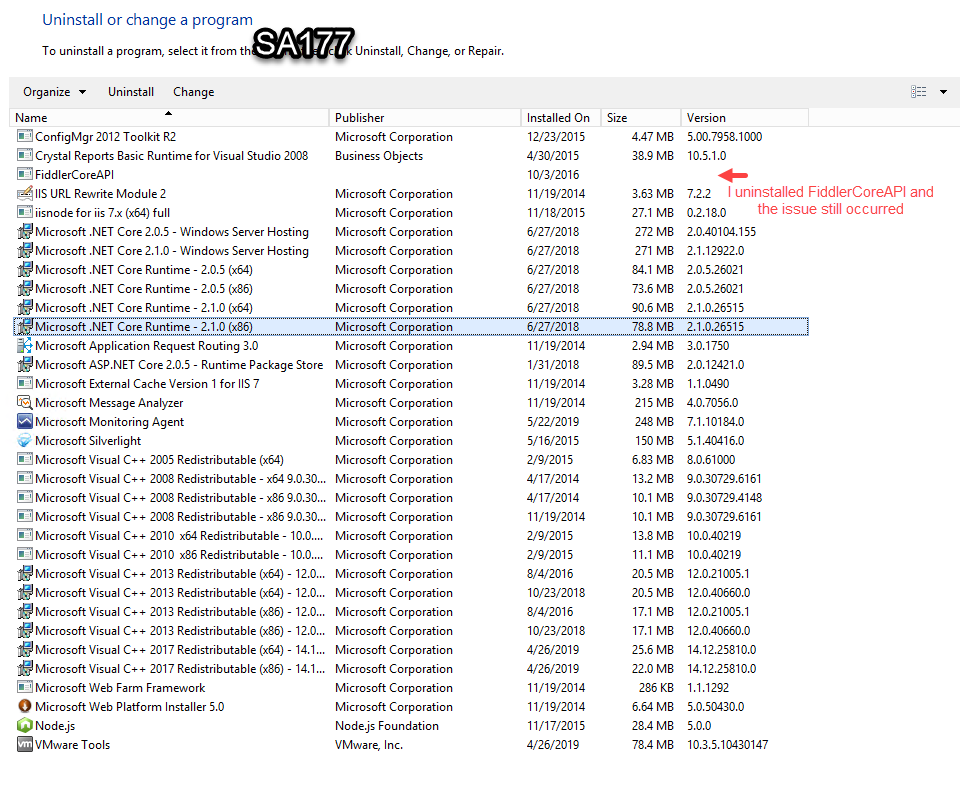
systeminfo:
[systeminfo.txt](https://github.com/aspnet/AspNetCore/files/3250624/systeminfo.txt)
### Expected behavior
I expected the installation to complete successfully. Here are logs from another server that "should" have the same configuration as the first server. So far, the only difference between the two that I could _see_ was the installation of FiddlerCoreAPI.
dotnet-hosting-2.2.0-win.exe-install.log:
[dotnet-hosting-2.2.0-win.exe-install.log](https://github.com/aspnet/AspNetCore/files/3250597/dotnet-hosting-2.2.0-win.exe-install.log)
dotnet-hosting-2.2.0-win.exe-install_000_AspNetCoreModule_x64.log:
[dotnet-hosting-2.2.0-win.exe-install_000_AspNetCoreModule_x64.log](https://github.com/aspnet/AspNetCore/files/3250599/dotnet-hosting-2.2.0-win.exe-install_000_AspNetCoreModule_x64.log)
dotnet-hosting-2.2.0-win.exe-install_000_AspNetCoreModuleV2_x64.log:
[dotnet-hosting-2.2.0-win.exe-install_000_AspNetCoreModuleV2_x64.log](https://github.com/aspnet/AspNetCore/files/3250600/dotnet-hosting-2.2.0-win.exe-install_000_AspNetCoreModuleV2_x64.log)
[dotnet-hosting-2.2.0-win.exe-install_003_AspNetCoreSharedFramework_x86.log]
dotnet-hosting-2.2.0-win.exe-install_003_AspNetCoreSharedFramework_x86.log
(https://github.com/aspnet/AspNetCore/files/3250601/dotnet-hosting-2.2.0-win.exe-install_003_AspNetCoreSharedFramework_x86.log)
dotnet-hosting-2.2.0-win.exe-install_004_AspNetCoreSharedFramework_x64.log:
[dotnet-hosting-2.2.0-win.exe-install_004_AspNetCoreSharedFramework_x64.log](https://github.com/aspnet/AspNetCore/files/3250603/dotnet-hosting-2.2.0-win.exe-install_004_AspNetCoreSharedFramework_x64.log)
This is a screenshot of appwiz.cpl on the server the install completed on:
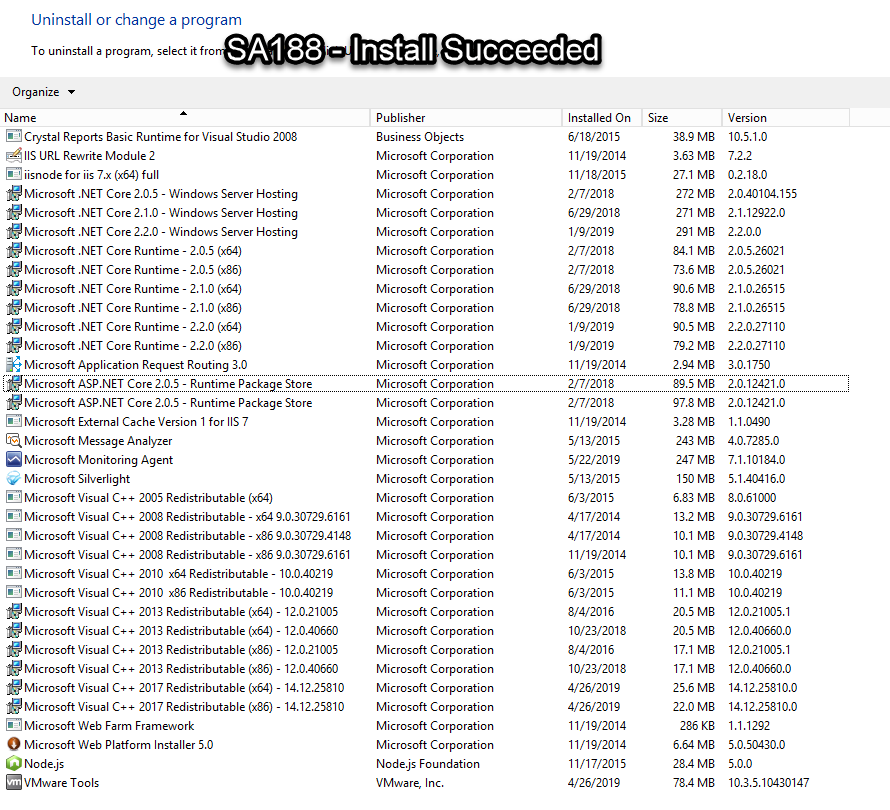
systeminfo:
[systeminfo.txt](https://github.com/aspnet/AspNetCore/files/3250626/systeminfo.txt)
This is another server where ConfigMgr 2012 Toolkit R2 is installed. The installation succeeded in this configuration. This server did _not_ have FiddlerCoreAPI installed.
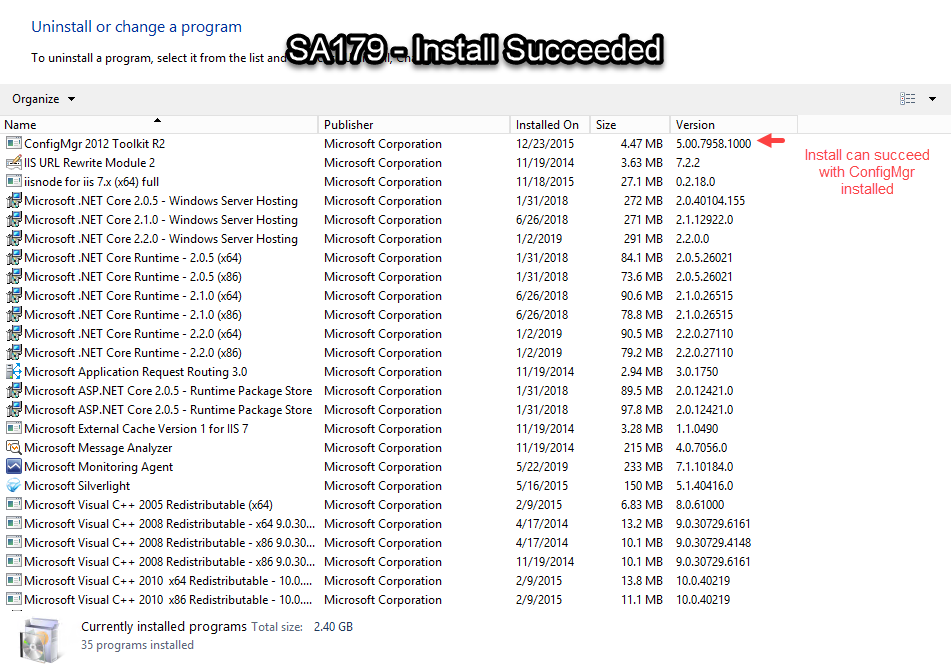
systeminfo:
[systeminfo.txt](https://github.com/aspnet/AspNetCore/files/3250641/systeminfo.txt)
Thanks In Advance!
Contributor guide
Assessment
This issue has not been assessed yet.