Outdated components in published Razor Pages application without scaffolded identity
- Dominant language
- C#
- Stars
- 818
- Forks
- 260
- Avg merge
- 1d 8h
- Merged PRs (30d)
- 10
Description
### Is there an existing issue for this?
- [X] I have searched the existing issues
### Describe the bug
Published Razor Pages application without scaffolded identity has old DLLs. Application with scaffolded identity has to many files.
### Expected Behavior
All components (DLLs) in published application should be current. We should not publish files which are not necessary to run the application.
### Steps To Reproduce
Create a new ASP.NET Core Web App in VS and select Individual Accounts. Create a new publish `File` profile and publish the app to `publish\1` folder.
In Package Manager Console run this command (see https://learn.microsoft.com/en-us/aspnet/core/security/authentication/scaffold-identity?view=aspnetcore-7.0&tabs=visual-studio):
`Install-Package Microsoft.VisualStudio.Web.CodeGeneration.Design`
You don't have to run scaffolder. Just install the above packages.
Modify folder in publish profile to `publish\2` and publish the app again. Compare published files. You will see something like this:

Notice that in second folder (on the right) I have much more folders and much more files. Folders with language resources probably shouldn't be published:
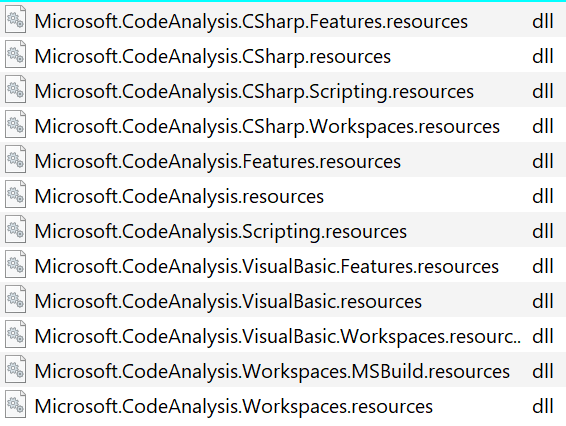
Now let's compare contents of some folders:

On the left I have `netcoreapp3.0` and on the right there is `net6.0`.
In main publish folder `publish\2` I have a lot of files. Do we really need all of them, for example:
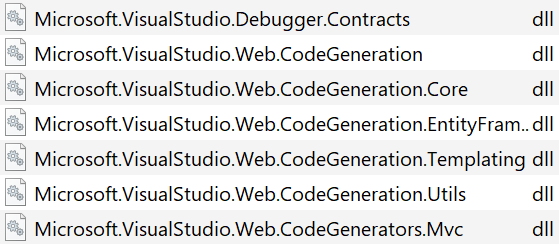
On the left some files are older:

All of them have file version 5.0.x. Files on the right have version 6.0.x.
### Exceptions (if any)
_No response_
### .NET Version
7.0.100-rc.2.22477.23
### Anything else?
Microsoft Visual Studio Community 2022 Version 17.4.0 Preview 3.0
VisualStudio.17.Preview/17.4.0-pre.3.0+33006.217
I also have VS 2022 17.3.6 on this computer.
dotnet --info
.NET SDK:
Version: 7.0.100-rc.2.22477.23
Commit: 0a5360315a
Środowisko uruchomieniowe:
OS Name: Windows
OS Version: 10.0.19044
OS Platform: Windows
RID: win10-x64
Base Path: C:\Program Files\dotnet\sdk\7.0.100-rc.2.22477.23\
Host:
Version: 7.0.0-rc.2.22472.3
Architecture: x64
Commit: 550605cc93
.NET SDKs installed:
6.0.305 [C:\Program Files\dotnet\sdk]
6.0.402 [C:\Program Files\dotnet\sdk]
7.0.100-rc.1.22431.12 [C:\Program Files\dotnet\sdk]
7.0.100-rc.2.22477.23 [C:\Program Files\dotnet\sdk]
.NET runtimes installed:
Microsoft.AspNetCore.App 6.0.10 [C:\Program Files\dotnet\shared\Microsoft.AspNetCore.App]
Microsoft.AspNetCore.App 7.0.0-rc.1.22427.2 [C:\Program Files\dotnet\shared\Microsoft.AspNetCore.App]
Microsoft.AspNetCore.App 7.0.0-rc.2.22476.2 [C:\Program Files\dotnet\shared\Microsoft.AspNetCore.App]
Microsoft.NETCore.App 6.0.10 [C:\Program Files\dotnet\shared\Microsoft.NETCore.App]
Microsoft.NETCore.App 7.0.0-rc.1.22426.10 [C:\Program Files\dotnet\shared\Microsoft.NETCore.App]
Microsoft.NETCore.App 7.0.0-rc.2.22472.3 [C:\Program Files\dotnet\shared\Microsoft.NETCore.App]
Microsoft.WindowsDesktop.App 6.0.10 [C:\Program Files\dotnet\shared\Microsoft.WindowsDesktop.App]
Microsoft.WindowsDesktop.App 7.0.0-rc.1.22427.1 [C:\Program Files\dotnet\shared\Microsoft.WindowsDesktop.App]
Microsoft.WindowsDesktop.App 7.0.0-rc.2.22472.13 [C:\Program Files\dotnet\shared\Microsoft.WindowsDesktop.App]
Other architectures found:
x86 [C:\Program Files (x86)\dotnet]
registered at [HKLM\SOFTWARE\dotnet\Setup\InstalledVersions\x86\InstallLocation]
Environment variables:
Not set
global.json file:
Not found
Contributor guide
Assessment
This issue has not been assessed yet.