dotnet / dotnet/AspNetCore.Docs
Kestrel tries to use Kerberos
- Dominant language
- C#
- Stars
- 13.1k
- Forks
- 24.6k
- Avg merge
- 1d 3h
- Merged PRs (30d)
- 97
Description
@Ninja4Code I'm working on you contribution.
Create Razor web app:
`dotnet new razor -o WebNeg -au Individual`
Add the following `AddAuthentication`, `AddAuthorization`
```
using Microsoft.AspNetCore.Authentication.Negotiate;
var builder = WebApplication.CreateBuilder(args);
builder.Services.AddAuthentication(NegotiateDefaults.AuthenticationScheme)
.AddNegotiate();
builder.Services.AddAuthorization(options =>
{
options.FallbackPolicy = options.DefaultPolicy;
});
```
Run app and use F12 browsers tools, network tab.
But all I see is:
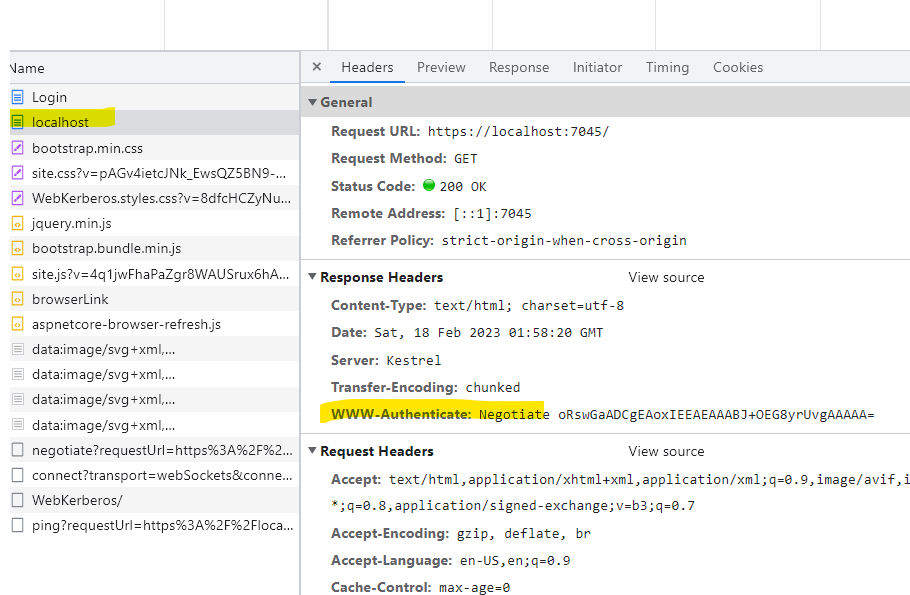
contributes to #28365
The default [Negotiate](https://learn.microsoft.com/windows/win32/secauthn/microsoft-negotiate) package on Kestrel to use [Kerberos](https://learn.microsoft.com/windows-server/security/kerberos/kerberos-authentication-overview), which is a more secure and peformant authentication scheme than NTLM.
The following snippet, from Program.cs, shows the Negotiate request:
```
using Microsoft.AspNetCore.Authentication.Negotiate;
var builder = WebApplication.CreateBuilder(args);
builder.Services.AddAuthentication(NegotiateDefaults.AuthenticationScheme)
.AddNegotiate();
builder.Services.AddAuthorization(options =>
{
options.FallbackPolicy = options.DefaultPolicy;
});
var app = builder.Build();
app.MapGet("/", () => "Hello World!");
app.Run();
```
[NegotiateDefaults.AuthenticationScheme](https://learn.microsoft.com/dotnet/api/microsoft.aspnetcore.authentication.negotiate.negotiatedefaults.authenticationscheme) uses Kerberos by default. The [FallbackPolicy](https://learn.microsoft.com/dotnet/api/microsoft.aspnetcore.authorization.authorizationoptions.fallbackpolicy?view=aspnetcore-7.0) uses the [DefaultPolicy](/dotnet/api/microsoft.aspnetcore.authorization.authorizationoptions.defaultpolicy?view=aspnetcore-7.0) meaning if Kerberos not available, Kestrel will fall back to NTLM.
Kerberos is known as the Negotiate AuthenticationType, whereas NTLM is known as the NTLM AuthenticationType. This can be demonstrated by viewing a request in Fiddler where the `WWW-Authenticate` header contain either Negotiate or NTLM.
IIS and IISExpress support Kerberos and NTLM; however, Kestrel in disallows NTLM connections.
Steps to Reproduce:
1. Create an ASP.NET Core React app with `dotnet new react`.
2. Install the `Microsoft.AspNetCore.Authentication.Negotiate` package.
3. Add the preceding code for authentication and authorization.
4. Ensure authentication and authorization are in the pipeline in the correct order:
```cli
app.UseRouting();
app.UseAuthentication();
app.UseAuthorization();
```
6. Run the app using Kestrel.
7. When navigating to the site, you may either see a sign-in prompt or 401 status code.
8. When analyzing the request in Fiddler, you notice a `WWW-Authenticate:` NTLM header.
Troubleshooting and Resolution
You'll need to check to see if the computer running the app has a valid service principal name (SPN) registration with the HTTP service. These same steps can be run locally, on a VM, server or within a Docker container host.
1. Verify the computer has a valid SPN.
2. Run `setspn -L` to list all of the services your computer has an SPN registration for.
`setspn -L `
Machine name is often synonymous with computer name. If you don’t know your computer name, type `“$env:computername”` in PowerShell. Machine name is also a valid account name in Active Directory. So even if your FQDN machine name is `myhost1.example.com` you'll use `myhost1` in this command.
`setspn -L myhost1`
3. Readout is displayed. If you don't see any service named http or HTTP then you don't have a valid SPN for Negotiate.
4. Add your machine name account to the http service.
5. Run the `setspn -S command` **TWICE**, once for the machine short name and once for the FQDN.
```
setspn -S http/myhost1
setspn -S http/myhost1.example.com
```
6. If successful you'll see a message that the service principal name was updated, otherwise and error is displayed.
7. Run `setspn -L ` command again to verify that the registration was successfully updated.
9. You should see two listings for http with your machine name as well as the FQDN.
10. Exit from the command line and start the app.
11. You should be able to navigate within the web site without sign-in prompts or 401 errors.
12. You can confirm this by analyzing the request in Fiddler, noticing the `WWW-Authenticate:` Negotiate header.
NOTE: In order to update `setspn` successfully, you'll need to run the command either with an elevated command prompt with an account with either Domain Admin or Account Operators permissions.
---
#### Document Details
⚠ *don't edit this section. It's required for learn.microsoft.com ➟ GitHub issue linking.*
* ID: f22dcddb-0c25-be1a-9a02-9e71dce86bdb
* Version Independent ID: 3e0e12c2-e544-5655-e001-d2ec180b11a8
* Content: [Kestrel web server implementation in ASP.NET Core](https://learn.microsoft.com/en-us/aspnet/core/fundamentals/servers/kestrel?view=aspnetcore-7.0)
* Content Source: [aspnetcore/fundamentals/servers/kestrel.md](https://github.com/dotnet/AspNetCore.Docs/blob/main/aspnetcore/fundamentals/servers/kestrel.md)
* Product: **aspnet-core**
* Technology: **aspnetcore-fundamentals**
* GitHub sign-in: @Rick-Anderson
* Microsoft Alias: **riande**
Contributor guide
Assessment
This issue has not been assessed yet.