JavaScript +lsp (TypeScript) not displaying errors correctly/not jumping to the correct definitions
- Dominant language
- Emacs Lisp
- Stars
- 22.7k
- Forks
- 3.1k
- Avg merge
- 10h 46m
- Merged PRs (30d)
- 4
Description
### I confirm that...
- [X] I have searched the [issue tracker](https://github.com/doomemacs/doomemacs/issues), [documentation](https://docs.doomemacs.org), [FAQ](https://docs.doomemacs.org/-/faq), [Discourse](https://discourse.doomemacs.org), and [Google](https://google.com), in case this issue has already been reported/resolved.
- [X] I have read "[How to Debug Issues](https://doomemacs.org/d/how2debug)", and will use it to provide as much information about this issue as possible.
- [X] The issue can be reproduced on the **latest** available commit of Doom.
- [X] The issue can be reproduced on a stable release of Emacs, such as 27 or 28. *(Doom does not support development builds like 29+ or any version ending in .50 or .9x)*
### Expected behavior
I love Doom! Thank you so much for making and maintaining this terrific application. I have scoured the internet for solutions and I can't seem to configure TypeScript and/or React in a way that is comparable to VSCode's language support. The amount of options and package combinations makes this particularly confusing to set up.
I would like Doom to replicate LSP/ESLint functionality found in VSCode, particularly the following:
1. Show/highlight/underline errors as determined by my ESLint configuration
2. Perform lookup on functions, variables, etc. on all files in the project, including source code contained in `node_modules`
I would also like to ask, in lieu of a specific fix, if you know of any configuration that emulates VSCode's functionality more closely.
And more generally, what is the preferred language server, tide, typescript-mode, etc. that should be used at the time of writing this.
### Current behavior
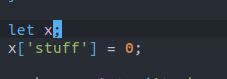
1. One example of Doom being inconsistent with VSCode's error highlighting is as follows:
```javascript
let x;
x['stuff'] = 0;
```
VSCode correctly reports "'x' is possibly 'undefined'.ts(18048)" here and red-underlines "x" (I have a separate keybinding, `spc-e-e` in VSCode for displaying the error message box):
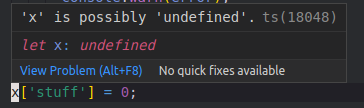
Doom fails to produce any warning or error at all in this example:
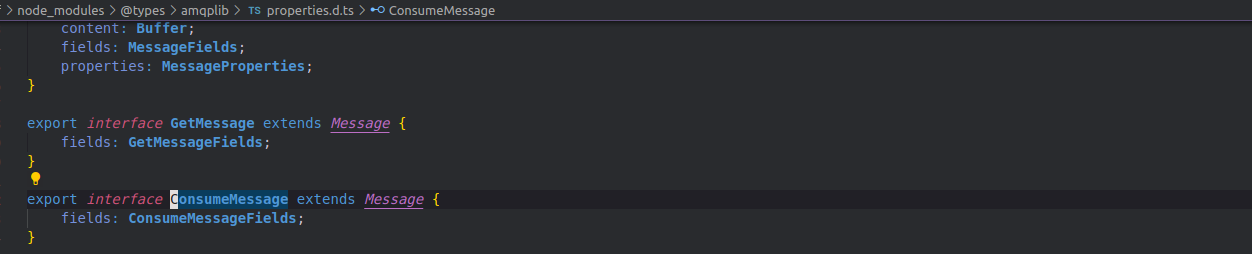
2. Performing `g-d` or `spc-c-d` (jump to definition) on this statement, whose source is contained in a `node_modules` directory, doesn't jump to or display the definition. Rather, it displays/jumps to usage of it within my own project:

Trying `spc-c-D` (jump to references) produces this:

And `spc-c-l` for LSP mode shows no options:

Ideally one of these commands would replicate VSCode's `g-d`functionality, opening a new buffer and taking me straight to the definition like this:
### Steps to reproduce
See above. In the pastebin, I've included system info as well as my project's `eslintrc, package.json, tsconfig.json` files.
I apologize in advance if I've missed something obvious with setting all this up. I'm quite a novice with Emacs, but I've managed to setup language features for other languages with relative ease.
### System Information
https://pastebin.com/i7USf6Q6
Contributor guide
Assessment
This issue has not been assessed yet.