Explicitly enabling :ui treemacs changes its look and behavior
- Dominant language
- Emacs Lisp
- Stars
- 22.7k
- Forks
- 3.1k
- Avg merge
- 10h 46m
- Merged PRs (30d)
- 4
Description
### What did you expect to happen?
Treemacs should look and behave the same regardless of how it was loaded: via `ui: treemacs` in `init.el` or as a dependency for some other module.
### What actually happened?
When treemacs is enabled in `init.el` by uncommenting/adding a line `(treemacs +lsp)` or just `treemacs` it looks nothing like default treemacs and in a bad way. To demonstrate look at the picture below. I've marked points of interest with blue markers with descriptions. We will later compare it to "normal"(?) configuration. `M-x treemacs/toggle` is the command that I use to open treemacs window, but using `M-x treemacs` doesn't change anything.
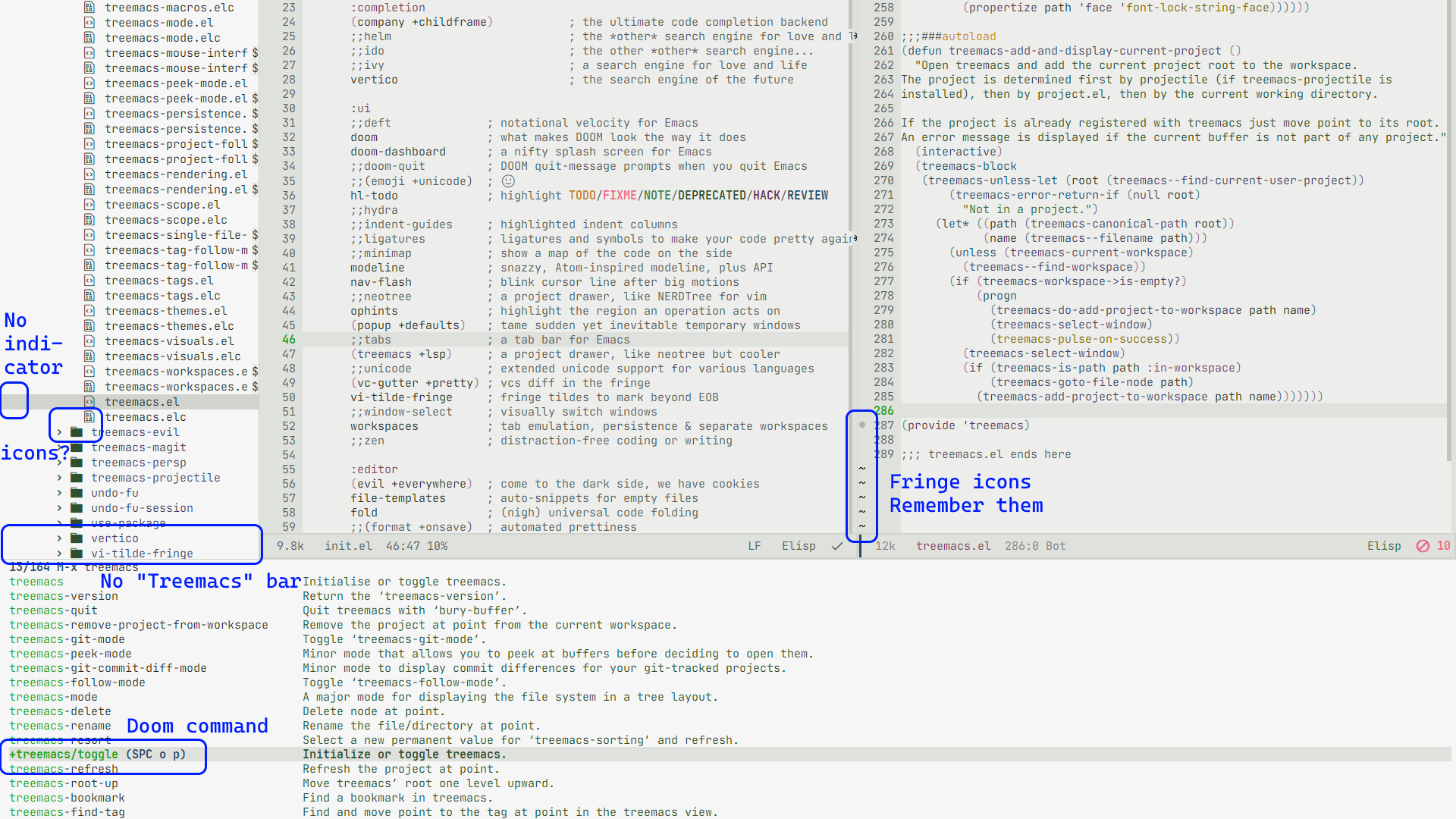
Now, if i remove `treemacs` from my `init.el` it still gets loaded as a dependency package for lsp or dap-mode (not sure which one exactly):
```
:tools
(debugger +lsp)
lsp
:lang
(cc +lsp)
```
Treemacs can only be opened now with `M-x treemacs`, and I have to add my project manually (both things are working as intended afaik). But it looks completely different now for no reason:

Now I have to say, i don't really care about fancy icons or named bars or the indicator. But the thing that really frustrates me is how it works with `dap-mode`. Every time I start a debug session (or just execute `M-x dap-ui-show-many-windows`) it breaks the fringe in the window which was active at the moment. The broken fringe hides one of the most important things during debugging – breakpoints. Just to be clear – this happens when `:ui treemacs` is enabled in `init.el`.

Again if we disable `ui: treemacs` in `init.el` and treemacs just gets loaded as a dap dependency it works exactly like intended:

### **Why I think this is Doom-specific issue**
There is nothing treemacs-specific in my `config.el`.
The only thing I change to observe the described behavior is commenting and uncommenting `(treemacs +lsp)` line in `init.el` file.
Also one thing I noticed: on [Doom repo page](https://github.com/doomemacs/doomemacs) there is a screenshot that shows either neotree or this 'broken' version of treemacs. I'm not sure which one exactly but it looks similar to both.
But on the [Treemacs repo page](https://github.com/Alexander-Miller/treemacs/) the screenshot of treemacs looks more like what could be seen on my 'good/correct' treemacs screenshots (icons, bar, indicator).
### Describe your attempts to resolve the issue
I've tried adding `(unpin! treemacs)` and `(unpin! dap-mode)` in my `packages.el` file - there is no noticeable difference. Also I tried adding and removing `+lsp` from `ui: (treemacs +lsp)`
Good workaround for now I think is just to remove `treemacs` from `init.el` and setup hotkeys manually. Maybe `(package! treemacs-evil)` in `packages.el` works too, but I didn't test it yet.
### Steps to reproduce
1. Add to `init.el`
```
:tools
(debugger +lsp)
lsp
:lang
(cc +lsp)
:ui
(treemacs +lsp)
```
2. Synchronize config
3. Start Doom Emacs
4. Use `SPC o p` hotkeys or execute `M-x treemacs/toggle`
5. Close treemacs
6. Execute `M-x dap-ui-show-many-windows`
7. Close Doom Emacs
8. Remove `(treemacs +lsp) from `init.el`
9. Synchronize config
10. Start Doom Emacs
11. Execute `M-x treemacs` or `M-x dap-ui-show-many-windows`
### System Information
https://pastebin.com/X1RTmLNk
Contributor guide
Assessment
This issue has not been assessed yet.