Vanilla Doom Can't Find Fonts Stored Under $HOME
- Dominant language
- Emacs Lisp
- Stars
- 22.7k
- Forks
- 3.1k
- Avg merge
- 10h 46m
- Merged PRs (30d)
- 4
Description
### What did you expect to happen?
Vanilla Doom to do the following:
1. Find my fonts stored under `$HOME/.local/share/fonts`
2. Render the all-the-icons-related fonts.
I'm running on WSL2 on Windows 10 with VcxSrv.
### What actually happened?
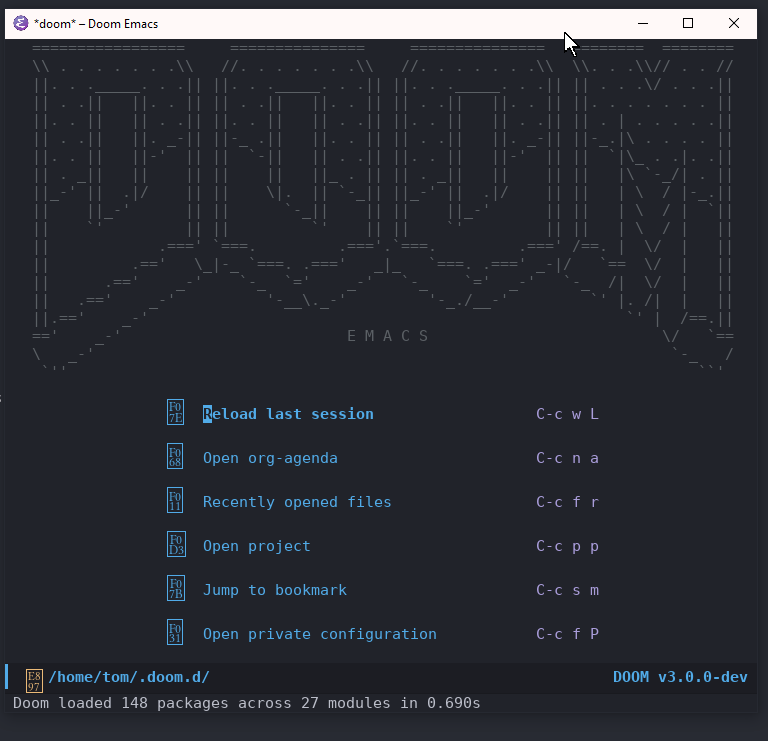
Here's an error message that I get when I try to load a local font:
```
custom-initialize-reset: Font not available: #
```
### Describe your attempts to resolve the issue
I tried running the following command in Vanilla Emacs, which was configured with only Melpa, use-package and all-the-icons:
```
(insert (all-the-icons-icon-for-file "foo.js"))
```
In vanilla emacs the character rendered correctly. In vanilla Doom it prints an invisible character.
I then wanted to make sure the fonts were in my cache:
```
fc-list | grep "all-the-icons"
/home/tom/.fonts/all-the-icons.ttf: all\-the\-icons:style=Regular
/home/tom/.local/share/fonts/all-the-icons.ttf: all\-the\-icons:style=Regular
...
➜ fc-list | grep "ETBembo"
/home/tom/.fonts/et-book-display-italic-old-style-figures.ttf: ETBembo:style=DisplayItalic
/home/tom/.local/share/fonts/et-book-semi-bold-old-style-figures.ttf: ETBembo:style=SemiBoldOSF
/home/tom/.fonts/et-book-bold-line-figures.ttf: ETBembo:style=BoldLF
/home/tom/.local/share/fonts/et-book-roman-line-figures.ttf: ETBembo:style=RomanLF
/home/tom/.local/share/fonts/et-book-bold-line-figures.ttf: ETBembo:style=BoldLF
/home/tom/.fonts/et-book-semi-bold-old-style-figures.ttf: ETBembo:style=SemiBoldOSF
/home/tom/.fonts/et-book-roman-line-figures.ttf: ETBembo:style=RomanLF
/home/tom/.local/share/fonts/et-book-roman-old-style-figures.ttf: ETBembo:style=RomanOSF
/home/tom/.fonts/et-book-roman-old-style-figures.ttf: ETBembo:style=RomanOSF
/home/tom/.local/share/fonts/et-book-display-italic-old-style-figures.ttf: ETBembo:style=DisplayItalic
```
Doom `doctor` says that the fonts are available:
```
> Checking Doom Emacs...
✓ Initialized Doom Emacs 3.0.0-dev
✓ Detected 27 modules
✓ Detected 95 packages
> Checking Doom core for irregularities...
Found font material-design-icons.ttf
Found font weathericons.ttf
Found font octicons.ttf
Found font fontawesome.ttf
Found font file-icons.ttf
Found font all-the-icons.ttf
```
I've also run 'fc-cache -f -v` about 100 times :-)
I also installed the fonts under Windows 10 (outside of WSL) to see if that would help.
### Steps to reproduce
1. Install Vanilla Doom
2. Open Doom Emacs
### System Information
https://pastebin.com/nJaye9Jz
Contributor guide
Assessment
This issue has not been assessed yet.