LSP-mode with C-sharp seems not working properly, despite following instructions
- Dominant language
- Emacs Lisp
- Stars
- 22.7k
- Forks
- 3.1k
- Avg merge
- 10h 46m
- Merged PRs (30d)
- 4
Description
### What did you expect to happen?
I expected C-sharp mode in Doom Emacs to give Company mode completion of specific keywords or variables, Projectile integration and Flycheck suggestion when making errors.
All of this is not happening, while `M-x lsp-diagnose` doesn't give any errors:
```
Checking for Native JSON support: OK
Check emacs supports `read-process-output-max': OK
Check `read-process-output-max' default has been changed from 4k: OK
Byte compiled against Native JSON (recompile lsp-mode if failing when Native JSON available): OK
`gc-cons-threshold' increased?: OK
Using gccemacs with emacs lisp native compilation (https://akrl.sdf.org/gccemacs.html): NOT AVAILABLE (OPTIONAL)
```
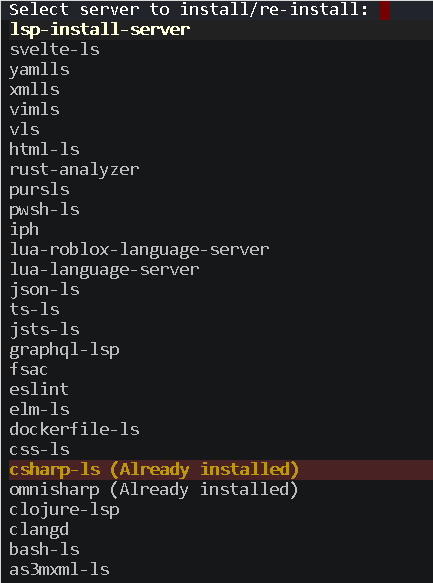
When trying `M-x lsp-install-server`, I see the following:
"csharp-ls (Already installed)"
"omnisharp (Already installed)"
### What actually happened?
I didn't get any error messages and Omnisharp installed on my computer. When with Doom Emacs with opening a regular `.cs` file, Omnisharp is connected, as minibuffer output confirms when opening it, the message should look like `LSP :: connected to [omnisharp:2827946/starting]`.
### Steps to reproduce
1. Make sure you have [libuv](https://github.com/libuv/libuv/blob/master/README.md#build-instructions) installed on Linux machine for HTTP-traffic to Omnisharp. Then install on Linux machine the following:
`wget https://packages.microsoft.com/config/ubuntu/21.04/packages-microsoft-prod.deb -O packages-microsoft-prod.deb
sudo dpkg -i packages-microsoft-prod.deb
rm packages-microsoft-prod.deb`
Then:
`dotnet tool install --global csharp-ls`
2. You need to compile Omnisharp too:
`git clone https://github.com/OmniSharp/omnisharp-roslyn & ./omnisharp-roslyn/build.sh`
When the compilation shows no errors, remember the path where the omnisharp is installed.
3. Open Emacs with vanilla Doom config
4. In `init.el` under the `:tools` section uncomment `lsp`.
5. In `init.el` under the `:lang` section replace csharp with `(csharp +lsp)` and uncomment it too (folllowing these instructions: https://github.com/hlissner/doom-emacs/tree/develop/modules/tools/lsp)
6. In `config.el`, add the following:
`(after! csharp-mode (setq lsp-csharp-server-path "[the path you remembered]omnisharp-roslyn/artifacts/publish/OmniSharp.Http.Driver/linux-x64/net6.0/OmniSharp"))`
7. Call `doom sync`, and then restart Doom Emacs.
8. Check if Omnisharp is connected with Doom Emacs with opening a regular `.cs` file and check minibuffer output when opening it, the message should look like `LSP :: connected to [omnisharp:2827946/starting]`.
### System Information
https://pastebin.com/P018T0g0
I also have to say that the Doom manual for C-sharp mode is not very descriptive https://github.com/hlissner/doom-emacs/blob/develop/modules/lang/csharp/README.org and wanted to rewrite the manual for Doom Emacs, but I can't figure out which step I did wrong in my described steps above.
Contributor guide
Assessment
This issue has not been assessed yet.