docker stats block I/O is always 0 on windows
Open
Nobody has claimed this yet.
kind/bug
status/0-triage
- Dominant language
- Go
- Stars
- 6.1k
- Forks
- 2.2k
- Avg merge
- 1d 15h
- Merged PRs (30d)
- 43
Description
Description
A user of the Resource Usage extension reported that on Windows the disk usage is always 0.
I tried it and compared it with the docker stats output. In both cases the value is 0.
Reproduce
- start an ELK compose stack from awesome-compose
- run
docker stats
This docker stats on Windows

This docker stats on mac os
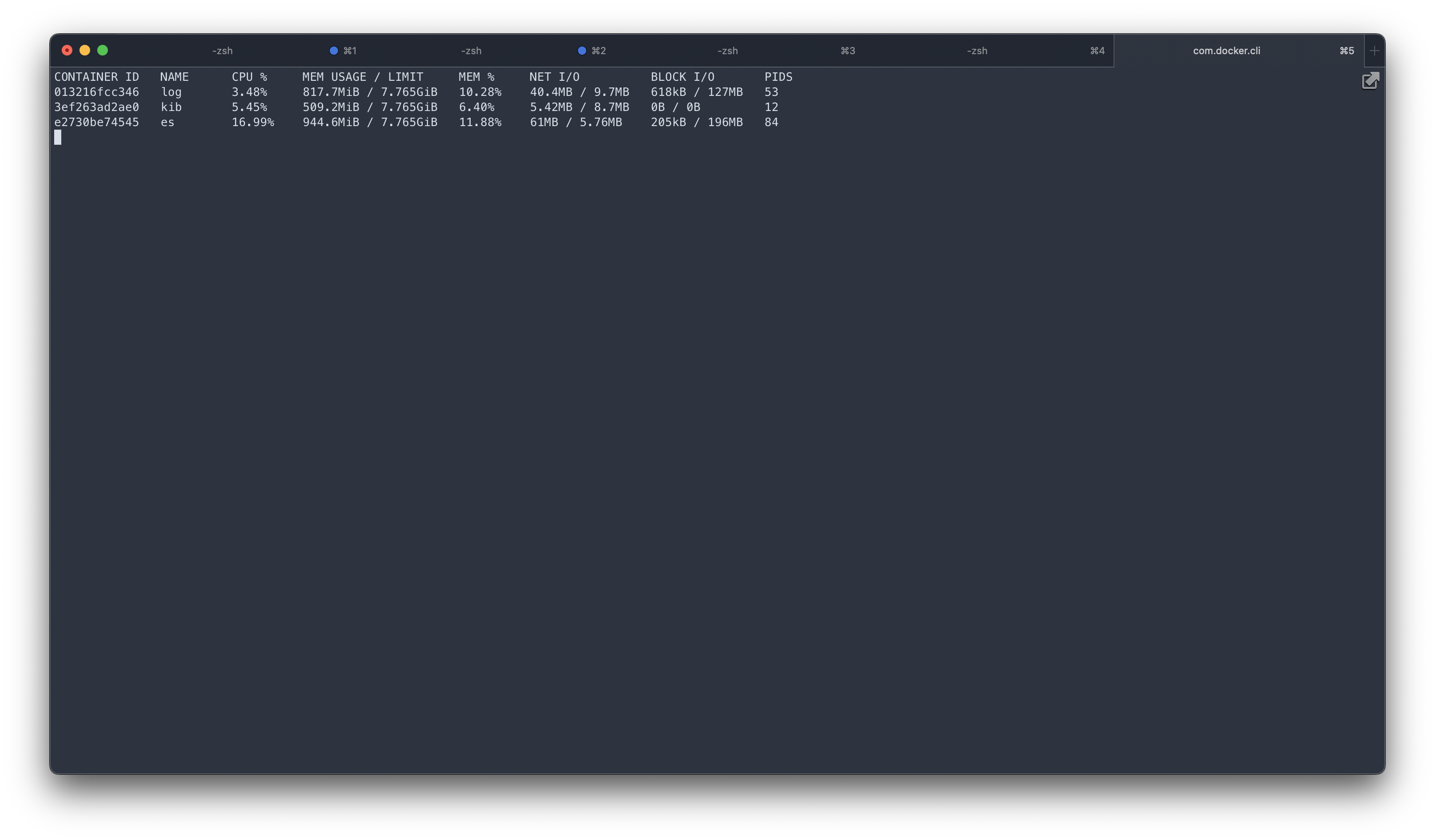
Expected behavior
On Windows docker stats should display the real numbers.
docker version
Client:
 Cloud integration: v1.0.29
 Version:           20.10.21
 API version:       1.41
 Go version:        go1.18.7
 Git commit:        baeda1f
 Built:             Tue Oct 25 18:08:16 2022
 OS/Arch:           windows/amd64
 Context:           default
 Experimental:      true
Server: Docker Desktop 4.14.0 (91374)
 Engine:
  Version:          20.10.21
  API version:      1.41 (minimum version 1.12)
  Go version:       go1.18.7
  Git commit:       3056208
  Built:            Tue Oct 25 18:00:19 2022
  OS/Arch:          linux/amd64
  Experimental:     false
 containerd:
  Version:          1.6.9
  GitCommit:        1c90a442489720eec95342e1789ee8a5e1b9536f
 runc:
  Version:          1.1.4
  GitCommit:        v1.1.4-0-g5fd4c4d
 docker-init:
  Version:          0.19.0
  GitCommit:        de40ad0
docker info
Client:
 Context:    default
 Debug Mode: false
 Plugins:
  buildx: Docker Buildx (Docker Inc., v0.9.1)
  compose: Docker Compose (Docker Inc., v2.12.2)
  dev: Docker Dev Environments (Docker Inc., v0.0.3)
  extension: Manages Docker extensions (Docker Inc., v0.2.13)
  sbom: View the packaged-based Software Bill Of Materials (SBOM) for an image (Anchore Inc., 0.6.0)
  scan: Docker Scan (Docker Inc., v0.21.0)
Server:
 Containers: 8
  Running: 4
  Paused: 0
  Stopped: 4
 Images: 12
 Server Version: 20.10.21
 Storage Driver: overlay2
  Backing Filesystem: extfs
  Supports d_type: true
  Native Overlay Diff: true
  userxattr: false
 Logging Driver: json-file
 Cgroup Driver: cgroupfs
 Cgroup Version: 1
 Plugins:
  Volume: local
  Network: bridge host ipvlan macvlan null overlay
  Log: awslogs fluentd gcplogs gelf journald json-file local logentries splunk syslog
 Swarm: inactive
 Runtimes: runc io.containerd.runc.v2 io.containerd.runtime.v1.linux
 Default Runtime: runc
 Init Binary: docker-init
 containerd version: 1c90a442489720eec95342e1789ee8a5e1b9536f
 runc version: v1.1.4-0-g5fd4c4d
 init version: de40ad0
 Security Options:
  seccomp
   Profile: default
 Kernel Version: 5.10.16.3-microsoft-standard-WSL2
 Operating System: Docker Desktop
 OSType: linux
 Architecture: x86_64
 CPUs: 8
 Total Memory: 7.67GiB
 Name: docker-desktop
 ID: DZAR:5QT6:I6QW:22MS:SUOQ:BT3V:3S22:3PJJ:JVVQ:HQVT:GVJM:JSJK
 Docker Root Dir: /var/lib/docker
 Debug Mode: false
 HTTP Proxy: http.docker.internal:3128
 HTTPS Proxy: http.docker.internal:3128
 No Proxy: hubproxy.docker.internal
 Registry: https://index.docker.io/v1/
 Labels:
 Experimental: false
 Insecure Registries:
  hubproxy.docker.internal:5000
  127.0.0.0/8
 Live Restore Enabled: false
Additional Info
No response
Contributor guide
First steps
- Read the whole issue, then the project's contributing guide.
- Comment on the issue to say you are picking it up — it saves two people doing the same work.
- Fork the repository and make your change on a branch.
- Open a pull request that references the issue number.
Research direction
Start by reproducing the issue with the ELK compose stack and comparing docker stats block I/O output on Windows and macOS. Trace the docker stats path responsible for block I/O reporting; done when Windows displays the real numbers instead of 0.
Written by the indexing model from the issue text.
Assessment
- Tech stack
- docker, go
- Domain
- cli, operating-systems
- Issue type
- Bug
- Difficulty
- 4/5
- Estimated time
- 3-5 days
- Activity status
- Stale
- Clarity
- Mostly clear
- Newbie friendliness
- 35/100