Error messages for wrong Docker OS can be confusing when using volumes + multi-arch images
Nobody has claimed this yet.
- Dominant language
- Go
- Stars
- 6.1k
- Forks
- 2.2k
- Avg merge
- 1d 15h
- Merged PRs (30d)
- 43
Description
Description
When using Docker Desktop on Windows, you can have the Docker daemon in either Windows or Linux mode. When you try to run a non-multi-arch image in the wrong mode, you will get a clear error message. However, if you are using a multi-arch image and volumes, the error gets less clear.
Steps to reproduce the issue:
- Put Docker Desktop into Linux mode.
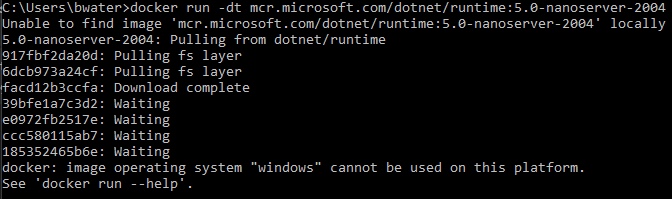
- Run an image that is Windows only. The error message is nice and clear:
docker run -dt mcr.microsoft.com/dotnet/runtime:5.0-nanoserver-2004
- Now pick a multi-arch image. It would be valid to run
docker run -dt mcr.microsoft.com/dotnet/runtime:5.0here; it would pull and run the Linux version of that image. However, if you add in Windows-style volume arguments, you get a less clear error message, blaming the volume syntax, even though the real problem is wrong OS:
docker run -dt -v D:\Sandbox:C:\remotesandbox mcr.microsoft.com/dotnet/runtime:5.0

In other circumstances you might see "Invalid volume specification".
Now, arguably the CLI is emitting the correct error message; it has no way of knowing that the user's intent was actually to run a Windows image but they're in the wrong mode. It sees an invalid volume specification so it gives that error. From a UX perspective though, the user gives a valid Windows-container command line (docker run -dt -v D:\Sandbox:C:\remotesandbox mcr.microsoft.com/dotnet/runtime:5.0), their intent is to run a Windows container--and the reason it fails to run is not really about the volume, but that they have the wrong OS.
Probably the best fix is to add something like a parenthetical question after the "invalid mode" / "invalid volume specification" error, if the image is multi-arch. For example, something like docker: Error response from daemon: invalid mode: \remotesandbox (Did you mean to run in Windows mode?). To be more conservative, the message could also be shown only if the volume specification parses correctly in the other OS mode.
Contributor guide
First steps
- Read the whole issue, then the project's contributing guide.
- Comment on the issue to say you are picking it up — it saves two people doing the same work.
- Fork the repository and make your change on a branch.
- Open a pull request that references the issue number.
Research direction
Start by reproducing the two docker run commands in the issue with Docker Desktop in Linux mode, comparing the clear wrong-OS error with the volume-related error. Trace the CLI entry points that parse volume specifications and report invalid mode or volume errors. Done means the multi-arch case gives a useful Windows-mode hint without regressing valid volume errors.
Written by the indexing model from the issue text.
Assessment
- Tech stack
- docker, go
- Domain
- cli
- Issue type
- Bug
- Difficulty
- 4/5
- Estimated time
- 3-5 days
- Activity status
- Stale
- Clarity
- Mostly clear
- Newbie friendliness
- 35/100