diegomura / diegomura/react-pdf
Text is Not Centered in Line Height
- Dominant language
- TypeScript
- Stars
- 16.8k
- Forks
- 1.3k
- Avg merge
- 5h 6m
- Merged PRs (30d)
- 52
Description
**Describe the bug**
The text rendered is not centered in the line height. While this is expected behavior for type-setting programs such as Adobe InDesign and Affinity Publisher, it is not expected when working with web technologies. Encountered this when converting a design in Figma to React PDF.
*I'm unsure if this is intended behavior, so reporting this as a bug instead of a feature request.*
**To Reproduce**
Steps to reproduce the behavior:
1. Go to [this repl session](https://react-pdf-repl.vercel.app/?modules=true&cp_code=JYWwDg9gTgLgBAbzgEQgYwK4gKYDsYA0cAKtgB6FwAKAhgObZwC-cAZlBCHAOQACU2GmhgBaMABNWAegG5x2AVG4AoZeUiw481jQwAbeAAoAlHAC8APjiHlcOAB5UmHPgu27D2gzgBnYAC9sMwQAbQAmAAYIokiIgF0mNw8Pe1IKC3spNJgrdztMr2wkhyknLDwc5WNlIA&version=3.0.2).
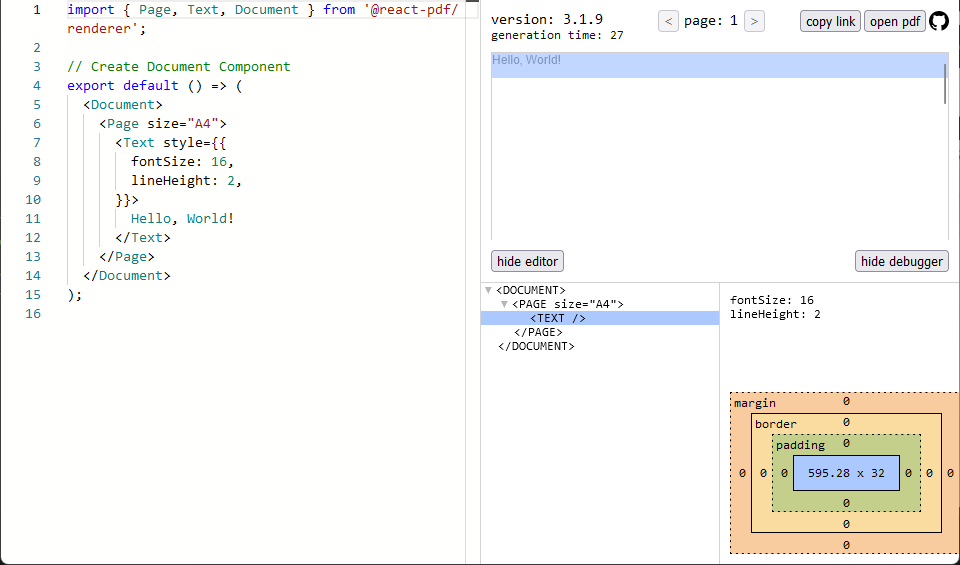
2. Hover over the "Hello, World" text and notice that it hugs the top and left of the bounding box, with a large area below it that is the rest of the leading.
**Expected behavior**
Expect text to be centered in the line height box (leading) instead of hugging the top of the line height box.
**Screenshots**
An example of how text is positioned in the leading with HTML:

An example of how text is positioned in the leading with `react-pdf`:
**Desktop (please complete the following information):**
- OS: Windows 11
- Browser: Firefox 111.0.1
- React-pdf version: v3.1.9
Contributor guide
Assessment
This issue has not been assessed yet.