diegomura / diegomura/react-pdf
Use flex direction row makes text comes out
- Dominant language
- TypeScript
- Stars
- 16.8k
- Forks
- 1.3k
- Avg merge
- 5h 6m
- Merged PRs (30d)
- 52
Description
Hi !
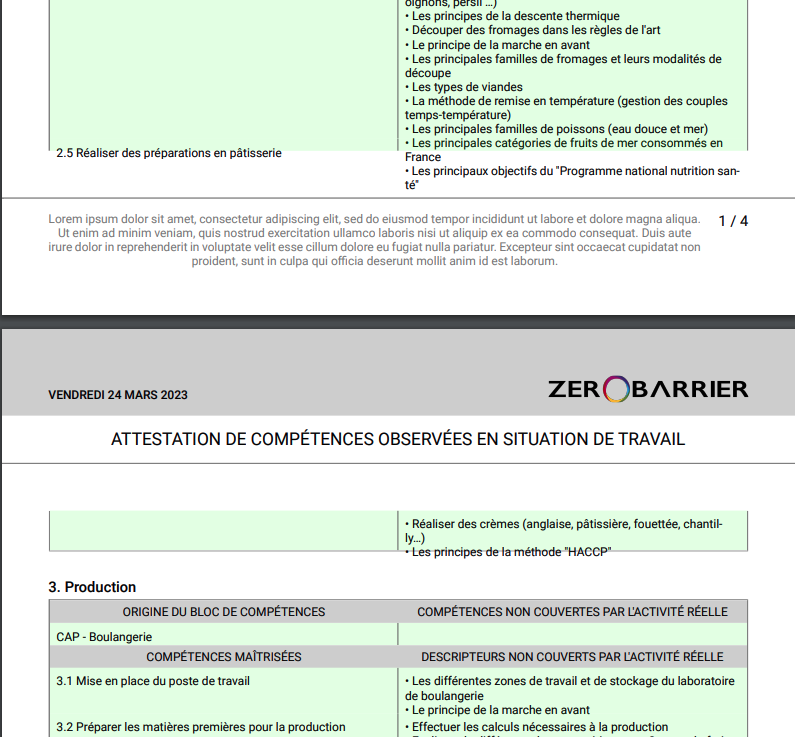
I tired to create a table with 2 columns. I set a view with flex direction row and as you can see, the text comes out of his container. However, The text component has the correct height (background color green). I saw several issues on this problem but none solved.
Thanks a lot for you help
JSX
```
{/* -------------------- THEAD -------------------- */}
{t('custom_block_origin')}
{t('skills_not_covered')}
{/* -------------------- TR -------------------- */}
{customBlock.origins.join('\r\n')}
{customBlock.missingSkills
.map(ms => `• ${ms.name}`)
.join('\r\n')
}
{/* -------------------- THEAD -------------------- */}
{t('mastered_skills')}
{t('descriptors_not_covered')}
{/* -------------------- TR -------------------- */}
{customBlock.customSkills.map(cs => (
{`${customBlock.position}.${cs.skill?.position} ${cs.skill?.name}`}
{cs.missingDescriptors
.map(md => `• ${md.name}`)
.join('\r\n')
}
))}
```
CSS
```
table: {
borderWidth: 1,
borderColor: 'gray',
borderStyle: 'solid',
marginTop: 5,
},
thead: {
flexDirection: 'row',
alignItems: 'center',
backgroundColor: 'lightgray',
},
theadText: {
width: '50%',
padding: 5,
fontSize: 9,
fontFamily: 'Roboto',
textAlign: 'center',
textTransform: 'uppercase',
},
tr: {
flexDirection: 'row',
},
td: {
width: '50%',
padding: 5,
fontSize: 9,
fontFamily: 'Roboto',
backgroundColor: 'rgba(0, 255, 0, 0.1)',
},
```
Contributor guide
Assessment
This issue has not been assessed yet.