diegomura / diegomura/react-pdf
Korean(or Unicode) character is not displayed correctly
- Dominant language
- TypeScript
- Stars
- 16.8k
- Forks
- 1.3k
- Avg merge
- 5h 6m
- Merged PRs (30d)
- 52
Description
Korean(or Unicode) character is not displayed correctly in browser when <Document> is created before fonts are loaded.
Please check if fonts are loaded in react-pdf before <Document> is created.
**Code**
```
Font.register({ family: "NanumGothic", src: "https://fonts.gstatic.com/ea/nanumgothic/v5/NanumGothic-Regular.ttf" });
const styles = StyleSheet.create({
body: {
fontSize: 30,
fontFamily: 'NanumGothic'
}
});
const MyDocument = () => (
한글 (Korean)
);
function App() {
return (
);
}
```
**Result**
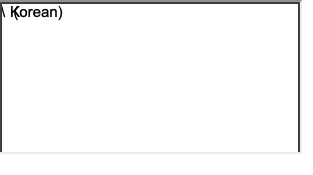
**Code 2**
If I check font before document creation everything works fine.
It would be great if react-pdf can do this without additional codes.
```
...
const useFont = (fontFamily: string) => {
const [loaded, setLoaded] = useState(false);
useEffect(() => {
(async () => {
await Font.load({fontFamily: fontFamily});
const timer = setInterval(() => {
if (Font.getFont({fontFamily: fontFamily})?.loading === false) {
clearInterval(timer);
setLoaded(true);
}
}, 100);
})();
}, []);
return loaded;
}
function App() {
const loaded = useFont("NanumGothic");
if (!loaded) return
return (<>
{loaded &&
}
);
}
```
**Result 2**
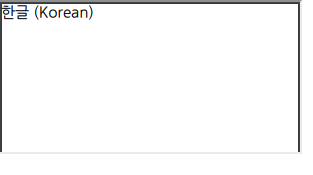
**Desktop (please complete the following information):**
- OS [MacOS]
- Browser [chrome]
- React-pdf version [v2.1.1]
Contributor guide
Assessment
This issue has not been assessed yet.