Base branch not displayed for resolving conflicts when dialog opens mid-rebase
- Dominant language
- TypeScript
- Stars
- 21.8k
- Forks
- 10.5k
- Avg merge
- 1d 15h
- Merged PRs (30d)
- 25
Description
## Description
@tierninho originally discovered this bug in https://github.com/desktop/desktop/pull/8097#pullrequestreview-275217992.
### The problem
There are a few ways we get to the points of presenting the `ShowConflictedFilesDialog` to users.
1. The user initiates a rebase through the UI
2. The user loads Desktop and there is already a rebase in progress
3. The user closed the `ShowConflictedFilesDialog` and then re-opened it by clicking "View Conflicts" in the `RebaseConflictsBanner`
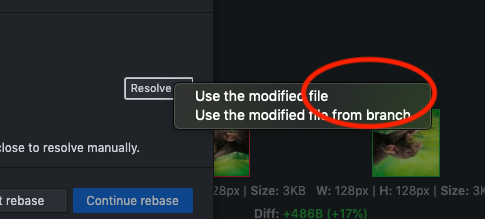
For cases 2 and 3 the user will be disappointed to see that the name of the branch that they are rebasing onto (the base branch) is not present in the menu for resolving conflicts:
For case 1 (initiating a rebase through the UI) we pass along the `baseBranch` data to the `ShowConflictedFilesDialog` since we have it handy.
It seems that for cases 2 and 3 we rely on `getRebaseInternalState` to provide the branch details to us. This method reads from the `.git/rebase-apply` folder which is what Git uses to keep track of where the user is at in a rebase operation. This folder contains only the commit sha for the branch being rebased onto, and not the branch name. Presumably, this is because it doesn't actually need the branch name in order to successfully complete a rebase... it just needs to know what commit to apply rebased commits onto.
So we end up with `undefined` for the `baseBranch` and hence the missing branch name in the conflict resolution menu.
### The solution?
How can we get access to the base branch name?
**We could store off the base branch when the user selects it for the rebase.**
This would address case 3, but would not address case 2. Plus, where would we store this state? In memory? That doesn't help us if the user closes and re-opens Desktop. Do we store it somewhere in the `.git` folder on disk for future access? That doesn't help us if the user initiated the rebase on the command line, and generally feels a bit icky.
**We could look through the branch reflog to see the most recent entry that says `rebase: checkout `**
This seems like it's the most reliable way to get the base branch, and I can't think of any edge cases it doesn't address. It will require adding another reflog method for shelling out to Git.
## Version
* GitHub Desktop: bfd0207945 (dev)
* Operating system: macOS High Sierra 10.13.6
## Steps to Reproduce
1. download [repo-binary-file.zip](https://github.com/desktop/desktop/files/3494892/repo-binary-file.zip)
1. check out `master` and verify that you're on commit `bbb019c` (or `reset --hard` to it)
1. check out `branch` and verify that you're on commit `0359ae5` (or `reset --hard` to it)
1. on the command line in the repo type `git rebase master`. Verify that you see `CONFLICT (content): Merge conflict in cute_rodent.jpeg`
1. open Desktop (or close and then re-open it, or re-load the window if in dev mode)
1. click the "Resolve" button to see menu items for resolving the conflict
### Expected Behavior
`Use the modified file from master` is displayed as an option
### Actual Behavior
`Use the modified file` is displayed as an option (base branch name is missing)
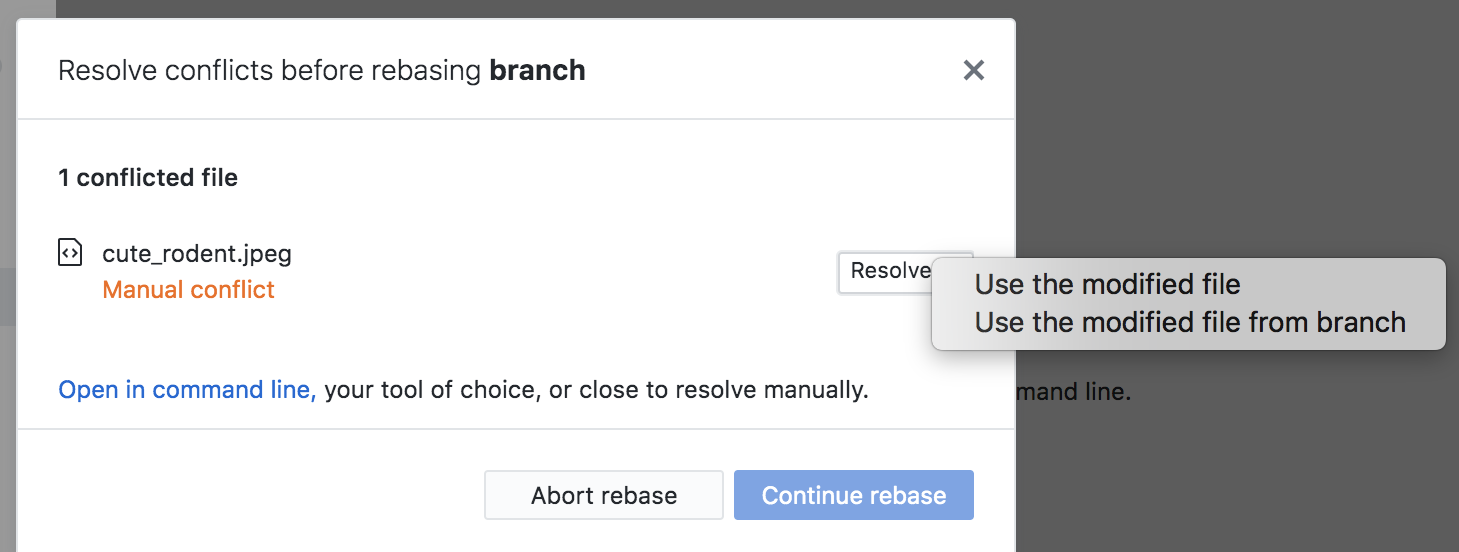
Alternative repro steps are to initiate a rebase via the UI, close the conflict dialogue, and then re-open it by clicking "View Conflicts" from the rebase message near the top of the window. However in my opinion this way of reproducing the bug doesn't catch as many edge cases as the one outlined above.
## Additional Information
Think the above pretty much covers it...
### Logs
N/A
Contributor guide
Assessment
This issue has not been assessed yet.