dense-analysis / dense-analysis/ale
ALE causes cursor move irregularly when Pmenu is visible in GVim
- Dominant language
- Vim Script
- Stars
- 14k
- Forks
- 1.5k
- Avg merge
- 17h 49m
- Merged PRs (30d)
- 1
Description
When I just start to use ALE recently, it works great, but when I am using ALE with YouCompleteMe together, I find two issues here:
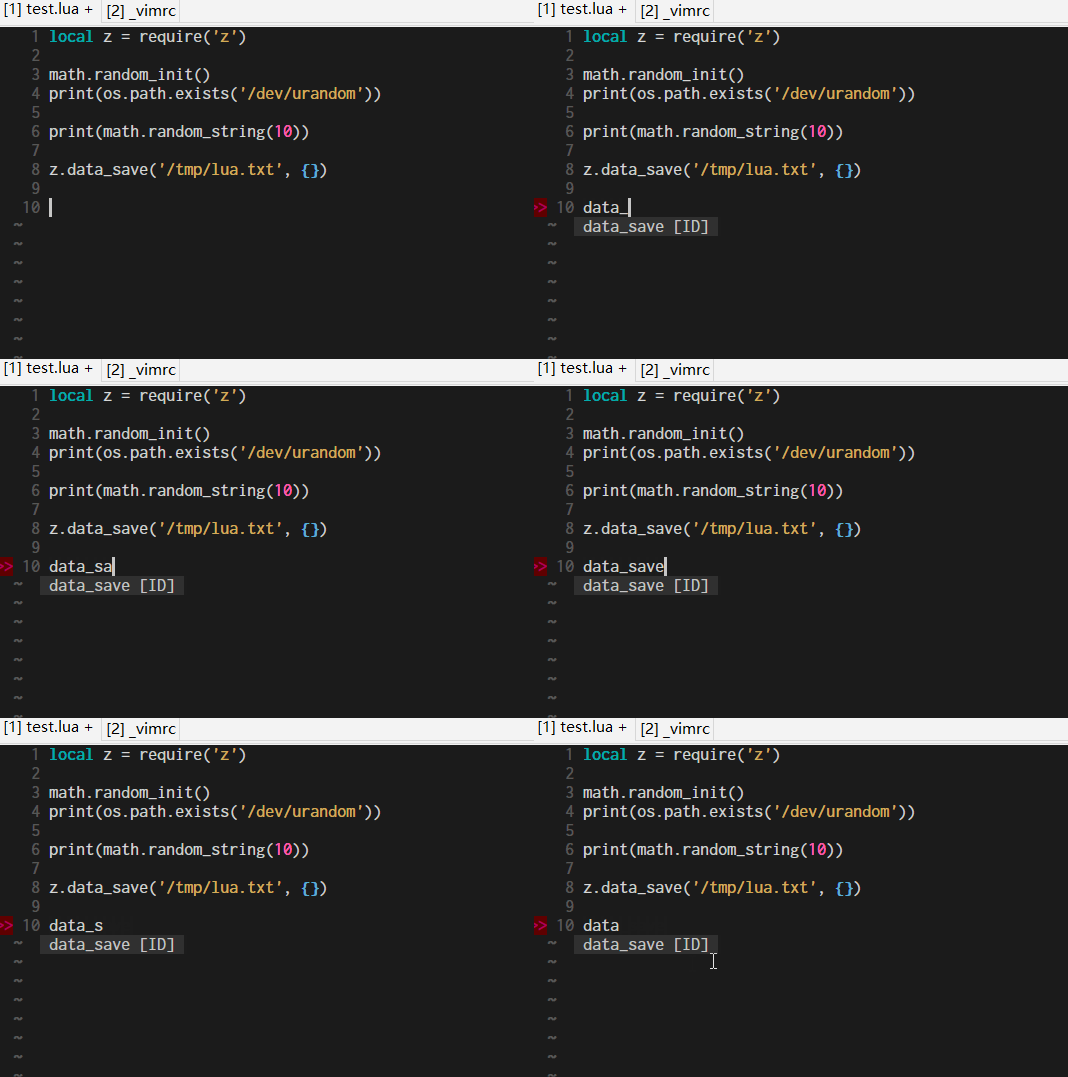
1. when I type something with Pmenu visible, the cursor will move away from its origin position and stay on the right edge of the completion Pmenu for nearly one second, then the cursor will move back again. See the GIF below:
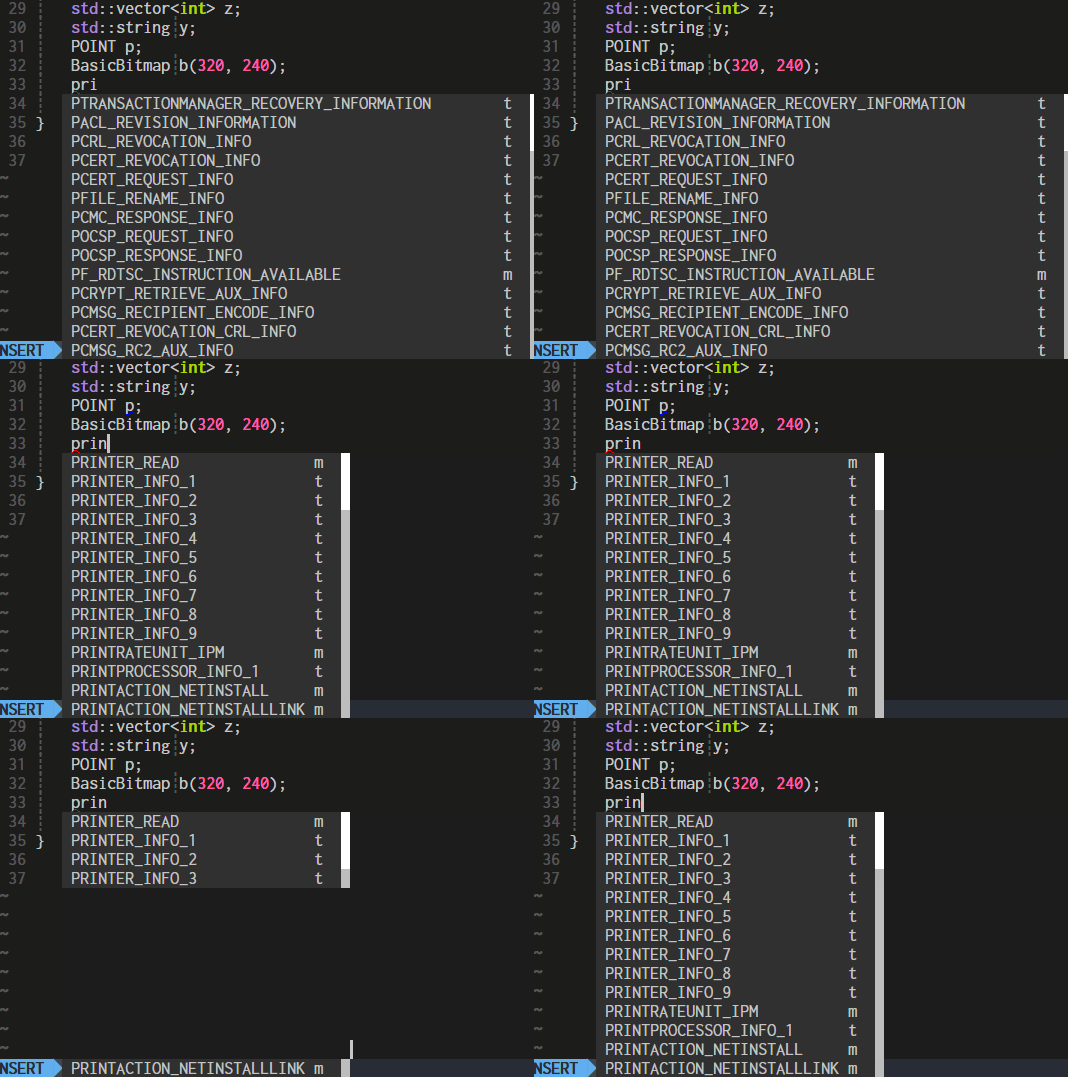
2. ALE causes Pmenu flicker (refresh frequently), especially when Pmenu has more than 5 items. See the GIF below:
This is very annoying. I just can't use them together in GVim.
## Information
VIM Version: 8.0.1704 (GVIM on windows)
```text
VIM - Vi IMproved 8.0 (2016 Sep 12, compiled Apr 12 2018 22:09:26)
MS-Windows 32-bit GUI version with OLE support
Included patches: 1-1704
```
Operating System: Windows 10
### :ALEInfo
```text
Current Filetype: lua
Available Linters: ['luac', 'luacheck']
Enabled Linters: ['luac']
Linter Variables:
let g:ale_lua_luac_executable = 'luac'
Global Variables:
let g:ale_cache_executable_check_failures = 0
let g:ale_change_sign_column_color = 0
let g:ale_command_wrapper = ''
let g:ale_completion_delay = 500
let g:ale_completion_enabled = 0
let g:ale_completion_max_suggestions = 50
let g:ale_echo_cursor = 1
let g:ale_echo_msg_error_str = 'Error'
let g:ale_echo_msg_format = '[%linter%] %code: %%s'
let g:ale_echo_msg_info_str = 'Info'
let g:ale_echo_msg_warning_str = 'Warning'
let g:ale_enabled = 1
let g:ale_fix_on_save = 0
let g:ale_fixers = {}
let g:ale_history_enabled = 1
let g:ale_history_log_output = 1
let g:ale_keep_list_window_open = 0
let g:ale_lint_delay = 500
let g:ale_lint_on_enter = 1
let g:ale_lint_on_filetype_changed = 1
let g:ale_lint_on_save = 1
let g:ale_lint_on_text_changed = 'always'
let g:ale_lint_on_insert_leave = 0
let g:ale_linter_aliases = {}
let g:ale_linters = {'c': ['gcc', 'cppcheck'], 'lua': ['luac'], 'cpp': ['gcc', 'cppcheck'], 'python': ['flake8', 'pylint']}
let g:ale_linters_explicit = 1
let g:ale_list_window_size = 10
let g:ale_list_vertical = 0
let g:ale_loclist_msg_format = '[%linter%] %code: %%s'
let g:ale_max_buffer_history_size = 20
let g:ale_max_signs = -1
let g:ale_maximum_file_size = 0
let g:ale_open_list = 0
let g:ale_pattern_options = {}
let g:ale_pattern_options_enabled = 0
let g:ale_set_balloons = 1
let g:ale_set_highlights = 1
let g:ale_set_loclist = 1
let g:ale_set_quickfix = 0
let g:ale_set_signs = 1
let g:ale_sign_column_always = 0
let g:ale_sign_error = '>>'
let g:ale_sign_info = '--'
let g:ale_sign_offset = 1000000
let g:ale_sign_style_error = '>>'
let g:ale_sign_style_warning = '--'
let g:ale_sign_warning = '--'
let g:ale_statusline_format = ['%d error(s)', '%d warning(s)', 'OK']
let g:ale_type_map = {}
let g:ale_use_global_executables = v:null
let g:ale_warn_about_trailing_blank_lines = 1
let g:ale_warn_about_trailing_whitespace = 1
Command History:
(started) 'cmd /s/c "luac -p - < C:\Users\Linwei\AppData\Local\Temp\VIAFA46.tmp\test.lua"'
(finished - exit code 0) 'cmd /s/c "luac -p - < C:\Users\Linwei\AppData\Local\Temp\VIBFA76.tmp\test.lua"'
<<>>
(finished - exit code 0) 'cmd /s/c "luac -p - < C:\Users\Linwei\AppData\Local\Temp\VIC90D.tmp\test.lua"'
<<>>
(finished - exit code 1) 'cmd /s/c "luac -p - < C:\Users\Linwei\AppData\Local\Temp\VIDFC5.tmp\test.lua"'
<<>>
luac: stdin:11: syntax error near
<<>>
(finished - exit code 1) 'cmd /s/c "luac -p - < C:\Users\Linwei\AppData\Local\Temp\VIE136F.tmp\test.lua"'
<<>>
luac: stdin:11: syntax error near
<<>>
(finished - exit code 1) 'cmd /s/c "luac -p - < C:\Users\Linwei\AppData\Local\Temp\VIM4554.tmp\test.lua"'
<<>>
luac: stdin:11: syntax error near
<<>>
......
<<>>
```
## What went wrong
1. when I type something with Pmenu visible, the cursor will move away from its origin position and stay on the right edge of the completion Pmenu for nearly one second, then the cursor will move back again.

2. ALE causes Pmenu flicker (refresh frequently), especially when Pmenu has more than 5 items.

## Reproducing the bug
Steps for repeating the bug:
1. Enable YouCompleteMe and ALE in GVim on windows.
2. Type something cause the completion popup menu display.
3. Type one character.
Contributor guide
Assessment
This issue has not been assessed yet.