Custom buttons on the List widget
- Dominant language
- JavaScript
- Stars
- 19.4k
- Forks
- 3.1k
- Avg merge
- 1d 14h
- Merged PRs (30d)
- 9
Description
**Is your feature request related to a problem? Please describe.**
I have a bunch of images on Flickr, and would like to add these in bulk to a list in Netlify. Flickr has an API that I can use to get all images, so I'd like to be able to use that.
The images themselves don't need to be uploaded, simply their urls added to the list.
**Describe the solution you'd like**
Since this is a rather specific problem, I was thinking about a more generic solution.
It would be useful if it was possible to add **custom buttons at the top of the list** (next to the "add" button).
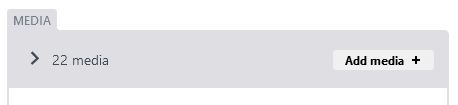
That way I could create an "Add from Flickr" button or something and interact with the list in whatever function is called.
Since the solution is generic, it would also be possible to for instance add a "sort" button to sort the entries in the list alphabetically. Or a "clear" button to remove everything.
A solution like this could be much simpler than a fully custom widget. Simply define a function with a single parameter (the list) and give it a name to be placed on the button.
**Describe alternatives you've considered**
At the moment I'm looking at creating a fully custom list, or perhaps extend the existing list if that is possible (I've not used React much before so I'm not sure).
**Additional context**
In the end I'm trying to create a "Media" list, with not only Flickr images in it, but also Youtube/Vimeo videos and perhaps more later.
These custom buttons in combinations with the "List Widget: Variable Types" beta feature would be very powerful I think.
That way I could create custom widgets for each kind of "media" I want, and add them in bulk through API's with custom buttons.
Contributor guide
Assessment
This issue has not been assessed yet.