Hidden/Lost progress feeback on re-run after correcting the issue
- Dominant language
- Java
- Stars
- 51.8k
- Forks
- 4.4k
- Avg merge
- 3d 8h
- Merged PRs (30d)
- 188
Description
### Description
After submitting a query with an issue (usually mis-spelled name), we get an error as below:
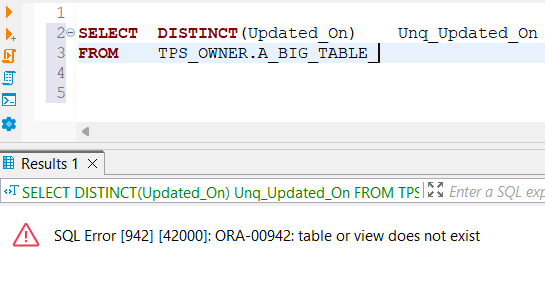
The above is expected but after correcting the error and re-run, DBeaver is not displaying the progress feedback with the "Cancel" button. We have to find other ways to kill the running query. The following display that the query is still running:

The work around is to remember to close the "Result" tab and let DBeaver instantiate a new tab so that I can get back a normal progress feedback.
### DBeaver Version
Community Edition 23.0
### Operating System
Windows 11
### Database and driver
Oracle
### Steps to reproduce
1. Type in a query that should run a long time and deliberately mis-spell the table name.
2. Execute it. You should get an error
3. Fix the mis-typed and re-execute.
4. The bug is that DBeaver is not surfacing the progress with the "Cancel" button.
### Additional context
_No response_
Contributor guide
Assessment
This issue has not been assessed yet.