Table statistics showing ... because the value doesn't fit
- Dominant language
- Java
- Stars
- 51.8k
- Forks
- 4.4k
- Avg merge
- 3d 10h
- Merged PRs (30d)
- 185
Description
### Description
Not sure if this applies for anything more than Sybase, but I've enabled Statistics so I can see the table sizes in my database. On rare occasions, the Database Navigator will actually show me the size in text. But the vast majority of the time I get 3 dots. It seems as though the value is too big to fit the column in the interface because I can usually (not always) see the value if I hover over each one. There is no obvious way to resize the statistics column to see them all at once. Even if I resize the Database Navigator, the width of the statistics doesn't change proportionately.
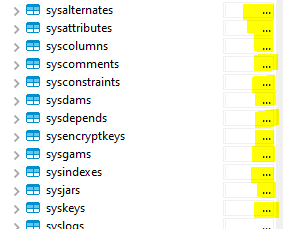
### DBeaver Version
Community Edition 22.3.2
### Operating System
Windows 10
### Database and driver
Sybase JDBC
### Steps to reproduce
Enable Statistics
Under Database Navigator, look at the table listing under any database.
### Additional context
_No response_
Contributor guide
Research direction
Start in the Database Navigator table listing with Statistics enabled, using the Sybase JDBC setup described in the reproduction steps. Check how the statistics column width responds when the navigator is resized and how truncated values are displayed; done means table sizes are readable without relying on hover text.
Written by the indexing model from the issue text.
Assessment
- Tech stack
- java
- Domain
- database, frontend
- Issue type
- Bug
- Difficulty
- 3/5
- Estimated time
- 1-2 days
- Activity status
- Stale
- Clarity
- Mostly clear
- Newbie friendliness
- 35/100