(Minor Bug) Preferences Window: Single-click not clearing search textbox
- Dominant language
- Java
- Stars
- 51.8k
- Forks
- 4.4k
- Avg merge
- 3d 8h
- Merged PRs (30d)
- 188
Description
#### System information:
- OS: MacOS Big Sur v11.4
- DBeaver version: 22.0.4.202205011839
- Additional extensions: None
#### Connection specification:
- AWS connection to MySQL v5.7
- Driver name: MySQL 5
- Do you use tunnels or proxies (SSH, SOCKS, etc)? No.
#### Describe the problem you're observing:
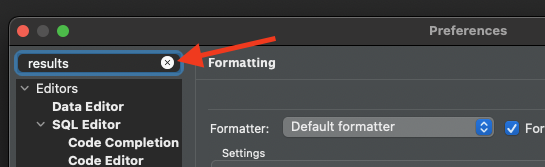
In the DBeaver Preferences window, when trying to clear the search results textbox, single-clicking on the "X" does not clear the textbox. However, double-clicking the "X" does clear it. This should only require a single-click.
#### Steps to reproduce, if exist:
1. Open the DBeaver Preferences.
2. Perform a search (e.g. results)
3. Try clearing the search box by single-clicking on the "X" button. The results do not clear.
4. Now, double-click the "X" button and the search box clears as expected.
#### Include any warning/errors/backtraces from the logs
No error logs produced.
Contributor guide
Assessment
This issue has not been assessed yet.