darktable-org / darktable-org/darktable
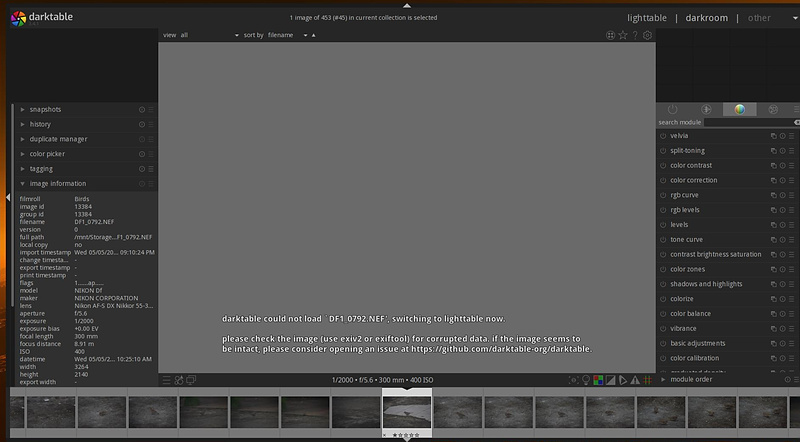
Nikon DF: images shot on an FX camera with a DX lens can't be edited
Open
@LebedevRI is already working on this.
Since May 30, 2021.
scope: camera support
understood: clear
- Dominant language
- C
- Stars
- 13.1k
- Forks
- 1.4k
- Avg merge
- 22h 14m
- Merged PRs (30d)
- 198
Description
Nikon cameras, when using a DX (crop sensor) lens on an FX (full frame)
camera DT is unable to load images into darkroom module.
To Reproduce
- import images shot with a Nikon FX camera with DX lens
- Click on 'Darkroom'
Expected behavior
image opens for editing
Screenshots
DT_error.jpg
Platform
_Please fill as much information as possible in the list given below. Please state "unknown" where you do not know the answer and remove any sections that are not applicable _
- darktable version : 3.4.1
- OS : Linux - kernel 5.12.1
- Linux - Distro : Arcolinux rolling
- Memory : 64gb
- Graphics card : AMD Radeon RX480
- Graphics driver :
- OpenCL installed :
- OpenCL activated :
- Xorg : X11
- Desktop : i3wm
- GTK+ :
- gcc :
- cflags :
- CMAKE_BUILD_TYPE :
Additional context
Please provide any additional information you think may be useful, for example:
- Can you reproduce with another darktable version(s)? yes with version x-y-z / no
- Can you reproduce with a RAW or Jpeg or both? RAW-file-format/Jpeg/both
- Are the steps above reproducible with a fresh edit (i.e. after discarding history)? yes/no
- If the issue is with the output image, attach an XMP file if (you'll have to change the extension to
.txt) - Is the issue still present using an empty/new config-dir (e.g. start darktable with --configdir "/tmp")? yes/no
Contributor guide
First steps
- Read the whole issue, then the project's contributing guide.
- Comment on the issue to say you are picking it up — it saves two people doing the same work.
- Fork the repository and make your change on a branch.
- Open a pull request that references the issue number.
Assessment
This issue has not been assessed yet.