darkreader / darkreader/darkreader
[Broken Website] Google Docs Colors
- Dominant language
- TypeScript
- Stars
- 22.4k
- Forks
- 2.7k
- Avg merge
- 21h 11m
- Merged PRs (30d)
- 78
Description
# Broken Website
## Website
All google docs, feel free to look with this one: https://docs.google.com/document/d/1BAONkD_T-SNmlbNTDK2jAxlc1vEP2f13d_oPkJ8fnhs/edit?usp=sharing
## How to Reproduce
- Go to docs.google.com site
- Make a new doc or open an existing one
- Look at colors in text and in color selector menu
## Expected behavior
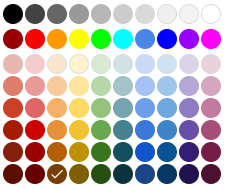
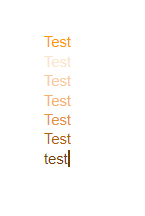
Colors make sense and match the color selector
## Actual behavior
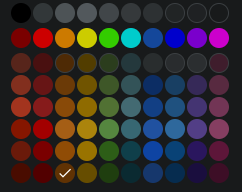
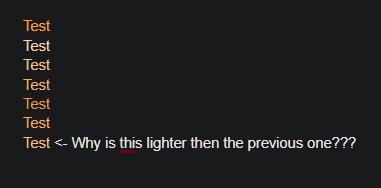
Colors don't make sense and don't match the color picker
## Screenshots
First of all, look at this color selector:
Its meant to look like this:
Second of all, colors don't exactly line up:
What its supposed to look like:
## System Information
- OS: Windows 10
- Browser: Chrome 88
- Dark Reader Version: 4.9.27
## Additional context
Please not this happens with all colors, not just orange.
Contributor guide
Assessment
This issue has not been assessed yet.