darkreader / darkreader/darkreader
"Detect dark theme" button not present in settings
- Dominant language
- TypeScript
- Stars
- 22.4k
- Forks
- 2.7k
- Avg merge
- 21h 11m
- Merged PRs (30d)
- 78
Description
### Prerequisites
- [X] I [searched for any existing report](https://github.com/darkreader/darkreader/issues?q=is%3Aissue) about this bug to avoid opening a duplicate.
- [X] I can reproduce this bug in a new, unmodified web browser profile with Dark Reader installed as the only extension.
- [X] I understand I need to use the [Broken Website Report template](https://github.com/darkreader/darkreader/issues/new?assignees=&labels=Broken+Website&template=broken-website-report.yml&title=%5BBroken+Website%5D+Replace+with+title) if this bug I am reporting occurs on a single website.
### Bug Description
This feature has been listed since March 2022 (https://darkreader.org/blog/detect-dark-theme/) however I was never able to find the "Detect dark theme" button illustrated at the above page.
I activated "v5 design preview" as instructed, and when I click Settings it tells me I'm on Version 5 Preview (4.9.43) but there is no trace of the "Detect dark theme" button.
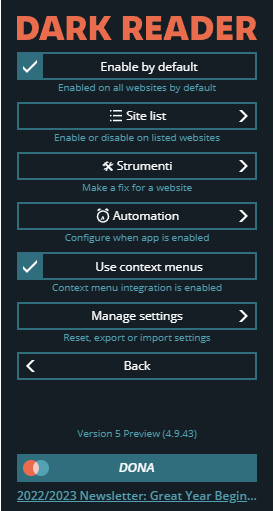
According to the blog article linked above this is where the button should appear.
However I also looked for it in every menu and submenu.
This has been driving me mad for months now, please tell me where I can find it or what I am doing wrong.
Thank you.
### Website Address
not applicable
### Steps To Reproduce
See bug description.
### Expected Behavior
See bug description.
### Actual Behavior
See bug description.
### Screenshots
_No response_
### Operating System
Windows 10
### Web Browser name and version
Brave 1.48.171 - Chromium: 110.0.5481.177 - 64 bit
### Dark Reader version
4.9.43
### Additional Context
_No response_
Contributor guide
Assessment
This issue has not been assessed yet.